Creating Models
- Selecting the Model to Create
- Creating an Exponential Smoothing Model
- Creating an ARIMA Model
- Creating a Subset (Factored) ARIMA Model
- Creating a Moving Average Model
- Creating a Random Walk Model
- Creating a Multiple Regression Model
- Creating a Curve Fitting Model
- Creating a Combination Model
Selecting the Model to Create
For any time seriesan aggregation of transactional data into specified time intervals and sorted according to unique combinations of the default attributes (BY variables) selected in the Series pane, you can create your own models in the Interactive Modeling node. After creating the model, you can view the results and compare its performance to the other models listed in the Modeling tab.
To create your own model, click  in the toolbar above the model selection list table and select one of the
following models from the list.
in the toolbar above the model selection list table and select one of the
following models from the list.
- Exponential Smoothing Model (ESM)
- ARIMA Model
- Subset (Factored) ARIMA Model
- Moving Average Model
- Random Walk Model
- Multiple Regression Model
- Curve Fitting Model
- Combination Model
This launches a window for you to specify the parameters for the new model.
When you complete all of the specifications for your new model, click OK. If the new model is created successfully, it is shown in the model selection list table with the MAPE statistics and the plots are shown below it.
If there are any problems creating the new model, these status icons are shown in the Details column for the model:
 — Error
 — Warning
Right-click the model and select View
status details. The Status Details window shows the error
or warning messages generated by the model. You can click  to download the logs and determine the source of the problem. See Downloading and Running Code for a Model for more information.
If the selected series has at least 2 nonmissing observations, then custom models can be created. If an IDM model is generated by the system, it might show the warning icon after the custom model is created. If you view the message, it indicates that the statistics for the IDM model cannot be compared to the statistics for a nonintermittent model.
If the model is created successfully but the analysis fails, an error icon is shown to the left of the analysis in the drop-down menu over the plot area:
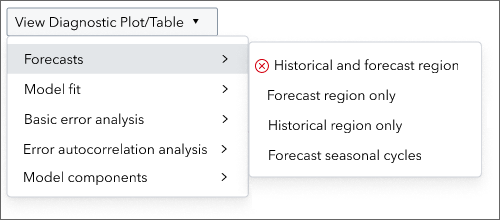
Click the View log button for more information about the failure.
Creating an Exponential Smoothing Model
If you select to create an ESM model, the New Exponential Smoothing Model window is opened. To create an exponential smoothing model, the selected time series must have more than one non-missing observation.
Complete the following fields to customize the new ESM model.
- Name
-
Specify a name for this model that is unique within the scope of the selected time series. The name for the custom model is not case sensitive. The name can contain only letters, numbers, and underscores. It must be a valid SAS name as described in Rules for Most SAS Names.
Note: The name for a custom model cannot begin with the following strings.DIAGPREDECESSOR
These are reserved for system-generated models.
- Description
-
Use this field to include any comments or additional information that would be helpful. This field is optional.
- Details
-
Shows information about the model specification. The value is generated based on your selections in the New Exponential Smoothing Model window.
- Method
-
Select from the following exponential smoothing methods.
- Simple exponential
smoothing
Requests simple (single) exponential smoothing. To view the model equation for simple exponential smoothing, see Simple Exponential Smoothing.
- Double (Brown) exponential
smoothing
Requests second order exponential smoothing. If this method is selected, the level and trend components are combined. To view the model equation for Double (Brown) exponential smoothing, see Double (Brown) Exponential Smoothing.
- Linear (Holt) exponential
smoothing
Requests linear (Holt) exponential smoothing. To view the model equation for Linear (Holt) exponential smoothing, see Linear (Holt) Exponential Smoothing.
- Damp-trend exponential
smoothing
Requests damped trend exponential smoothing. To view the model equation for damped-trend linear exponential smoothing, see Damped-Trend Linear Exponential Smoothing.
- Additive seasonal exponential
smoothing
Requests additive seasonal exponential smoothing. To use this method, the number of observations in the time series must be greater than the length of the seasonal cycle, which must be greater than 1.
To view the model equation for additive seasonal exponential smoothing, see Seasonal Exponential Smoothing.
- Multiplicative seasonal exponential
smoothing
Requests multiplicative seasonal exponential smoothing. To use this method, the number of observations in the time series must be greater than the length of the seasonal cycle, which must be greater than 1.
To view the model equation for multiplicative seasonal exponential smoothing, see Multiplicative Seasonal Smoothing.
- Winters
method
Requests the Holt-Winters multiplicative method.
To view the model equation for multiplicative (Winters) seasonal exponential smoothing, see Winters Method — Multiplicative Version.
- Additive-Winters
method
Requests the Winters additive method. To view the model equation for additive (Winters) exponential smoothing, see Winters Method — Additive Version.
- Automatic
methods
- Automatically select best
non-seasonal model
Requests the best candidate nonseasonal smoothing model among the simple, linear, or damped-trend methods.
- Automatically select best seasonal
model
Requests the best candidate seasonal smoothing model among the seasonal, additive Winters, or multiplicative Winters methods. To use this method, the number of observations in the time series must be greater than the length of the seasonal cycle, which must be greater than 1.
- Automatically select best
model
Requests the best candidate smoothing model among the simple, linear, damped-trend, seasonal, additive Winters, or multiplicative Winters methods.
For more information about how these automatic models work, see the description of the Include ESM models setting for the Hierarchical Forecasting model.
- Automatically select best
non-seasonal model
- Simple exponential
smoothing
- Selection criterion
-
specifies the model selection criterionthe statistic of fit that is used for forecast model selection. (statistic of fit) to be used to select from several candidate models when Method is one of the automatically select best options. The default is RMSE. For a complete description, see Descriptions of Model Selection Criteria.
This option can be changed only if one of the automatic methods is selected.
- Functional transformation
-
specifies the functional transformation to be used by the ESM model. Functional transformation cannot be applied for time series that have a minimum value of 0 or less.
The following transformations are provided:
- None
-
No transformations are processed on the time series. This is the default.
- Auto
-
Selects between logarithmic or no transformation as determined by the model selection criteria
- Box-Cox
-
Box-Cox transformation
For the Box-Cox parameter, specify a number for the exponent, lambda (λ), which varies from -5.0 to 5.0, inclusive.
- Log
-
Logarithmic transformation
- Logistic
-
Logistic transformation
- Square root
-
Square-root transformation
- Forecast
-
This setting is disabled if Functional transformation is set to None. Select one of the following values that specify prediction semantics for the inverse transform.
- Mean
-
requests that the inverse transform produce mean forecasts
- Median
-
requests that the inverse transform produce median forecasts
- Weights
-
specifies a range for the smoothing component weights.
By default, this weight is restricted to a 0–1 range (0.001 to 0.999 inclusive). Click
 to change this value. The Edit Weights window is
opened.
to change this value. The Edit Weights window is
opened.Edit Weights - Weights
-
Select one of the following options.
- Restrict to 0–1 range: The weight value is restricted between 0.001 and 0.999 (inclusive). This is the default.
- Do not restrict: If you choose this option, the weight value can range from –1 to 2.
- Use advanced settings: Select this option if you want to specify, for each ESM component, your own initial value for the smoothing state and the upper and lower limits for the weights.
- Advanced Settings
-
- Level settings — Set the initial value for the level smoothing weight. Use Lower limit and Upper limit to set the range of the weighted value. These values must be in the range from -1 to 2.
- Trend settings — Set the initial value for the trend smoothing weight. Use Lower limit and Upper limit to set the range of the weighted value. These values must be in the range from -1 to 2.
- Damping settings — Set the initial value for the trend damping weight. Use Lower limit and Upper limit to set the range of the weighted value. These values must be in the range from -1 to 2.
- Season settings — Set the initial value for the seasonal smoothing weight. Use Lower limit and Upper limit to set the range of the weighted value. These values must be in the range from -1 to 2.
- Combined level/trend settings — This setting is available if the Double (Brown) exponential smoothing method is selected. The same smoothing weight is used for level and trend components. Set the initial value for the smoothing weight. Use Lower limit and Upper limit to limit the range of the weighted value. These values must be in the range from -1 to 2.
- General
settings
- Do not perform estimation (noest): Select this option to fix the values for the smoothing model parameters. By default, this option is not selected to optimize the smoothing model parameters.
- Restrict weights to stable values: Restricts the smoothing model parameter estimates to the additive invertible region of the parameter space. Deselect this option to remove this restriction.
See Also
Creating an ARIMA Model
Overview
You can create an ARIMA model for a time series in Interactive Modeling. If you select to create an ARIMA model, the New ARIMA Model window is opened. To create an ARIMA model, the selected time series must have more than six observations (T > 6). The window has the following tabs.
If an IDM model is generated for the selected time series, creating this model might issue a warning in the IDM model. The statistics of fit for the IDM model is not comparable to the statistics of fit for the custom model.
Specification Tab
|
Specification |
Name |
Specify a name for this model that is unique within the scope of the selected time series. The name for the custom model is not case sensitive. The name can contain only letters, numbers, and underscores. It must be a valid SAS name as described in Rules for Most SAS Names. Note: The name for a custom model cannot begin with the following strings.
These are reserved for system-generated models. |
|
Description |
Use this field to include any comments or additional information that would be helpful. This field is optional. |
|
|
Details |
Shows information about the model specification. This field is generated based on your selections in the New ARIMA Model window. If the equation for the model specification becomes very long, you can use the vertical scroll bar to view or copy the complete equation. |
|
|
Functional transformation |
Specifies the functional transformation to be used by the model. Functional transformation cannot be used for time series that have a minimum value of 0 or less. Note: You can specify a transformation only when the values of the input are positive. Select one of the following transformations to use:
|
|
|
Forecast |
This setting is disabled if Functional transformation is set to None. Select one of the following values that specify prediction semantics for the inverse transform.
|
|
|
Box-Cox parameter |
Specify a number for
the exponent, lambda (λ), which varies from -5.0 to 5.0, inclusive.
This setting is enabled only if Functional transformation
is set to |
|
|
Intercept |
Specifies that an intercept term is to be included in the model. Note: If you specify a differencing order, then a message asks whether you want to suppress the intercept. It is recommended that you suppress the intercept when a differencing order is specified. |
|
|
ARIMA Options and Seasonal ARIMA Options |
The ARIMA model has nonseasonal and seasonal components. The seasonal options are available only if the data is seasonal. Use this section to specify an integer value for the autoregressive (p and P), differencing (d and D), and moving average (q and Q) orders for your model. Note: For a simple nonseasonal ARIMA model, you do not have to specify the orders for the seasonal component (P D Q). The season length (such as monthly, daily, and so on) is implied by the time ID variable in the project. |
|
|
Autoregressive (p) and Autoregressive (P) |
Specifies the nonseasonal (p) and seasonal (P) autoregressive orders.
If you set p = 4, then you are implying autoregressive orders of (1,2,3,4) in the nonseasonal component of the model. If you set p = 4 and P = 3, then you are implying autoregressive orders of (1,2,3,4) in the nonseasonal component of the model and autoregressive orders of (1,2,3) in the seasonal component of the model. The seasonal length of the order is identified by the placeholder "s". In Details, the order in this example appears as P = ((1,2,3,4)(1,2,3)s). |
|
|
Differencing (d) and Differencing (D) |
Specifies the nonseasonal (d) and seasonal (D) differencing orders. To use differencing, the time series must be greater than the length of the seasonal cycle (T > S).
If you set d = 4, then you are implying differencing orders of (1,1,1,1) in the nonseasonal component of the model. If you set d = 4 and D = 3, then you are implying (1,1,1,1) in the nonseasonal component of the model and (s,s,s) in the seasonal component of the model. In Details, the order in this example appears as D = (1,1,1,1,s,s,s). |
|
|
Moving average (q) and Moving average (Q) |
Specifies the nonseasonal (q) and seasonal (Q) moving average orders.
If you set q = 4, then you are implying moving average orders of (1,2,3,4) in the nonseasonal component of the model. If you set q = 4 and Q = 3, then you are implying (1,2,3,4) in the nonseasonal component of the model and (1,2, 3) in the seasonal component of the model. In Details, the order in this example appears as Q = ((1 2 3 4)(1 2 3)s). For more information, see Moving Average Orders. |
See Also
Independent Variables, Predefined Variables, and Events Tab
Use the Independent Variables, Predefined Variables, or Events tabs to include any of these inputs in the model.
Any independent variables that are assigned to the project are listed here. Predefined variables are already available for any project. These are described in detail in Predefined Variables for the ARIMA Model.
All events are initially set to Do not use for a project. Even if the event usage is set to Do not use (which is the default), a custom model can use the events with no restrictions. For a description of the event usage settings, see Usage in System-Generated Models .
If the list of inputs is long, use Search to reduce the list to inputs that match the characters that you enter. You can also use Sort to rearrange the order of inputs.
Select any inputs from
these tabs that you want to include in the model. To make any modifications
to the selected inputs, such as transformations, lagging, or differencing,
click . The Transfer Function window
is displayed with these options.
|
Functional Transformation |
Specify the transformation to apply to the selected input. Functional transformations are not available for events. If you select the Box-Cox transformation, specify a number in Box-Cox parameter for the exponent, lambda (λ), which varies from -5.0 to 5.0, inclusive. |
|
Lagging periods |
Specify an integer that defines the number of periods of time delay (lag) for this input series. You can select from the integers provided. The number of lags available depends on the number of nonmissing observations in the data (N). The total number of lags for an ARIMA model is the minimum of N-1 or 13. The total number of lags for a subset ARIMA model is N-1. |
|
Simple Differencing |
Specify a value between 0 and 13 (inclusive) for the simple differencing order. |
|
Seasonal Differencing |
Specify a value between 0 and 3 (inclusive) for the seasonal differencing order. |
|
Numerator Factors |
Specify the integer value to use for the simple and seasonal factors. For more information, see Numerator Factors in the SAS/ETS User’s Guide.
|
|
Denominator Factors |
Specify the integer value to use for the simple and seasonal factors. For more information, see Denominator Factors in the SAS/ETS User’s Guide.
|
Estimation Tab
|
Method |
Select one of the following estimation methods to use.
|
|
Convergence criterion |
Requires a numeric value between 0 and 1, exclusive, that specifies the convergence criterion. Convergence is assumed when the largest change in the estimate for any parameter is less than the specified value. If the absolute value of the parameter estimate is greater than 0.01, the relative change is used. Otherwise, the absolute change in the estimate is used. The default value is 0.001. |
|
Number of iterations |
Requires a positive integer between 1 and 1000 that specifies the maximum number of iterations allowed. The default is 50. |
|
Delta |
Requires a numeric value that specifies the perturbation value for computing numerical derivatives. The default value is 0.001. The minimum value is 0.00000001. The maximum value must be less than 1. |
|
Singularity criterion |
Requires a numeric value between 0 and 1, exclusive, that specifies the criterion for checking singularity. If a pivot of a sweep operation is less than the value, the matrix is deemed singular. Sweep operations are performed on the Jacobian matrix during final estimation and on the covariance matrix when preliminary estimates are obtained. The default is 1E–7 (0.0000001). |
|
Restrict parameters to stable values |
When selected, the autoregressive and moving average parameter estimates for the noise part of the model are restricted to the stationary and invertible regions, respectively. |
Creating a Subset (Factored) ARIMA Model
Overview
You can create a subset ARIMA model for a time series in Interactive Modeling. To create a subset ARIMA model, the selected time series must have more than six observations (T > 6). If you select to create a subset ARIMA model, the New Subset (factored) ARIMA Model window is opened.
If an IDM model is generated for the selected time series, creating this model might issue a warning in the IDM model. The statistics of fit for the IDM model is not comparable to the statistics of fit for the custom model.
The window has the following tabs:
Specification Tab
|
Name |
Specify a name for this model that is unique within the scope of the selected time series. The name for the custom model is not case sensitive. The name can contain only letters, numbers, and underscores. It must be a valid SAS name as described in Rules for Most SAS Names. Note: The name for a custom model cannot begin with the following strings.
These are reserved for system-generated models. |
|
Description |
Use this field to include any comments or additional information that would be helpful. This field is optional. |
|
Details |
Shows information about the model specification. This field is generated based on your selections in the New Subset (factored) ARIMA Model window. If the equation for the model specification becomes very long, you can use the vertical scroll bar to view or copy the complete equation. |
|
Functional Transformation |
Specifies the functional transformation to be used by the model. Functional transformation cannot be used for time series that have a minimum value of 0 or less. Note: You can specify a transformation only when the values of the input are positive. Select one of the following transformations to use:
|
|
Forecast |
This setting is disabled if Functional transformation is set to None. Select one of the following values that specify prediction semantics for the inverse transform.
|
|
Box-Cox parameter |
Specify a number for
the exponent, lambda (λ), which varies from -5.0 to 5.0, inclusive.
This setting is enabled only if Functional transformation
is set to |
|
Intercept |
Specifies that an intercept term is to be included in the model. If you specify a differencing order, then a message asks whether you want to suppress the intercept. It is recommended that you suppress the intercept when a differencing order is specified. |
|
ARIMA Options |
Use this section to specify the autoregressive (p), differencing (d), and moving average (q) orders for your model. For information about how to enter the specifications, review the following topics. |
Independent Variables, Predefined Variables, and Events Tabs
Use the Independent Variables, Predefined Variables, or Events tabs to include any of these inputs in the model.
If the list of inputs is long, use Search to reduce the list to inputs that match the characters that you enter. You can also use Sort to rearrange the order of inputs.
Any independent variables that are assigned to the project are listed here. Predefined variables are already available for any project. These are described in detail in Predefined Variables for the ARIMA Model.
All events are initially set to Do not use for a project. Even if the event usage is set to Do not use (which is the default), a custom model can use the events with no restrictions. For a description of the event usage settings, see Usage in System-Generated Models .
Select any inputs from
these tabs that you want to include in the model. To make any modifications
to the selected inputs, such as transformations, lagging, or differencing,
click . The Transfer Function window
is displayed with these options.
|
Functional Transformation |
Specify the transformation to apply to the selected input. Functional transformations are not available for events. If you select the Box-Cox transformation, specify a number in Box-Cox parameter for the exponent, lambda (λ), which varies from -5.0 to 5.0, inclusive. |
|
Lagging periods |
Specify an integer that defines the number of periods of time delay (lag) for this input series. You can select from the integers provided. The number of lags available depends on the number of nonmissing observations in the data (N). The total number of lags for an ARIMA model is the minimum of N-1 or 13. The total number of lags for a subset ARIMA model is N-1. |
|
Differencing order |
For differencing orders, you must enclose the value or values that you specify in parentheses. Unlike the autoregressive and moving average orders, you must include all orders that you specify in a single list. You can specify an integer value multiple times in the same list. You can use placeholders (such as "s") to specify seasonal differencing. Use the following syntax.
|
|
Numerator polynomial |
Use the following syntax to specify the numerator polynomial of the transfer function.
|
|
Denominator polynomial |
Use the following syntax to specify the denominator polynomial of the transfer function.
|
Estimation Tab
|
Method |
Select one of the following estimation methods to use.
|
|
Convergence criterion |
Requires a numeric value between 0 and 1, exclusive, that specifies the convergence criterion. Convergence is assumed when the largest change in the estimate for any parameter is less than the specified value. If the absolute value of the parameter estimate is greater than 0.01, the relative change is used. Otherwise, the absolute change in the estimate is used. The default value is 0.001. |
|
Number of iterations |
Requires a positive integer between 1 and 1000 that specifies the maximum number of iterations allowed. The default is 50. |
|
Delta |
Requires a numeric value that specifies the perturbation value for computing numerical derivatives. The default value is 0.001. The minimum value is 0.00000001. The maximum value must be less than 1. |
|
Singularity criterion |
Requires a numeric value between 0 and 1, exclusive, that specifies the criterion for checking singularity. If a pivot of a sweep operation is less than the value, the matrix is deemed singular. Sweep operations are performed on the Jacobian matrix during final estimation and on the covariance matrix when preliminary estimates are obtained. The default is 1E–7 (0.0000001). |
|
Restrict parameters to stable values |
When selected, the autoregressive and moving average parameter estimates for the noise part of the model are restricted to the stationary and invertible regions, respectively. |
Creating a Moving Average Model
You can create a moving average model for a time
series in Interactive Modeling. The formula for the moving average model with window
size
(periods) p is  .
.
The moving average model of period
p is equivalent to an autoregressive model (AR) of order
p with each AR coefficient fixed to a value of  .
.
If an IDM model is generated for the selected time series, creating this model might issue a warning in the IDM model. The statistics of fit for the IDM model is not comparable to the statistics of fit for the custom model.
If you select to create a moving average model, the New Moving Average Model window is opened. Use the following fields to define your moving average model.
- Name
-
Specify a name for this model that is unique within the scope of the selected time series. The name for the custom model is not case sensitive. The name can contain only letters, numbers, and underscores. It must be a valid SAS name as described in Rules for Most SAS Names.
Note: The name for a custom model cannot begin with the following strings.DIAGPREDECESSOR
These are reserved for system-generated models.
- Description
-
Use this field to include any comments or additional information that would be helpful. This field is optional.
- Details
-
Shows information about the model specification. This field is generated based on your selections in the New Moving Average Model window.
- Log transform dependent variable
-
Select this option to log transform the dependent variable. Log transformation cannot be used for time series that have a minimum value of 0 or less.
- Window (periods)
-
Specify p, the window size (periods) for the moving average.
Creating a Random Walk Model
You can create a random walk model for a time series in Interactive Modeling. If you use the default settings, then you can create an
ARIMA(0, 1, 0) model with no intercept. The formula for this model is  .
.
If an IDM model is generated for the selected time series, creating this model might issue a warning in the IDM model. The statistics of fit for the IDM model is not comparable to the statistics of fit for the custom model.
You can also create the following random walk models:
- Random Walk with Drift
-
 , or in ARIMA notation ARIMA(0, 1, 0)
 - Seasonal Random Walk without Drift
-
ARIMA(0, 1, 0)(0, 1, 0)s with no intercept
- Seasonal Random Walk with Drift
-
ARIMA(0, 1, 0)(0, 1, 0)s
If you select to create a random walk model, the New Random Walk Model window is opened. Use the following fields to define your random walk model.
- Name
-
Specify a name for this model that is unique within the scope of the selected time series. The name for the custom model is not case sensitive. The name can contain only letters, numbers, and underscores. It must be a valid SAS name as described in Rules for Most SAS Names.
Note: The name for a custom model cannot begin with the following strings.DIAGPREDECESSOR
These are reserved for system-generated models.
- Description
-
Use this field to include any comments or additional information that would be helpful. This field is optional.
- Details
-
Shows information about the model specification. This field is generated based on your selections in the New Random Walk Model window.
- Log transform dependent variable
-
Select this option to log transform the dependent variable. Log transformation cannot be used for time series that have a minimum value of 0 or less.
- Select the terms to include
-
Select whether to include a drift term, trend term, and seasonal term in the model.
Creating a Multiple Regression Model
You can create a multiple regression model for a time series in Interactive Modeling. If you select to create a regression model, the New Multiple Regression Model window opens.
If an IDM model is generated for the selected time series, creating this model might issue a warning in the IDM model. The statistics of fit for the IDM model is not comparable to the statistics of fit for the custom model.
Use the following fields to define your regression model.
|
Name |
Specify a name for this model that is unique within the scope of the selected time series. The name for the custom model is not case sensitive. The name can contain only letters, numbers, and underscores. It must be a valid SAS name as described in Rules for Most SAS Names. Note: The name for a custom model cannot begin with the following strings.
These are reserved for system-generated models. |
|
Description |
Use this field to include any comments or additional information that would be helpful. This field is optional. |
|
Details |
Refer to this field for information about the model specification. This field is generated based on your selections in the New Multiple Regression Model window. |
|
Log transform dependent variable |
Specify whether to log transform the dependent variable. This option is enabled if the series is strictly positive. |
|
Log transform independent variables |
Specify whether to log transform the independent variable. This option is enabled in the presence of independent variables and at least one of the independent variables is strictly positive. |
|
Intercept |
Specifies that an intercept term is to be included in the model. |
|
Independent variables |
If the project has independent variables, select which of these variables to include in the regression model. |
|
All project events can be included in a custom model in the Interactive Modeling node. If the event usage is defined for Interactive Modeling, those event usage specifications are used for model diagnosis and generation. Otherwise, the event usage specifications from the Data tab are retained. All events are initially set to Do not use for a project. Even if the event usage is set to Do not use (which is the default), a custom model can use the events with no restrictions. For a description of the event usage settings, see Usage in System-Generated Models . |
Creating a Curve Fitting Model
You can create a curve fitting model for a time series in Interactive Modeling. Curve fitting models enable you to identify trends and relationships in your time series data. You can create a curve fitting model with a linear or quadratic trend. If you select to create a curve fitting model, the New Curve Fitting Model window opens.
If an IDM model is generated for the selected time series, creating this model might issue a warning in the IDM model. The statistics of fit for the IDM model is not comparable to the statistics of fit for the custom model.
Use the following fields to define your curve fitting model.
|
Name |
Specify a name for this model that is unique within the scope of the selected time series. The name for the custom model is not case sensitive. The name can contain only letters, numbers, and underscores. It must be a valid SAS name as described in Rules for Most SAS Names. Note: The name for a custom model cannot begin with the following strings.
These are reserved for system-generated models. |
|
Description |
Use this field to include any comments or additional information that would be helpful. This field is optional. |
|
Details |
Refer to this field for information about the model specification. This field is generated based on your selections in the New Curve Fitting Model window. |
|
Log transform dependent variable |
Specify whether to log transform the dependent variable. This option is enabled only if the time series is strictly positive. |
|
Curve component |
Select the curve component for the model. You can choose from a linear or quadratic trend.
|
|
Log transform the curve component |
Specify whether to log transform the curve component. |


Creating a Combination Model
You can combine models from the model selection list for a time series to create a combination model in Interactive Modeling. If you select to create a combination model, the New Combination Model window opens.
Use the following fields to define how your models are combined.
- Name
-
Specify a name for this model that is unique within the scope of the selected time series. The name for the custom model is not case sensitive. The name can contain only letters, numbers, and underscores. It must be a valid SAS name as described in Rules for Most SAS Names.
Note: The name for a custom model cannot begin with the following strings.DIAGPREDECESSOR
These are reserved for system-generated models.
- Description
-
Add any information for this model that might be useful. This field is optional.
- Models
-
Select at least two models from the model selection list shown in the Interactive Modeling node. They can be system-generated (based on Auto-forecasting using the default settings) or previously created custom models.
A combination model cannot include another combination model. When creating a combination model, other combination models that have already been created for this time series are displayed in the selection list. If you select another combination model, an error message is displayed. You are prevented from saving the new combination model if it includes another combination model.
Note: For each system-generated model that is included in the combination, a copy of the original model is included in the model selection list as a new custom model when the combination model is saved. Any custom models in the combination are not copied. When a model is included in a combination model, it cannot be edited or deleted.Combined models cannot include IDM or ESMBEST type models.
- Method of combination
-
specifies the method for determining the combination of weights that are used in the weighted average of the candidate forecasts in the combination list. Select one of the following values:
- AICC (Akaike's Information Corrected Criterion)
-
computes the combination weights based on corrected AIC weights. By default, all AICC-scored candidate forecasts are combined.
- AVERAGE
-
computes the simple average of the forecasts that are selected for combination.
- ERLS (Equally Restricted Least Squares)
-
computes the combination weights based on a constrained least squares problem to minimize the script
 norm of the combined forecasta numerical prediction of a future value for a specified time period for each unique
combination of BY variable values residuals subject to the constraint that the weights
sum to 1.
norm of the combined forecasta numerical prediction of a future value for a specified time period for each unique
combination of BY variable values residuals subject to the constraint that the weights
sum to 1. - LAD (Least Absolute Deviation)
-
computes the weights based on least absolute deviations (LAD) measure of fit for the combined forecast. A linear program is formulated, where an objective function to be minimized is expressed in terms of the absolute values of a loss series. This loss series is subject to the constraints that the weights sum to 1 and be nonnegative.
- NERLS (Nonnegative Equally Restricted Least Squares)
-
computes the combination weights based on a constrained least squares problem to minimize the script
norm of the combined forecast residuals subject to the constraints that the weights
sum to 1 and be nonnegative. - NRLS (Nonnegative Restricted Least Squares)
-
is equivalent to NERLS except that the resulting combination weights are not constrained to sum to 1.
- OLS (Ordinary Least Squares)
-
computes the combination weights that result from the ordinary least squares problem to minimize the script
norm of the combined forecast residuals. - RANKWGT
-
assigns weights by using the rank of the candidate forecasts at the time the combination is performed. You must specify the assigned weights in Edit ranked weight. These weights must sum to 1. The weights are assigned by ranking the candidate forecasts from best to worst. The set of weights that are used is normalized to account for candidates that fail to forecast or for candidates that are omitted from the final combination.
- RMSEWGT
-
computes the combination weights based on the RMSE statistic of fita statistical value that is used to evaluate how well a forecasting model fits the historical series by comparing the actual data to the predicted values. for the forecast contributors. The weights are normalized to sum to 1.
- USERDEF
-
assigns weights by using the list of user-specified values. Selecting this option displays a Weight column under Models. For each model, assign a numeric value so that the sum of the weights in the column is equal to 1.0.
The weights correspond to the order of specification of the model families. The set of weights that are used is normalized to account for candidates that fail to forecast or for candidates that are omitted from the final combination.
- Edit ranked weight
-
specify the weights for each of the models selected in the model table based on the performance outcome of the ranking criterion. These weights must sum to 1. The weights are assigned by ranking the candidate forecasts from best to worst. The set of weights that are used is normalized to account for candidates that fail to forecast or for candidates that are omitted from the final combination.
This field is enabled when RANKWGT is selected for Method of combination.
- Rank criterion
-
Select the forecast ranking criterion (statistic of fit) to be used when ranking forecast candidates. This field is enabled when RANKWGT is selected for Method of combination or Forecast encompassing test set to any value other than None.
- Forecast encompassing test
-
specifies the encompassing test type. The encompassing test attempts to eliminate from consideration forecasts that fail to add significant information to the final forecast. You can select one of the following values:
- HLN
-
uses the Harvey-Leybourne-Newbold (HLN) test to estimate pairwise encompassing between candidate forecasts.
- OLS
-
uses an OLS-based regression test to estimate pairwise encompassing between candidate forecasts.
- NONE
-
No encompassing test is performed.
If you select a forecast encompassing test, use the field on the right to specify the significance level.
- Thresholds for missing forecast values
-
Select one or both of the following to specify thresholds for missing values:
- Percentage of missing forecast values in the combination horizon
-
specify a threshold for the percentage of missing forecast values in the combination horizonthe number of intervals into the future, beyond a base date, for which analyses and predictions are made. used to exclude a candidate forecast from consideration in the final combination. By default, no horizon missing percentage test is performed on candidate forecasts. The range is 1 to 100.
- Percentage of missing forecast values in the combination estimation region
-
specify a threshold for the percentage of missing forecast values in the combination estimation region that is used to exclude a candidate forecast from consideration in the final combination. By default, no missing percentage test is performed on candidate forecasts. The range is 1 to 100.
- Treatment of missing values
-
specifies a method for treating missing values in the forecast combination. In a particular time slice across the combination ensemble, one or more combination contributors can have a missing value. This value determines the treatment of contributors in the final combination for such time indices. Select one of the following options.
- MISSING
-
generates a missing combined forecast at each time index with one or more missing contributors.
- RESCALE
-
rescales the combination weights for the nonmissing contributors at each time index so that they sum to 1. You cannot specify RESCALE when Method of combination is set to OLS or NRLS.
- Compute prediction error variance series
-
specifies the method for computing the prediction error variance series. This series is used to compute the prediction standard error, which in turn is used to compute confidence bands on the combined forecast. Select one of the following options.
- DIAG
-
computes the prediction error variance by assuming that the forecast errors at time
 are uncorrelated so that the simple diagonal form
of
are uncorrelated so that the simple diagonal form
of  is used.
 - ESTCORR
-
computes the prediction error variance by using estimates of
 , the sample cross-correlation between
  and
and  over the time span
  , where denotes the last time index of the actual series
  . This option implies that the error series and are jointly stationary.