Promotions and Upgrades within the SAS Viya Platform
- Content Migration Considerations
- Content Migration Considerations for SAS Visual Forecasting
- Promoting from Previous Versions of SAS Model Studio to the SAS Viya 4 Platform
- Upgrade Considerations
Content Migration Considerations
Content migration, formerly known as promotionthe process of copying selected metadata and associated content within or between planned deployments of SAS software that could run different software releases. Methods of promotion include import and export processes, as well as explicit copies between two servers. This process is repeatable for a particular deployment. , is the process of making resources that exist in one environment present, available, and usable in another environment. The migration process consists of exporting the resources from the source environment and then importing the resources to the target environment. In SAS Model Studio, the content to be migrated includes projects, templates, and any custom components included in your projects. For more information, see Content Migration: Overview.
Consider the following information before migrating content from SAS Viya 3.x to the SAS Viya 4 platform:
- The owner of a project
that is being promoted must sign in to the target environment before
any projects can be imported.
Note: Check whether there are pipelines that were created from templates that are owned by a user who is not the owner of the project. If so, the owner of the template must log on to the target environment before the project is imported.
- Before you promote a project, you must promote the input data for that project to the target environment.
- A user-created pipeline or node template must be promoted separately before you can use it in a new project. If a custom template is derived from another template in The Exchange, both templates are required to be on the source system in order to successfully import projects that use the template.
- You must rerun all nodes
and pipelines in a promoted project before the results are available
on the target environment.
Note: When you download score code from a node on the target environment, you must first run the node. Otherwise, the CAS host variables will not point to the correct CAS server.
Content Migration Considerations for SAS Visual Forecasting
When promoting a SAS Visual Forecasting project, consider the following information:
- The data sources for any imported attributes or custom eventsan incident that disrupts the normal flow of any process that generates the time series. Examples of events are holidays, retail promotions, and natural disasters. must also be promoted prior to promoting the project.
- If the project uses any pluggable modeling nodes, it might not support certain features from the new release. For more information, see Pluggable Modeling Nodes.
Promoting from Previous Versions of SAS Model Studio to the SAS Viya 4 Platform
You can promote projects, pipeline templates, and node templates from previous releases of SAS Model Studio to the SAS Viya 4 platform.
Before promoting your content to SAS Model Studio in the SAS Viya 4 platform, consider the following information:
- If you need to promote a project within the same version of SAS Model Studio, use the instructions in Importing and Exporting a Project to export the project from the source environment and import the project on the target environment.
- To promote a project or template to SAS Model Studio in the SAS Viya 4 platform, you can follow the instructions using either SAS Environment Manager or the transfer plug-in to the sas-admin CLI. For more information, see Migration within the SAS Viya Platform: Tasks in SAS Viya Platform: Content Migration from SAS Viya. In either case, all pipelines in the promoted projects must be rerun on the target system.
- If you choose to promote
a project from the same version of SAS
Model Studio, the project retains these features from the source
environment:
- All pipelines and nodes retain the same state.
- All users and permissions for which the project was shared are retained.
- All overrides retain the same state.
Upgrade Considerations
After migrating SAS Model Studio from a SAS Viya 3.x release, you must also upgrade your projects. For more information, see Full-System Migration from SAS Viya 3.X: Tasks.
Often when you upgrade from
an earlier release of the
SAS Viya 4 platform, your projects do not need to be upgraded. In some cases, projects need to be
upgraded to ensure compatibility with the new version. If the projects show this indicator,
 , upgrade your projects as described below.
Consider the following information before upgrading your projects:
- If a project is shared with other users,
the shared permissions are not maintained after the project is upgraded from a SAS
Viya 3.x release or from another SAS Viya 4 environment. Project owners should
record all of the users and permissions for the projects that are shared. After the
upgrade, the projects can be shared again. See Sharing Projects for more information.
If projects are upgraded in the same environment, the shared permissions remain intact and do not need to be recreated.
- If you are the project owner, you must
upgrade the projects that you created.
For any projects that you select for sharing, if they need upgrading, the upgrade is processed and then the projects are shared.
- Before you upgrade a project, you must load the input data for that project to the target environment.
- Any pluggable modeling nodes in your projects are not updated to preserve any customizations you might have made to the node. If there are certain features in the new version that are not working with the modeling node, you might have to add the modeling node to the pipeline again from The Exchange. Then you can update the new modeling node with any customizations before you remove the original modeling node. For a list of these nodes, see Pluggable Modeling Nodes.
To upgrade a project:
- Sign in to SAS
Model Studio. The icon in the project tile indicates that the project has not been
upgraded.
- Open the project that you want to upgrade,
and click the Upgrade button in the Upgrade
Project window.
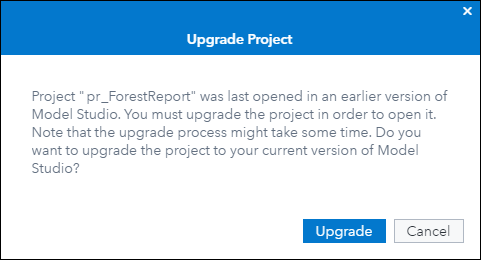
When the project upgrade is complete, the project is opened and you are prompted to refresh the data.
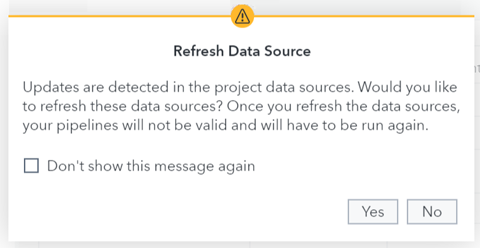
- Click Yes. The project is now ready for use.