Selected Champion Model Is Removed from Interactive Modeling
Description
This issue can occur when the following steps are performed.
- Inheritance is not enabled for the Interactive Modeling node. That is, the following setting is not checked for the node: Inherit model selection list of predecessor modeling node.
- The predecessor modeling nodes are configured to generate the forecast model selection graph tables (DIAGNOSEOUTFMSG).
- After Interactive Modeling completes, you select a different predecessor node as champion. For example, if PREDECESSOR1 is the champion, you select PREDECESSOR2 as the champion.
- You turn on inheritance for the Interactive Modeling node and run it again.
After completing these steps, when you reopen Interactive Modeling, you receive a Series Update Status message informing you that the champion node is no longer available.
When you run Interactive Modeling without inheritance, all of the predecessor nodes are listed in the model selection list as PREDECESSOR1, PREDECESSOR2, continually for each modeling node. When you turn on inheritance for Interactive Modeling and run the node, the model selection list no longer includes the predecessors that generate the tables for the forecasta numerical prediction of a future value for a specified time period for each unique combination of BY variable values model selection graph. Instead, it replaces them with the models from their own model selection list.
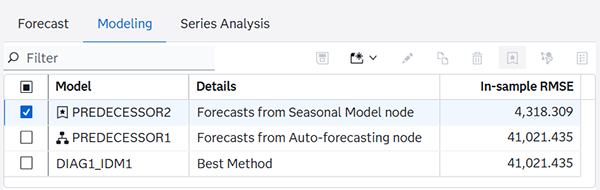
In the following example, Interactive Modeling is run without inheritance. The model selection list includes the Auto-forecasting node and the Seasonal node, with the names PREDECESSOR1 and PREDECESSOR2 respectively.
Model Selection List with Inheritance Turned Off
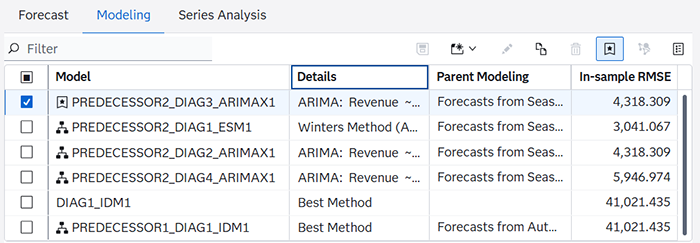
In this example, Interactive Modeling is run with inheritance turned on. For the selected time seriesan aggregation of transactional data into specified time intervals and sorted according to unique combinations of the default attributes (BY variables), the PREDECESSOR1 and PREDECESSOR2 models no longer exist. There are four models provided by the Seasonal modeling node (3 ARIMA models and 1 ESM model). Auto-forecasting provides one ESMBEST model and there is one system-generated model (ESMBEST).
Model Selection List with Inheritance Turned On
There are only four modeling nodes that can contribute their model selection list contents to the Interactive Modeling node. See Inherit model selection list of predecessor modeling node for more information.
Solution
To recover the selected modeling node as champion, simply turn inheritance off and rerun the node again. Then go back to each time series and change the selected champions as you had selected them before. This can be an arduous task if you made a large number of selections before.
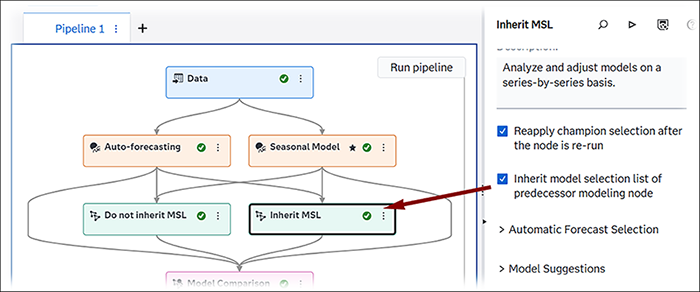
Another option to turning the inheritance on and off is the add two Interactive Modeling nodes, one with inheritance turned off and the other with inheritance turned on. In the following pipeline example, the nodes are renamed so that users know which one has inheritance turned on.
Pipeline with Two Interactive Modeling Nodes