PANEL Procedure
MODEL Statement
MODEL <"string"> response = regressors </ options>;
The MODEL statement specifies the regression model, the error structure that is assumed for the regression residuals, and the estimation technique to be used. The response variable (response) on the left side of the equal sign is regressed on the independent variables (regressors), which are listed after the equal sign. You can specify any number of MODEL statements. For each MODEL statement, you can specify only one response.
You can label models. Model labels are used in the printed output to identify the results for different models. If you do not specify a label, the model is referred to by numerical order wherever necessary. You can label the models in two ways:
First, you can prefix the MODEL statement by a label followed by a colon. For example:
label: MODEL …;
Second, you can add a quoted string after the MODEL keyword. For example:
MODEL "label" …;
Quoted-string labels are preferable because they allow spaces and special characters and because these labels are case-sensitive. If you specify both types of label, PROC PANEL uses the quoted string.
The MODEL statement supports a multitude of options, some more specific than others. Table 2 summarizes the options available in the MODEL statement. These are subsequently discussed in detail in the order in which the table presents them.
Table 2: Summary of MODEL Statement Options
| Option | Description |
|---|---|
| Estimation Technique Options | |
| AMACURDY | Fits a one-way model by using the Amemiya-MaCurdy estimator |
| BTWNG | Fits the between-groups model |
| BTWNT | Fits the between-time-periods model |
| DASILVA | Fits a moving average model by using the Da Silva method |
| DYNDIFF | Fits a dynamic panel model by using GMM on the difference equations |
| DYNSYS | Fits a dynamic panel model by using system GMM |
| FDONE | Fits a one-way model by using first-difference models |
| FDONETIME | Fits a one-way model for time effects by using first-differenced methods |
| FDTWO | Fits a two-way model by using first-difference models |
| FIXONE | Fits a one-way fixed-effects model |
| FIXONETIME | Fits a one-way fixed-effects model for time effects |
| FIXTWO | Fits a two-way fixed-effects model |
| HTAYLOR | Fits a one-way model by using the Hausman-Taylor estimator |
| PARKS | Fits an autoregressive model by using the Parks method |
| POOLED | Fits the pooled regression model |
| RANONE | Fits a one-way random-effects model |
| RANTWO | Fits a two-way random-effects model |
| Estimation Control Options | |
| M= | Specifies the moving average order |
| NOESTIM | Limits estimation to only transforming the data |
| NOINT | Suppresses the intercept |
| SINGULAR= | Specifies a matrix inverse singularity criterion |
| VCOMP= | Specifies the type of variance component estimation for random-effects estimation |
| Dynamic Panel Estimation Control Options | |
| ARTEST= | Specifies the maximum order of the autoregression (AR) test |
| ATOL= | Specifies the convergence criterion of iterated GMM, with respect to the weighting matrix |
| BIASCORRECTED | Requests bias-corrected variances for two-step GMM |
| BTOL= | Specifies the convergence criterion of iterated GMM, with respect to the parameter matrix |
| DLAGS= | Specifies the number of dependent variables to be used as regressors |
| GINV= | Specifies the type of generalized matrix inverse |
| GMM1 | Estimates by one-step GMM, the default |
| GMM2 | Estimates by two-step GMM |
| ITGMM | Estimates by iterative GMM |
| MAXITER= | Specifies the maximum iterations for iterative GMM |
| ROBUST | Specifies the robust covariance matrix |
| TIME | Includes time dummy variables in the model |
| Alternative Variances Options | |
| CLUSTER | Corrects covariance for intracluster correlation |
| HAC(options) | Specifies a heteroscedasticity- and autocorrelation-consistent (HAC) covariance |
| HCCME= | Specifies a heteroscedasticity-corrected covariance matrix estimator (HCCME) |
| NEWEYWEST(options) | Specifies the Newey-West covariance, a special case of the HAC covariance |
| Unit Root Test Options | |
| UROOTTEST(test-options) | Requests one or more panel data unit root and stationarity tests; specify test-options ALL through lLC within this option. |
| STATIONARITY(test-options) | Synonym for the UROOTTEST option |
| ALL | Requests that all unit root tests be performed |
| BREITUNG(options) | Specifies Breitung’s tests that are robust to cross-sectional dependence |
| COMBINATION(options) | Specifies one or more unit root tests that combine over all cross sections |
| FISHER(options) | Synonym for the COMBINATION option |
| HADRI(options) | Specifies Hadri’s (2000) stationarity test |
| HT | Specifies the Harris and Tzavalis (1999) panel unit root test |
| IPS(options) | Specifies the Im, Pesaran, and Shin (2003) panel unit root test |
| LLC(options) | Specifies the Levin, Lin, and Chu (2002) panel unit root test |
| Model Specification Test Options | |
| BFN | Requests the  statistic for serial correlation under fixed effects statistic for serial correlation under fixed effects |
| BL91 | Requests the Baltagi and Li (1991) Lagrange multiplier (LM) test for serial correlation and random effects |
| BL95 | Requests the Baltagi and Li (1995) LM test for first-order correlation under fixed effects |
| BP | Requests the Breusch-Pagan one-way test for random effects |
| BP2 | Requests the Breusch-Pagan two-way test for random effects |
| BSY | Requests the Bera, Sosa Escudero, and Yoon modified Rao’s score test |
| BW | Requests the Berenblut-Webb statistic for serial correlation under fixed effects |
| CDTEST(options) | Requests a battery of cross-sectional dependence tests |
| DW | Requests the Durbin-Watson statistic for serial correlation under fixed effects |
| GHM | Requests the Gourieroux, Holly, and Monfort test for two-way random effects |
| HONDA | Requests the Honda one-way test for random effects |
| HONDA2 | Requests the Honda two-way test for random effects |
| KW | Requests the King and Wu two-way test for random effects |
| POOLTEST | Requests poolability tests for one-way fixed effects and pooled models |
| WOOLDRIDGE02 | Requests the Wooldridge (2002) test for unobserved effects |
| Printed Output Options | |
| CORR | Prints the parameter correlation matrix |
| CORRB | Synonym for the CORR option |
| COVB | Prints the parameter covariance matrix |
| ITPRINT | Prints the iteration history |
| NOPRINT | Suppresses normally printed output |
| PHI | Prints the  covariance matrix for the Parks method covariance matrix for the Parks method |
| PRINTFIXED | Estimates and prints the fixed effects |
| RHO | Prints the autocorrelation coefficients for the Parks method |
| VAR | Synonym for the COVB option |
You can specify the following options in the MODEL statement after a slash (/).
Estimation Technique Options
Estimation technique options specify the assumed error structure and estimation method. You can specify more than one option, in which case the analysis is repeated for each. The default is RANTWO (two-way random effects).
All estimation methods are described in the section Details: PANEL Procedure and its subsections.
Estimation Control Options
Estimation control options define parameters that control the estimation and can be specific to the chosen technique (for example, how to estimate variance components in a random-effects model).
- M=number
specifies the order of the moving average process in the Da Silva method. The value of number must be less than
 , where T is the number of time periods. By default, M=1.
 - NOESTIM
limits the estimation of a FIXONE, FIXONETIME, FDONE, FDONETIME, or RANONE model to the generation of the transformed series. This option is intended for use with an OUTTRANS= data set.
- NOINT
- SINGULAR=number
specifies a singularity criterion for the inversion of the matrix. The default depends on the precision of the computer system.
- VCOMP=FB | NL | WH | WK
-
specifies the type of variance component estimate to use. You can specify the following values:
- FB
uses the Fuller-Battese method.
- NL
uses the Nerlove method.
- WH
uses the Wallace-Hussain method.
- WK
uses the Wansbeek-Kapteyn method.
By default, VCOMP=FB for balanced data and VCOMP=WK for unbalanced data. For more information, see the sections One-Way Random-Effects Model (RANONE Option) and Two-Way Random-Effects Model (RANTWO Option).
Dynamic Panel Estimation Control Options
Dynamic panel estimation control options are specific to dynamic panels, where the estimation technique is specified as DYNDIFF or DYNSYS. For more information, see the section Dynamic Panel Estimation (DYNDIFF and DYNSYS Options).
- ARTEST=integer
specifies the maximum order of the test for the presence of autoregression (AR) effects in the residual in the dynamic panel model. The value of integer must be between 1 and
 , inclusive, where T is the number of time periods.
 - ATOL=number
specifies the convergence criterion for the iterated generalized method of moments (GMM) when convergence of the method is determined by convergence in the weighting matrix. The convergence criterion (number) must be positive. If you do not specify this option, then the BTOL= option (or its default) is used.
- BIASCORRECTED
computes the bias-corrected covariance matrix of the two-step dynamic panel estimator. When you specify this option, the ROBUST option is disabled for the two-step GMM estimator.
- BTOL=number
specifies the convergence criterion for iterated GMM when convergence of the method is determined by convergence in the parameter matrix. The convergence criterion (number) must be positive. By default, BTOL=1E–8.
- DLAGS=number
specifies the number of dependent-variable lags to use as regressors. By default, DLAGS=1.
- GINV=G2 | G4
-
specifies what type of generalized inverse to use. You can specify the following values:
- G2
uses the G2 generalized inverse.
- G4
uses the G4 generalized inverse.
The difference between G2 and G4 becomes evident when you invert singular matrices. The G2 generalized inverse drops rows and columns from singular matrices to produce a viable inverse. The G4 inverse, on the other hand, is the Moore-Penrose generalized inverse. The Moore-Penrose generalized inverse averages the variance effects between collinear rows. The G4 inverse is usually more stable, but it is computationally intensive. By default, GINV=G2. If you have trouble reproducing published results, often the solution is to switch to GINV=G4.
- GMM1
estimates the dynamic panel regression by the one-step generalized method of moments (GMM). This is the default estimation method.
- GMM2
- ITGMM
- MAXITER=integer
specifies the maximum number of iterations for the ITGMM option. By default, MAXITER=200.
- ROBUST
uses the robust weighting matrix in the calculation of the covariance matrix of the one-step, two-step, and iterated GMM dynamic panel estimators.
- TIME
estimates the model by using the dynamic panel estimator method but includes time dummy variables to model any time effects in the data.
Alternative Variances Options
Alternative variance options specify variance estimation other than conventional model-based variance estimation. They include the robust, cluster robust, HAC, HCCME, and Newey-West techniques.
- CLUSTER
specifies the cluster correction for the covariance matrix. You can specify this option when you specify HCCME=0, 1, 2, or 3.
- HAC <(options) >
-
specifies the heteroscedasticity- and autocorrelation-consistent (HAC) covariance matrix estimator. This option is not available for between models and cannot be combined with the HCCME= option.
For more information, see the section Heteroscedasticity- and Autocorrelation-Consistent Covariance Matrices.
You can specify the following options within parentheses and separated by spaces:
- ADJUSTDF
-
makes a small-sample adjustment to the degrees of freedom in the covariance calculation.
- BANDWIDTH=number | method
-
specifies the fixed bandwidth value or bandwidth selection method to be used in the kernel function. You can specify either a fixed value (number) or one of the methods listed after number.
- number
specifies a fixed value of the bandwidth parameter.
- ANDREWS91 | ANDREWS
specifies the Andrews (1991) bandwidth selection method.
-
NEWEYWEST94<(C=number)>
NW94 <(C=number)> specifies the bandwidth selection method of Newey and West (1994) You can also specify C=number for the calculation of lag selection parameter; by default, C=12.
-
SAMPLESIZE<(options)>
SS<(options)> -
calculates the bandwidth according to the following equation based on the sample size,

where b is the bandwidth parameter; T is the sample size; and
 , r, and c are values that you specify using the following options within parentheses and separated by commas:
 - CONSTANT=number
specifies the constant c in the equation. By default, CONSTANT=0.5.
- GAMMA=number
specifies the coefficient
in the equation. By default, GAMMA=0.75. - INT
specifies that the bandwidth parameter must be integer; that is,
 , where
  denotes the largest integer less than or equal to x.
 - RATE=number
specifies the growth rate r in the equation. By default, RATE=0.3333.
By default, BANDWIDTH=ANDREWS91.
- KERNEL=BARTLETT | PARZEN | QS | TH | TRUNCATED
-
specifies the type of kernel function. You can specify the following values:
- BARTLETT
specifies the Bartlett kernel function.
- PARZEN
specifies the Parzen kernel function.
- QS
specifies the quadratic spectral kernel function.
- TH
specifies the Tukey-Hanning kernel function.
- TRUNCATED
specifies the truncated kernel function.
By default, KERNEL=TRUNCATED.
- KERNELLB=number
specifies the lower bound of the kernel weight value. Any kernel weight less than number is regarded as 0, which accelerates the calculation in large samples, especially for the quadratic spectral kernel function. By default, KERNELLB=0.
- PREWHITENING
requests prewhitening in the covariance calculation.
- HCCME=NO | number
-
specifies the type of HCCME covariance matrix. You can specify one of the following:
- NO
does not correct the covariance matrix.
- number
specifies the type of covariance adjustment. The value of number can be any integer from 0 to 4, inclusive.
For more information, see the section Heteroscedasticity-Corrected Covariance Matrices. By default, HCCME=NO.
- NEWEYWEST<(options)>
-
specifies the well-known Newey-West estimator, a special HAC estimator that uses (1) the Bartlett kernel; (2) a bandwidth that is determined by the equation based on the sample size,
; and (3) no adjustment to degrees of freedom and no prewhitening. By default, the bandwidth parameter for the Newey-West estimator is  , as shown in equation 15.17 in Stock and Watson (2002). You can specify the following options in parentheses and separated by commas:
 - CONSTANT=number
specifies the constant c in the equation. By default, CONSTANT=0.5.
- GAMMA=number
specifies the coefficient
in the equation. By default, GAMMA=0.75. - RATE=number
specifies the growth rate r in the equation. By default, RATE=0.3333.
To specify a Newey-West bandwidth directly (and not as a function of time series length), set GAMMA=0 and CONSTANT=b, where b is the bandwidth that you want. For example, the two variance specifications in the following statements are equivalent:
proc panel data=A;
   id i t;
   model y = x1 x2 x3 / ranone hac(kernel = bartlett bandwidth = 3);
   model y = x1 x2 x3 / ranone neweywest(gamma = 0, constant = 3);
run;
Unit Root Test Options
Unit root test options request unit root tests on the dependent variable. You begin with the UROOTTEST (or its synonym, STATIONARITY) option and specify everything else within parentheses after the UROOTTEST (or STATIONARITY) keyword. The BREITUNG, COMBINATION (or FISHER), HADRI, HT, IPS, and LLC options produce the corresponding tests. You can request them all by specifying the ALL option.
-
UROOTTEST(test1<(test-options), test2<(test-options)>…> <options>)
STATIONARITY(test1<(test-options), test2<(test-options)>…> <options>) -
specifies tests of stationarity or unit root for panel data, and specifies options for each test. These tests apply only to the dependent variable. Six tests are available; their corresponding options are BREITUNG, COMBINATION (or FISHER), HADRI, HT, IPS, and LLC. You can specify one or more of these tests, separated by commas. You can also request all tests by specifying UROOTTEST(ALL) or STATIONARITY(ALL). If you specify one or more test-options (separated by spaces) inside the parentheses after a particular test, they apply only to that test. If you specify one or more options separated by spaces after you specify the tests, they apply to all the tests. If you specify both test-options and options, the test-options override the options.
You can specify the following tests and test-options:
- BREITUNG<(test-options) >
-
performs Breitung’s unbiased test, t test, and generalized least squares (GLS) t test that are robust to cross-sectional dependence. The tests are described in Breitung and Meyer (1994); Breitung (2000); Breitung and Das (2005). You can specify one or more of the following test-options within parentheses and separated by spaces:
- DETAIL
prints intermediate results (lag order).
- LAG=type | value
-
specifies the method to choose the lag order for the augmented Dickey-Fuller (ADF) regressions. You can specify a value or one of the types listed after value.
- value
specifies the lag order. If the lag order is too big to run linear regression (value >
 , where T is the number of time periods and k is the number of parameters), then the lag order is set to
 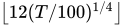 or
or  , whichever is smaller.
 - AIC
selects the order of lags by Akaike’s information criterion (AIC).
- GS
selects the order of lags by Hall’s (1994) sequential testing method, beginning with the most general model (maximum lags) and then reducing lag orders sequentially.
- HQIC
selects the order of lags by the Hannan-Quinn information criterion.
- MAIC
selects the order of lags by the modified AIC proposed by Ng and Perron (2001).
-
SBC
SIC
SBIC selects the order of lags by the Bayesian information criterion (Schwarz criterion).
- SG
selects the order of lags by Hall’s (1994) sequential testing method, beginning with no lag terms and then increasing lag orders sequentially.
By default, LAG=MAIC.
- MAXLAG=value
specifies the maximum lag order that the model allows. The default value is
. If value is larger than 0 and larger than , then the maximum lag order is set to the default value of or , whichever is smaller. This option is ignored if you specify LAG=value.
-
COMBINATION < (test-options) >
FISHER < (test-options) > -
specifies combination tests that are proposed by Choi (2001); Maddala and Wu (1999). You can specify one or more of the following test-options within parentheses and separated by spaces:
- TEST=ADF | PP
-
selects the time series unit root test for combination tests. You can specify the following values:
- ADF
specifies the augmented Dickey-Fuller (ADF) test. The BANDWIDTH and KERNEL options are ignored because they do not pertain to ADF tests.
- PP
specifies the Phillips and Perron (1988) unit root test. The LAG and MAXLAG options are ignored because they do not pertain to PP tests.
By default, TEST=PP.
- KERNEL=BARTLETT | PARZEN | QS | TH | TRUNCATED
-
specifies the type of kernel function. You can specify the following values:
- BARTLETT
specifies the Bartlett kernel function.
- PARZEN
specifies the Parzen kernel function.
- QS
specifies the quadratic spectral kernel function.
- TH
specifies the Tukey-Hanning kernel function.
- TRUNCATED
specifies the truncated kernel function.
By default, KERNEL=QS.
- BANDWIDTH=ANDREWS | number
-
specifies the bandwidth for the kernel. You can specify one of the following values:
- ANDREWS
selects the bandwidth by the Andrews method.
- number
sets the bandwidth to number, which must be nonnegative.
By default, BANDWIDTH=ANDREWS.
- DETAIL
prints intermediate results (lag order and long-run variance for each cross section).
- LAG=type | value
-
specifies the method to choose the lag order for the augmented Dickey-Fuller (ADF) regressions. You can specify a value or one of the types listed after value.
- value
specifies the lag order. If the lag order is too big to run linear regression (value >
, where T is the number of time periods and k is the number of parameters), then the lag order is set to or , whichever is smaller. - AIC
selects the order of lags by Akaike’s information criterion (AIC).
- GS
selects the order of lags by Hall’s (1994) sequential testing method, beginning with the most general model (maximum lags) and then reducing lag orders sequentially.
- HQIC
selects the order of lags by the Hannan-Quinn information criterion.
- MAIC
selects the order of lags by the modified AIC proposed by Ng and Perron (2001).
-
SBC
SIC
SBIC selects the order of lags by the Bayesian information criterion (Schwarz criterion).
- SG
selects the order of lags by Hall’s (1994) sequential testing method, beginning with no lag terms and then increasing lag orders sequentially.
By default, LAG=MAIC.
- MAXLAG=value
specifies the maximum lag order that the model allows. The default value is
. If value is larger than 0 and larger than , then the maximum lag order is set to the default value of or , whichever is smaller. This option is ignored if you specify LAG=value.
- HADRI < (test-options) >
-
specifies Hadri’s (2000) panel stationarity test. You can specify the following test-options:
- HT
specifies the Harris and Tzavalis (1999) panel unit root test. No options are available for this test.
- IPS < (test-options) >
-
specifies the Im, Pesaran, and Shin (2003) panel unit root test. You can specify one or more of the following test-options within parentheses and separated by spaces:
- DETAIL
prints intermediate results (lag order).
- LAG=type | value
-
specifies the method to choose the lag order for the augmented Dickey-Fuller (ADF) regressions. You can specify a value or one of the types listed after value.
- value
specifies the lag order. If the lag order is too big to run linear regression (value >
, where T is the number of time periods and k is the number of parameters), then the lag order is set to or , whichever is smaller. - AIC
selects the order of lags by Akaike’s information criterion (AIC).
- GS
selects the order of lags by Hall’s (1994) sequential testing method, beginning with the most general model (maximum lags) and then reducing lag orders sequentially.
- HQIC
selects the order of lags by the Hannan-Quinn information criterion.
- MAIC
selects the order of lags by the modified AIC proposed by Ng and Perron (2001).
-
SBC
SIC
SBIC selects the order of lags by the Bayesian information criterion (Schwarz criterion).
- SG
selects the order of lags by Hall’s (1994) sequential testing method, beginning with no lag terms and then increasing lag orders sequentially.
By default, LAG=MAIC.
- MAXLAG=value
specifies the maximum lag order that the model allows. The default value is
. If value is larger than 0 and larger than , then the maximum lag order is set to the default value of or , whichever is smaller. This option is ignored if you specify LAG=value.
- LLC < (test-options) >
-
specifies the Levin, Lin, and Chu (2002) panel unit root test. You can specify one or more of the following test-options within parentheses and separated by spaces:
- KERNEL=BARTLETT | PARZEN | QS | TH | TRUNCATED
-
specifies the type of kernel function. You can specify the following values:
- BARTLETT
specifies the Bartlett kernel function.
- PARZEN
specifies the Parzen kernel function.
- QS
specifies the quadratic spectral kernel function.
- TH
specifies the Tukey-Hanning kernel function.
- TRUNCATED
specifies the truncated kernel function.
By default, KERNEL=QS.
- BANDWIDTH=ANDREWS | number
-
specifies the bandwidth for the kernel. You can specify one of the following values:
- ANDREWS
selects the bandwidth by the Andrews method.
- number
sets the bandwidth to number, which must be nonnegative. By default, BANDWIDTH=ANDREWS.
- DETAIL
prints intermediate results (lag order and long-run variance for each cross section).
- LAG=type | value
-
specifies the method to choose the lag order for the augmented Dickey-Fuller (ADF) regressions. You can specify a value or one of the types listed after value.
- value
specifies the lag order. If the lag order is too big to run linear regression (value >
, where T is the number of time periods and k is the number of parameters), then the lag order is set to or , whichever is smaller. - AIC
selects the order of lags by Akaike’s information criterion (AIC).
- GS
selects the order of lags by Hall’s (1994) sequential testing method, beginning with the most general model (maximum lags) and then reducing lag orders sequentially.
- HQIC
selects the order of lags by the Hannan-Quinn information criterion.
- MAIC
selects the order of lags by the modified AIC proposed by Ng and Perron (2001).
-
SBC
SIC
SBIC selects the order of lags by the Bayesian information criterion (Schwarz criterion).
- SG
selects the order of lags by Hall’s (1994) sequential testing method, beginning with no lag terms and then increasing lag orders sequentially.
By default, LAG=MAIC.
- MAXLAG=value
specifies the maximum lag order that the model allows. The default value is
. If value is larger than 0 and larger than , then the maximum lag order is set to the default value of or , whichever is smaller. This option is ignored if you specify LAG=value.
Consider the following example, which requests two tests (LLC and BREITUNG options) on the dependent variable:
proc panel data=A;
   id i t;
   model y = x1 x2 x3 / unitroot(llc(kernel = parzen lag = aic),
                                 breitung(lag = gs)
                                 maxlag = 2
                                 kernel = bartlett);
run;
For the LLC test, the lag order is selected by AIC with maximum lag order 2, and the kernel is specified as Parzen (overriding Bartlett). For the Breitung test, the lag order is GS with a maximum lag order 2. The KERNEL option is ignored by the Breitung test because it is not relevant to that test.
Model Specification Test Options
The options in this category request model specification tests, such as a test for poolability in one-way models. These tests depend on the model specifications of dependent and independent variables, but not on the estimation technique that is used to fit the model. For example, a one-way test for random effects does not require you to fit a random-effects model, or even a one-way model for that matter. The model fits that are required for the selected tests are performed internally.
- BFN
requests the
 statistic for serial correlation under cross-sectional fixed effects.
 - BL91
requests the Baltagi and Li (1991) joint Lagrange multiplier (LM) test for serial correlation and random cross-sectional effects.
- BL95
requests the Baltagi and Li (1995) LM test for first-order correlation under fixed effects.
- BP
- BP2
- BSY
requests the Bera, Sosa Escudero, and Yoon modified Rao’s score test for random cross-sectional effects or serial correlation or both.
- BW
requests the Berenblut-Webb statistic for serial correlation under cross-sectional fixed effects.
- CDTEST <(P=value) >
requests cross-sectional dependence tests. These include the Breusch and Pagan (1980) LM test, the scaled version of the Breusch and Pagan (1980) test, and the Pesaran (2004) CD test. When you specify P=value, the CD test for local cross-sectional dependence is performed using the order
 , where is an integer greater than 0.
 - DW
requests the Durbin-Watson statistic for serial correlation under cross-sectional fixed effects.
- GHM
requests the Gourieroux, Holly, and Monfort two-way test for random effects.
- HONDA
- HONDA2
- KW
- POOLTEST
requests poolability tests for one-way fixed effects and pooled models.
- WOOLDRIDGE02
requests the Wooldridge (2002) test for the presence of unobserved effects.
Printed Output Options
Printed output options change how results are presented.
-
CORRB
CORR prints the matrix of estimated correlations between the parameter estimates.
-
COVB
VAR prints the matrix of estimated covariances between the parameter estimates.
- ITPRINT
prints the iteration history of the parameter and transformed sum of squared errors.
- NOPRINT
- PHI
prints the
 matrix of estimated covariances of the observations for the Parks method. The PHI option is relevant only when you specify the PARKS option. For more information, see the section Parks Method for Autoregressive Models (PARKS Option).
 - PRINTFIXED
estimates and prints the fixed effects in models where they would normally be absorbed within the estimation.
- RHO
prints the estimated autocorrelation coefficients for the Parks method.