PANEL Procedure

Dynamic Panel Estimation (DYNDIFF and DYNSYS Options)

You perform dynamic panel estimation that uses first differences by specifying the DYNDIFF option in the MODEL statement. For dynamic panel estimation that uses a full system of difference and level equations, specify the DYNSYS option. For an example of dynamic panel estimation, see Example 25.5.

Dynamic panel models are regression models that include lagged versions of the dependent variable as covariates. Consider the following panel regression, which includes L lags of the dependent variable:

y Subscript i t Baseline equals sigma-summation Underscript j equals 1 Overscript upper L Endscripts phi Subscript j Baseline y Subscript i comma t minus j Baseline plus sigma-summation Underscript k equals 1 Overscript upper K Endscripts x Subscript i t k Baseline beta Subscript k Baseline plus nu Subscript i Baseline plus epsilon Subscript i t

Because the effect nu Subscript i is common to all observations for that individual, it is correlated with any lagged y because it played a role in its realization. As such, lagged dependent variables are endogenous regressors and require special consideration.

First Differencing

For ease of notation, consider the special case upper L equals upper K equals 1. A first attempt to remove the source of the correlation would be to take first differences, which removes nu Subscript i. That is,

normal upper Delta y Subscript i t Baseline equals phi normal upper Delta y Subscript i comma t minus 1 Baseline plus normal upper Delta x Subscript i t Baseline beta plus eta Subscript i t

where normal upper Delta y Subscript i t Baseline equals y Subscript i comma t Baseline minus y Subscript i comma t minus 1, normal upper Delta x Subscript i t Baseline equals x Subscript i comma t Baseline minus x Subscript i comma t minus 1, and eta Subscript i t Baseline equals epsilon Subscript i comma t Baseline minus epsilon Subscript i comma t minus 1. Even though the individual effects are removed, the problem of endogeneity persists because normal upper Delta y Subscript i comma t minus 1 is correlated with the differenced error term eta Subscript i t. That is because epsilon Subscript i comma t minus 1 is a component of y Subscript i comma t minus 1 (Nickell 1981).

Arellano and Bond (1991) show that you can use the generalized method of moments (GMM) to obtain a consistent estimator. In GMM parlance, the moment condition that upper E left-brace left-parenthesis normal upper Delta y Subscript i comma t minus 1 Baseline right-parenthesis eta Subscript i t Baseline right-brace equals 0 is violated. Estimation requires a set of instrumental variables that do meet their moment conditions and that can adequately predict normal upper Delta y Subscript i comma t minus 1. A natural set of instruments is y Subscript i comma t minus 2 and all other previous realizations of y. These lags of y are not correlated with epsilon Subscript i comma t minus 1 because they occurred before time t minus 1. Given the autoregressive nature of the model, y Subscript i comma t minus 1 (and hence normal upper Delta y Subscript i comma t minus 1) is well predicted by its previous values.

Begin with t equals 3, the first time period where the differenced model holds. The dynamic regression model for individual i can be expressed as
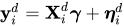
bold y Subscript i Superscript d Baseline equals bold upper X Subscript i Superscript d Baseline bold-italic gamma plus bold-italic eta Subscript i Superscript d

where

bold y Subscript i Superscript d Baseline equals Start 4 By 1 Matrix 1st Row  normal upper Delta y Subscript i Baseline 3 Baseline 2nd Row  normal upper Delta y Subscript i Baseline 4 Baseline 3rd Row  vertical-ellipsis 4th Row  normal upper Delta y Subscript i upper T Baseline EndMatrix bold upper X Subscript i Superscript d Baseline equals Start 4 By 2 Matrix 1st Row 1st Column normal upper Delta y Subscript i Baseline 2 Baseline 2nd Column normal upper Delta x Subscript i Baseline 3 Baseline 2nd Row 1st Column normal upper Delta y Subscript i Baseline 3 Baseline 2nd Column normal upper Delta x Subscript i Baseline 4 Baseline 3rd Row 1st Column vertical-ellipsis 2nd Column vertical-ellipsis 4th Row 1st Column normal upper Delta y Subscript i comma upper T minus 1 Baseline 2nd Column normal upper Delta x Subscript i upper T Baseline EndMatrix bold-italic gamma equals StartBinomialOrMatrix phi Choose beta EndBinomialOrMatrix bold-italic eta Subscript i Superscript d Baseline equals Start 4 By 1 Matrix 1st Row  eta Subscript i Baseline 3 Baseline 2nd Row  eta Subscript i Baseline 4 Baseline 3rd Row  vertical-ellipsis 4th Row  eta Subscript i upper T EndMatrix

Proceeding with the idea that you can use as instruments for the endogenous covariate normal upper Delta y Subscript i comma t minus 1 for , the instrument matrix for the lagged dependent variables is

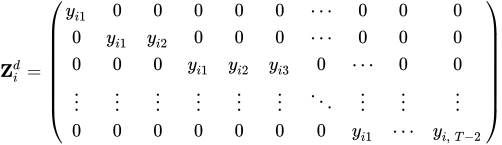
bold upper Z Subscript i Superscript d Baseline equals Start 5 By 10 Matrix 1st Row 1st Column y Subscript i Baseline 1 Baseline 2nd Column 0 3rd Column 0 4th Column 0 5th Column 0 6th Column 0 7th Column midline-horizontal-ellipsis 8th Column 0 9th Column 0 10th Column 0 2nd Row 1st Column 0 2nd Column y Subscript i Baseline 1 Baseline 3rd Column y Subscript i Baseline 2 Baseline 4th Column 0 5th Column 0 6th Column 0 7th Column midline-horizontal-ellipsis 8th Column 0 9th Column 0 10th Column 0 3rd Row 1st Column 0 2nd Column 0 3rd Column 0 4th Column y Subscript i Baseline 1 Baseline 5th Column y Subscript i Baseline 2 Baseline 6th Column y Subscript i Baseline 3 Baseline 7th Column 0 8th Column midline-horizontal-ellipsis 9th Column 0 10th Column 0 4th Row 1st Column vertical-ellipsis 2nd Column vertical-ellipsis 3rd Column vertical-ellipsis 4th Column vertical-ellipsis 5th Column vertical-ellipsis 6th Column vertical-ellipsis 7th Column down-right-diagonal-ellipsis 8th Column vertical-ellipsis 9th Column vertical-ellipsis 10th Column vertical-ellipsis 5th Row 1st Column 0 2nd Column 0 3rd Column 0 4th Column 0 5th Column 0 6th Column 0 7th Column 0 8th Column y Subscript i Baseline 1 Baseline 9th Column midline-horizontal-ellipsis 10th Column y Subscript i comma upper T minus 2 EndMatrix

This extends naturally to upper L greater-than 1 and upper K greater-than 1; simply add columns to bold upper X Subscript i Superscript d and elements to bold-italic gamma as appropriate. When an observation is either missing or lost because of missing lags, delete the corresponding rows of bold y Subscript i Superscript d, bold upper X Subscript i Superscript d, bold-italic eta Subscript i Superscript d, and bold upper Z Subscript i Superscript d. Even if an observation is not missing with respect to the regression model, some of the lagged instruments might not be available because previous observations are missing. When that occurs, replace any missing instrument with 0.

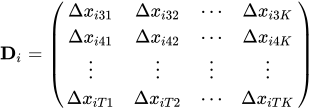
When you specify the DYNDIFF option in the MODEL statement, PROC PANEL by default treats x variables as exogenous and uses a projection that leaves these variables unchanged in the differenced regression. The full instrument matrix is then bold upper Z Subscript i Baseline equals left-parenthesis bold upper Z Subscript i Superscript d Baseline comma bold upper D Subscript i Baseline right-parenthesis, where
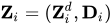
bold upper D Subscript i Baseline equals Start 4 By 4 Matrix 1st Row 1st Column normal upper Delta x Subscript i Baseline 31 Baseline 2nd Column normal upper Delta x Subscript i Baseline 32 Baseline 3rd Column midline-horizontal-ellipsis 4th Column normal upper Delta x Subscript i Baseline 3 upper K Baseline 2nd Row 1st Column normal upper Delta x Subscript i Baseline 41 Baseline 2nd Column normal upper Delta x Subscript i Baseline 42 Baseline 3rd Column midline-horizontal-ellipsis 4th Column normal upper Delta x Subscript i Baseline 4 upper K Baseline 3rd Row 1st Column vertical-ellipsis 2nd Column vertical-ellipsis 3rd Column vertical-ellipsis 4th Column vertical-ellipsis 4th Row 1st Column normal upper Delta x Subscript i upper T Baseline 1 Baseline 2nd Column normal upper Delta x Subscript i upper T Baseline 2 Baseline 3rd Column midline-horizontal-ellipsis 4th Column normal upper Delta x Subscript i upper T upper K EndMatrix

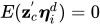
When upper L equals 1, the default bold upper Z Subscript i has left-parenthesis upper T minus 1 right-parenthesis left-parenthesis upper T minus 2 right-parenthesis slash 2 plus upper K columns. Each column bold z Subscript c of bold upper Z Subscript i satisfies the moment condition upper E left-parenthesis bold z Subscript c Superscript prime Baseline bold-italic eta Subscript i Superscript d Baseline right-parenthesis equals 0.

System GMM

Blundell and Bond (1998) proposed a system GMM estimator that uses additional moment conditions to increase efficiency. The efficiency gain can be substantial when there is strong serial correlation in the dependent variable.

When either phi is near 1 or sigma Subscript nu Superscript 2 Baseline slash sigma Subscript epsilon Superscript 2 is large, the lagged dependent variables are weak instruments for the differenced variables normal upper Delta y Subscript i comma t minus 1. System GMM solves the weak instrument problem by augmenting the difference equations described previously with a set of level equations. When upper L equals upper K equals 1, the level equations are

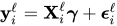
bold y Subscript i Superscript script l Baseline equals bold upper X Subscript i Superscript script l Baseline bold-italic gamma plus bold-italic epsilon Subscript i Superscript script l

where

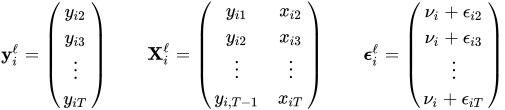
bold y Subscript i Superscript script l Baseline equals Start 4 By 1 Matrix 1st Row  y Subscript i Baseline 2 Baseline 2nd Row  y Subscript i Baseline 3 Baseline 3rd Row  vertical-ellipsis 4th Row  y Subscript i upper T Baseline EndMatrix bold upper X Subscript i Superscript script l Baseline equals Start 4 By 2 Matrix 1st Row 1st Column y Subscript i Baseline 1 Baseline 2nd Column x Subscript i Baseline 2 Baseline 2nd Row 1st Column y Subscript i Baseline 2 Baseline 2nd Column x Subscript i Baseline 3 Baseline 3rd Row 1st Column vertical-ellipsis 2nd Column vertical-ellipsis 4th Row 1st Column y Subscript i comma upper T minus 1 Baseline 2nd Column x Subscript i upper T Baseline EndMatrix bold-italic epsilon Subscript i Superscript script l Baseline equals Start 4 By 1 Matrix 1st Row  nu Subscript i Baseline plus epsilon Subscript i Baseline 2 Baseline 2nd Row  nu Subscript i Baseline plus epsilon Subscript i Baseline 3 Baseline 3rd Row  vertical-ellipsis 4th Row  nu Subscript i Baseline plus epsilon Subscript i upper T EndMatrix

Blundell and Bond (1998) note that you can use lagged differences of y as instruments for the levels of y. The main instrument matrix for the level equations is then
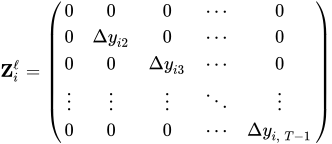
bold upper Z Subscript i Superscript script l Baseline equals Start 5 By 5 Matrix 1st Row 1st Column 0 2nd Column 0 3rd Column 0 4th Column midline-horizontal-ellipsis 5th Column 0 2nd Row 1st Column 0 2nd Column normal upper Delta y Subscript i Baseline 2 Baseline 3rd Column 0 4th Column midline-horizontal-ellipsis 5th Column 0 3rd Row 1st Column 0 2nd Column 0 3rd Column normal upper Delta y Subscript i Baseline 3 Baseline 4th Column midline-horizontal-ellipsis 5th Column 0 4th Row 1st Column vertical-ellipsis 2nd Column vertical-ellipsis 3rd Column vertical-ellipsis 4th Column down-right-diagonal-ellipsis 5th Column vertical-ellipsis 5th Row 1st Column 0 2nd Column 0 3rd Column 0 4th Column midline-horizontal-ellipsis 5th Column normal upper Delta y Subscript i comma upper T minus 1 EndMatrix

where the first row corresponds to time t equals 2. You can extend this to upper L greater-than 1 and upper K greater-than 1 by adding columns to bold upper X Subscript i Superscript script l and elements to bold-italic gamma as appropriate. Higher-order lags require deletion of the leading rows of bold y Subscript i Superscript script l, bold upper X Subscript i Superscript script l, bold-italic epsilon Subscript i Superscript script l, and bold upper Z Subscript i Superscript script l.

Regression on the full system is obtained by stacking bold y Subscript i Superscript d and bold y Subscript i Superscript script l to form bold y Subscript i Superscript s, stacking bold upper X Subscript i Superscript d and bold upper X Subscript i Superscript script l to form bold upper X Subscript i Superscript s, and stacking bold-italic eta Subscript i Superscript d and bold-italic epsilon Subscript i Superscript script l to form bold-italic epsilon Subscript i Superscript s.

When you specify the DYNSYS model option, the default instrument matrix for the full system is
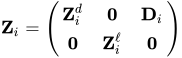
bold upper Z Subscript i Baseline equals Start 2 By 3 Matrix 1st Row 1st Column bold upper Z Subscript i Superscript d Baseline 2nd Column bold 0 3rd Column bold upper D Subscript i Baseline 2nd Row 1st Column bold 0 2nd Column bold upper Z Subscript i Superscript script l Baseline 3rd Column bold 0 EndMatrix

Estimation

The estimation in this section assumes system GMM. To obtain difference GMM, restrict estimation to the rows that correspond to the difference equations.

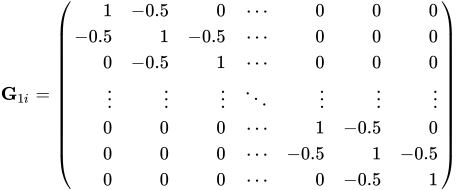
The initial moment matrix is derived from the theoretical variance of the combined residuals and is expressed as bold upper H Subscript 1 i Baseline equals normal d normal i normal a normal g left-parenthesis bold upper G Subscript 1 i Baseline comma bold upper G Subscript 2 i Baseline right-parenthesis, where

bold upper G Subscript 1 i Baseline equals Start 7 By 7 Matrix 1st Row 1st Column 1 2nd Column negative 0.5 3rd Column 0 4th Column midline-horizontal-ellipsis 5th Column 0 6th Column 0 7th Column 0 2nd Row 1st Column negative 0.5 2nd Column 1 3rd Column negative 0.5 4th Column midline-horizontal-ellipsis 5th Column 0 6th Column 0 7th Column 0 3rd Row 1st Column 0 2nd Column negative 0.5 3rd Column 1 4th Column midline-horizontal-ellipsis 5th Column 0 6th Column 0 7th Column 0 4th Row 1st Column vertical-ellipsis 2nd Column vertical-ellipsis 3rd Column vertical-ellipsis 4th Column down-right-diagonal-ellipsis 5th Column vertical-ellipsis 6th Column vertical-ellipsis 7th Column vertical-ellipsis 5th Row 1st Column 0 2nd Column 0 3rd Column 0 4th Column midline-horizontal-ellipsis 5th Column 1 6th Column negative 0.5 7th Column 0 6th Row 1st Column 0 2nd Column 0 3rd Column 0 4th Column midline-horizontal-ellipsis 5th Column negative 0.5 6th Column 1 7th Column negative 0.5 7th Row 1st Column 0 2nd Column 0 3rd Column 0 4th Column midline-horizontal-ellipsis 5th Column 0 6th Column negative 0.5 7th Column 1 EndMatrix

and bold upper G Subscript 2 i is 0.5 times the identity matrix.

Define the weighting matrix as
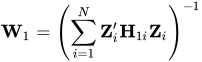
bold upper W 1 equals left-parenthesis sigma-summation Underscript i equals 1 Overscript upper N Endscripts bold upper Z prime Subscript i Baseline bold upper H Subscript 1 i Baseline bold upper Z Subscript i Baseline right-parenthesis Superscript negative 1

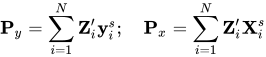
and the projections as

bold upper P Subscript y Baseline equals sigma-summation Underscript i equals 1 Overscript upper N Endscripts bold upper Z prime Subscript i Baseline bold y Subscript i Superscript s Baseline semicolon bold upper P Subscript x Baseline equals sigma-summation Underscript i equals 1 Overscript upper N Endscripts bold upper Z prime Subscript i Baseline bold upper X Subscript i Superscript s

The one-step GMM estimate of bold-italic gamma is the weighted OLS estimator

ModifyingAbove bold-italic gamma With caret Subscript 1 Baseline equals left-parenthesis bold upper P Subscript x Superscript prime Baseline bold upper W 1 bold upper P Subscript x Baseline right-parenthesis Superscript negative 1 Baseline bold upper P Subscript x Superscript prime Baseline bold upper W 1 bold upper P Subscript y

The variance of ModifyingAbove bold-italic gamma With caret Subscript 1 is

normal upper V normal a normal r left-parenthesis ModifyingAbove bold-italic gamma With caret Subscript 1 Baseline right-parenthesis equals ModifyingAbove sigma With caret Subscript epsilon Superscript 2 Baseline left-parenthesis bold upper P Subscript x Superscript prime Baseline bold upper W 1 bold upper P Subscript x Baseline right-parenthesis Superscript negative 1

where ModifyingAbove sigma With caret Subscript epsilon Superscript 2 is the mean square error (MSE) derived solely from the difference equations, namely

ModifyingAbove sigma With caret Subscript epsilon Superscript 2 Baseline equals left-parenthesis upper M minus upper K right-parenthesis Superscript negative 1 Baseline sigma-summation Underscript i equals 1 Overscript upper N Endscripts left-parenthesis bold y Subscript i Superscript d Baseline minus bold upper X Subscript i Superscript d Baseline ModifyingAbove bold-italic gamma With caret Subscript 1 Baseline right-parenthesis prime left-parenthesis bold y Subscript i Superscript d Baseline minus bold upper X Subscript i Superscript d Baseline ModifyingAbove bold-italic gamma With caret Subscript 1 Baseline right-parenthesis

The total number of observations, M, is equal to the number of observations for which the difference equations hold.

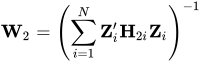
A disadvantage of ModifyingAbove bold-italic gamma With caret Subscript 1 is its reliance on the theoretical basis of bold upper H Subscript 1 i. The two-step GMM estimate of bold-italic gamma replaces bold upper H Subscript 1 i with a version that is obtained from the observed one-step residuals. Let bold upper H Subscript 2 i be the outer product of ModifyingAbove bold-italic epsilon With caret Subscript i Superscript s Baseline equals bold y Subscript i Superscript s Baseline minus bold upper X Subscript i Superscript s Baseline ModifyingAbove bold-italic gamma With caret Subscript 1. Then

ModifyingAbove bold-italic gamma With caret Subscript 2 Baseline equals left-parenthesis bold upper P Subscript x Superscript prime Baseline bold upper W 2 bold upper P Subscript x Baseline right-parenthesis Superscript negative 1 Baseline bold upper P Subscript x Superscript prime Baseline bold upper W 2 bold upper P Subscript y

where

bold upper W 2 equals left-parenthesis sigma-summation Underscript i equals 1 Overscript upper N Endscripts bold upper Z prime Subscript i Baseline bold upper H Subscript 2 i Baseline bold upper Z Subscript i Baseline right-parenthesis Superscript negative 1

The variance of ModifyingAbove bold-italic gamma With caret Subscript 2 is

normal upper V normal a normal r left-parenthesis ModifyingAbove bold-italic gamma With caret Subscript 2 Baseline right-parenthesis equals left-parenthesis bold upper P Subscript x Superscript prime Baseline bold upper W 2 bold upper P Subscript x Baseline right-parenthesis Superscript negative 1

The iterated GMM estimator of bold-italic gamma continues this pattern: First, use the current estimate ModifyingAbove bold-italic gamma With caret Subscript c to form the residuals that compose bold upper H Subscript c plus 1 comma i. Second, use bold upper H Subscript c plus 1 comma i to form the weighting matrix bold upper W Subscript c plus 1. Third, use bold upper W Subscript c plus 1 to update the estimate ModifyingAbove bold-italic gamma With caret Subscript c plus 1.

There are two criteria by which convergence is achieved. The first (and default) criterion is met when the magnitude of ModifyingAbove bold-italic gamma With caret Subscript c changes by a relative amount smaller than b, as specified in the BTOL= option in the MODEL statement. The second criterion is met when the magnitude of the variance matrix changes by a relative amount smaller than a, as specified in the ATOL= option in the MODEL statement.

Robust variances are calculated by the sandwich method. The robust variance of ModifyingAbove bold-italic gamma With caret Subscript 1 is

normal upper V normal a normal r Superscript r Baseline left-parenthesis ModifyingAbove bold-italic gamma With caret Subscript 1 Baseline right-parenthesis equals left-parenthesis bold upper P Subscript x Superscript prime Baseline bold upper W 1 bold upper P Subscript x Baseline right-parenthesis Superscript negative 1 Baseline bold upper P Subscript x Superscript prime Baseline bold upper W 1 bold upper W 2 Superscript negative 1 Baseline bold upper W 1 bold upper P Subscript x Baseline left-parenthesis bold upper P Subscript x Superscript prime Baseline bold upper W 1 bold upper P Subscript x Baseline right-parenthesis Superscript negative 1

The robust variance of ModifyingAbove bold-italic gamma With caret Subscript 2 is

normal upper V normal a normal r Superscript r Baseline left-parenthesis ModifyingAbove bold-italic gamma With caret Subscript 2 Baseline right-parenthesis equals left-parenthesis bold upper P Subscript x Superscript prime Baseline bold upper W 2 bold upper P Subscript x Baseline right-parenthesis Superscript negative 1 Baseline bold upper P Subscript x Superscript prime Baseline bold upper W 2 bold upper W 3 Superscript negative 1 Baseline bold upper W 2 bold upper P Subscript x Baseline left-parenthesis bold upper P Subscript x Superscript prime Baseline bold upper W 2 bold upper P Subscript x Baseline right-parenthesis Superscript negative 1

and so on as you iterate ModifyingAbove bold-italic gamma With caret Subscript c.

Arellano and Bond (1991), among others, note that robust two-step variance estimators are biased. Windmeijer (2005) derived a bias-corrected variance of ModifyingAbove bold-italic gamma With caret Subscript 2, and you can obtain this correction by specifying the BIASCORRECTED option in the MODEL statement.

Define the one-step and two-step residuals as ModifyingAbove bold e With caret Subscript 1 i Baseline equals bold y Subscript i Superscript s Baseline minus bold upper X Subscript i Superscript s Baseline ModifyingAbove bold-italic gamma With caret Subscript 1 and ModifyingAbove bold e With caret Subscript 2 i Baseline equals bold y Subscript i Superscript s Baseline minus bold upper X Subscript i Superscript s Baseline ModifyingAbove bold-italic gamma With caret Subscript 2. Also define the projected two-step residual as

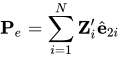
bold upper P Subscript e Baseline equals sigma-summation Underscript i equals 1 Overscript upper N Endscripts bold upper Z prime Subscript i Baseline ModifyingAbove bold e With caret Subscript 2 i

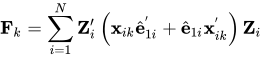
Formulate the matrix bold upper D such that its kth column is bold upper D Subscript k Baseline equals bold upper V 2 bold upper P Subscript x Superscript prime Baseline bold upper W 2 bold upper F Subscript k Baseline bold upper W 2 bold upper P Subscript e, where bold upper V 2 equals normal upper V normal a normal r left-parenthesis ModifyingAbove bold-italic gamma With caret Subscript 2 Baseline right-parenthesis. The matrix bold upper F Subscript k is the quadratic form

bold upper F Subscript k Baseline equals sigma-summation Underscript i equals 1 Overscript upper N Endscripts bold upper Z prime Subscript i Baseline left-parenthesis bold x Subscript i k Baseline ModifyingAbove bold e With caret Subscript 1 i Superscript prime Baseline plus ModifyingAbove bold e With caret Subscript 1 i Baseline bold x Subscript i k Superscript prime Baseline right-parenthesis bold upper Z Subscript i

where bold x Subscript i k is the kth column of bold upper X Subscript i Superscript s.

The Windmeijer (2005) bias-corrected variance is

normal upper V normal a normal r Superscript w Baseline left-parenthesis ModifyingAbove bold-italic gamma With caret Subscript 2 Baseline right-parenthesis equals bold upper V 2 plus bold upper D bold upper V 2 plus bold upper V 2 bold upper D Superscript prime Baseline plus bold upper D bold upper V 1 Superscript r Baseline bold upper D prime

where bold upper V 1 Superscript r is the robust variance estimate of ModifyingAbove bold-italic gamma With caret Subscript 1.

Estimating the Intercept

The intercept term vanishes when you take first differences and is thus identified only in the level equations. If you specify the DYNDIFF option in the MODEL statement and your model includes an intercept, then PROC PANEL will fit the model by using system GMM with the following (default) instrumentation,
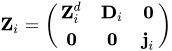
bold upper Z Subscript i Baseline equals Start 2 By 3 Matrix 1st Row 1st Column bold upper Z Subscript i Superscript d Baseline 2nd Column bold upper D Subscript i Baseline 3rd Column bold 0 2nd Row 1st Column bold 0 2nd Column bold 0 3rd Column bold j Subscript i EndMatrix

where bold j Subscript i is a column of ones. Because all the level instruments are zero except the constant, parameter estimates other than the intercept are unaffected by the added level equations.

If you specify the DYNDIFF option in the MODEL statement and your model does not include an intercept, then the level equations are excluded from the estimation.

If you specify the DYNSYS option in the MODEL statement, then there is no issue regarding the intercept. Under the default instrument specification, if bold upper X Subscript i Superscript script l includes an intercept, then the level instruments include an added column of ones. That is,
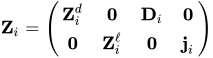
bold upper Z Subscript i Baseline equals Start 2 By 4 Matrix 1st Row 1st Column bold upper Z Subscript i Superscript d Baseline 2nd Column bold 0 3rd Column bold upper D Subscript i Baseline 4th Column bold 0 2nd Row 1st Column bold 0 2nd Column bold upper Z Subscript i Superscript script l Baseline 3rd Column bold 0 4th Column bold j Subscript i EndMatrix

Customizing Instruments

When you specify the DYNSYS option for performing system GMM, the default instrument matrix is
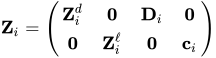
bold upper Z Subscript i Baseline equals Start 2 By 4 Matrix 1st Row 1st Column bold upper Z Subscript i Superscript d Baseline 2nd Column bold 0 3rd Column bold upper D Subscript i Baseline 4th Column bold 0 2nd Row 1st Column bold 0 2nd Column bold upper Z Subscript i Superscript script l Baseline 3rd Column bold 0 4th Column bold c Subscript i EndMatrix

where bold c Subscript i is either a column of ones, or bold 0 if you specify the NOINT option.

You can override the default set of instruments by specifying an INSTRUMENTS statement. You can choose which instrument sets to include as components of bold upper Z Subscript i. The INSTRUMENTS statement provides options to generate the appropriate instruments when variables are either endogenous, predetermined, or exogenous.

The following discussion assumes that you are performing system GMM by using the DYNSYS option in the MODEL statement. When you specify the DYNDIFF option instead, any specification (except the constant bold c Subscript i) that pertains to the level equations is ignored.

Dependent Variable

The DEPVAR option in the INSTRUMENTS statement adds instruments for the dependent variable and its lags. Specifying DEPVAR(DIFF) includes the lagged levels of the dependent variable (the matrix bold upper Z Subscript i Superscript d) in the difference equations. Specifying DEPVAR(LEVEL) includes the first differences of the dependent variable (the matrix bold upper Z Subscript i Superscript script l) in the level equations. Specifying DEPVAR(BOTH) (or simply DEPVAR) includes both bold upper Z Subscript i Superscript d and bold upper Z Subscript i Superscript script l.

You should at a minimum include instruments for the dependent variable when you perform dynamic panel estimation. For example:

proc panel data=a;
   id State Year;
   instruments depvar;
   model Sales = Price PopDensity / dynsys;
run;

Constant (or Intercept)

Specifying the keyword CONSTANT includes the constant vector bold c Subscript i in the level equations.

Endogenous Variables

A variable x Subscript i t is endogenous if upper E left-parenthesis x Subscript i t Baseline epsilon Subscript i s Baseline right-parenthesis not-equals 0 for s less-than-or-equal-to t and 0 otherwise.

The DIFFEND= option specifies a list of endogenous variables that form instrument matrices for the difference equations. The instruments are "GMM-style" and mirror the form used for the dependent variable. Suppose that the model includes one lag of the dependent variable (upper L equals 1). Specifying DIFFEND=(X) adds the following instruments to the difference equations:
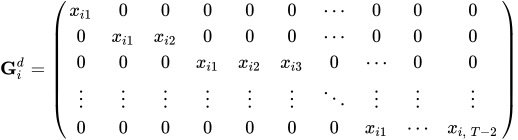
bold upper G Subscript i Superscript d Baseline equals Start 5 By 10 Matrix 1st Row 1st Column x Subscript i Baseline 1 Baseline 2nd Column 0 3rd Column 0 4th Column 0 5th Column 0 6th Column 0 7th Column midline-horizontal-ellipsis 8th Column 0 9th Column 0 10th Column 0 2nd Row 1st Column 0 2nd Column x Subscript i Baseline 1 Baseline 3rd Column x Subscript i Baseline 2 Baseline 4th Column 0 5th Column 0 6th Column 0 7th Column midline-horizontal-ellipsis 8th Column 0 9th Column 0 10th Column 0 3rd Row 1st Column 0 2nd Column 0 3rd Column 0 4th Column x Subscript i Baseline 1 Baseline 5th Column x Subscript i Baseline 2 Baseline 6th Column x Subscript i Baseline 3 Baseline 7th Column 0 8th Column midline-horizontal-ellipsis 9th Column 0 10th Column 0 4th Row 1st Column vertical-ellipsis 2nd Column vertical-ellipsis 3rd Column vertical-ellipsis 4th Column vertical-ellipsis 5th Column vertical-ellipsis 6th Column vertical-ellipsis 7th Column down-right-diagonal-ellipsis 8th Column vertical-ellipsis 9th Column vertical-ellipsis 10th Column vertical-ellipsis 5th Row 1st Column 0 2nd Column 0 3rd Column 0 4th Column 0 5th Column 0 6th Column 0 7th Column 0 8th Column x Subscript i Baseline 1 Baseline 9th Column midline-horizontal-ellipsis 10th Column x Subscript i comma upper T minus 2 EndMatrix

The first row corresponds to time t equals 3. The instruments are in lagged levels.

The LEVELEND= option specifies a list of endogenous variables that form instrument matrices for the level equations. The instruments mirror the form used for the dependent variable. Suppose that the model includes one lag of the dependent variable (upper L equals 1). Specifying LEVELEND=(X) adds the following instruments to the level equations:
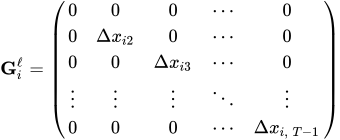
bold upper G Subscript i Superscript script l Baseline equals Start 5 By 5 Matrix 1st Row 1st Column 0 2nd Column 0 3rd Column 0 4th Column midline-horizontal-ellipsis 5th Column 0 2nd Row 1st Column 0 2nd Column normal upper Delta x Subscript i Baseline 2 Baseline 3rd Column 0 4th Column midline-horizontal-ellipsis 5th Column 0 3rd Row 1st Column 0 2nd Column 0 3rd Column normal upper Delta x Subscript i Baseline 3 Baseline 4th Column midline-horizontal-ellipsis 5th Column 0 4th Row 1st Column vertical-ellipsis 2nd Column vertical-ellipsis 3rd Column vertical-ellipsis 4th Column down-right-diagonal-ellipsis 5th Column vertical-ellipsis 5th Row 1st Column 0 2nd Column 0 3rd Column 0 4th Column midline-horizontal-ellipsis 5th Column normal upper Delta x Subscript i comma upper T minus 1 EndMatrix

The first row corresponds to time t equals 2. Because the instruments are used for the level equations, they are in lagged differences.

The following code fits a dynamic panel model by using difference equations. It includes GMM-style instruments for both the dependent variable Sales and the variable Price:

proc panel data=a;
   id State Year;
   instruments depvar diffend = (Price);
   model Sales = Price PopDensity / dyndiff;
run;

Predetermined Variables

A variable x Subscript i t is predetermined if upper E left-parenthesis x Subscript i t Baseline epsilon Subscript i s Baseline right-parenthesis not-equals 0 for s less-than t and 0 otherwise.

The DIFFPRE= option specifies a list of variables that are considered to be predetermined in the difference equations. The DIFFPRE= option works similarly to the DIFFEND= option, except that each observation contains an extra instrument that reflects orthogonality in the current time period. If upper L equals 1, specifying DIFFPRE=(X) adds the following instruments to the difference equations:
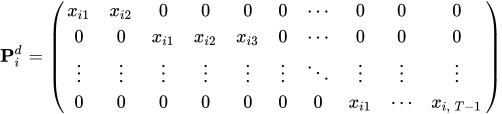
bold upper P Subscript i Superscript d Baseline equals Start 4 By 10 Matrix 1st Row 1st Column x Subscript i Baseline 1 Baseline 2nd Column x Subscript i Baseline 2 Baseline 3rd Column 0 4th Column 0 5th Column 0 6th Column 0 7th Column midline-horizontal-ellipsis 8th Column 0 9th Column 0 10th Column 0 2nd Row 1st Column 0 2nd Column 0 3rd Column x Subscript i Baseline 1 Baseline 4th Column x Subscript i Baseline 2 Baseline 5th Column x Subscript i Baseline 3 Baseline 6th Column 0 7th Column midline-horizontal-ellipsis 8th Column 0 9th Column 0 10th Column 0 3rd Row 1st Column vertical-ellipsis 2nd Column vertical-ellipsis 3rd Column vertical-ellipsis 4th Column vertical-ellipsis 5th Column vertical-ellipsis 6th Column vertical-ellipsis 7th Column down-right-diagonal-ellipsis 8th Column vertical-ellipsis 9th Column vertical-ellipsis 10th Column vertical-ellipsis 4th Row 1st Column 0 2nd Column 0 3rd Column 0 4th Column 0 5th Column 0 6th Column 0 7th Column 0 8th Column x Subscript i Baseline 1 Baseline 9th Column midline-horizontal-ellipsis 10th Column x Subscript i comma upper T minus 1 EndMatrix

The first row corresponds to time t equals 3.

The LEVELPRE= option specifies a list of variables that are considered to be predetermined in the level equations. The LEVELPRE= option works similarly to the LEVELEND= option, except that the lag is shifted up to reflect orthogonality in the current time period. If upper L equals 1, specifying LEVELPRE=(X) adds the following instruments to the level equations:
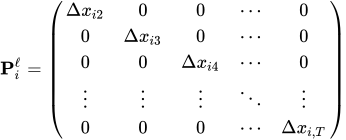
bold upper P Subscript i Superscript script l Baseline equals Start 5 By 5 Matrix 1st Row 1st Column normal upper Delta x Subscript i Baseline 2 Baseline 2nd Column 0 3rd Column 0 4th Column midline-horizontal-ellipsis 5th Column 0 2nd Row 1st Column 0 2nd Column normal upper Delta x Subscript i Baseline 3 Baseline 3rd Column 0 4th Column midline-horizontal-ellipsis 5th Column 0 3rd Row 1st Column 0 2nd Column 0 3rd Column normal upper Delta x Subscript i Baseline 4 Baseline 4th Column midline-horizontal-ellipsis 5th Column 0 4th Row 1st Column vertical-ellipsis 2nd Column vertical-ellipsis 3rd Column vertical-ellipsis 4th Column down-right-diagonal-ellipsis 5th Column vertical-ellipsis 5th Row 1st Column 0 2nd Column 0 3rd Column 0 4th Column midline-horizontal-ellipsis 5th Column normal upper Delta x Subscript i comma upper T EndMatrix

The first row corresponds to time t equals 2.

The following code fits a dynamic panel model by using difference equations. The instrument set includes GMM-style instruments for the dependent variable Sales and GMM-style instruments that correspond to the predetermined variable Price:

proc panel data=a;
   id State Year;
   instruments depvar diffpre = (Price);
   model Sales = Price PopDensity / dyndiff;
run;

Exogenous Variables

Exogenous variables are uncorrelated with both the level residuals and the differenced residuals. If a regression variable is exogenous, you might want to include that variable in the instrument set as a standard instrument. The DIFFEQ= option specifies a list of variables that compose the matrix of standard instruments bold upper D Subscript i for the difference equations; for an example of how bold upper D Subscript i is formed, see the section First Differencing. These variables are usually exogenous regressors that you want to preserve under the projection to the instrument space. Because these instruments belong to the difference equations, the variables are automatically differenced.

The LEVELEQ= option specifies a list of variables that form a matrix of standard instruments that is included in the level equations. You can use this option to specify external instruments that are not part of the main regression but that can be used as instruments for the regression variables in levels.

If upper L equals 1, specifying LEVELEQ=(X1 X2) adds the following instruments to the level equations:
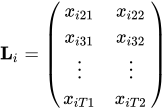
bold upper L Subscript i Baseline equals Start 4 By 2 Matrix 1st Row 1st Column x Subscript i Baseline 21 Baseline 2nd Column x Subscript i Baseline 22 Baseline 2nd Row 1st Column x Subscript i Baseline 31 Baseline 2nd Column x Subscript i Baseline 32 Baseline 3rd Row 1st Column vertical-ellipsis 2nd Column vertical-ellipsis 4th Row 1st Column x Subscript i upper T Baseline 1 Baseline 2nd Column x Subscript i upper T Baseline 2 EndMatrix

The first row corresponds to time t equals 2.

The following example illustrates how you would use an INSTRUMENTS statement to obtain the default set of instruments for system GMM:

proc panel data=a;
   id State Year;
   instruments depvar(both) constant diffeq = (Price PopDensity);
   model Sales = Price PopDensity / dynsys;
run;

Limiting the Number of Instruments

Arellano and Bond’s (1991) technique of expanding instruments is a useful method of dealing with autocorrelation in the response variable. However, too many instruments can bias the estimator. The number of instruments grows quadratically with the number of time periods, making computations less feasible for larger T.

By default, PROC PANEL uses all available lags. You can limit the number of instruments by specifying the MAXBAND= option in the INSTRUMENTS statement. For example, specifying MAXBAND=5 limits the number of GMM-style instruments to five per observation, for each variable. The MAXBAND= option applies to all GMM-style instruments: those for the dependent variable, those from the DIFFEND= option, and those from the DIFFPRE= option.

Sargan Test of Overidentifying Restrictions

A Sargan test is a referendum on your choice of instruments in a dynamic panel model. The Sargan test statistic for one-step GMM is
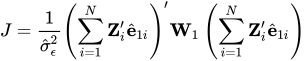
upper J equals StartFraction 1 Over ModifyingAbove sigma With caret Subscript epsilon Superscript 2 Baseline EndFraction left-parenthesis sigma-summation Underscript i equals 1 Overscript upper N Endscripts bold upper Z prime Subscript i Baseline ModifyingAbove bold e With caret Subscript 1 i Baseline right-parenthesis prime bold upper W 1 left-parenthesis sigma-summation Underscript i equals 1 Overscript upper N Endscripts bold upper Z prime Subscript i Baseline ModifyingAbove bold e With caret Subscript 1 i Baseline right-parenthesis

The Sargan test statistic for two-step GMM is
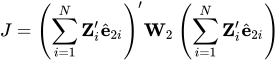
upper J equals left-parenthesis sigma-summation Underscript i equals 1 Overscript upper N Endscripts bold upper Z prime Subscript i Baseline ModifyingAbove bold e With caret Subscript 2 i Baseline right-parenthesis prime bold upper W 2 left-parenthesis sigma-summation Underscript i equals 1 Overscript upper N Endscripts bold upper Z prime Subscript i Baseline ModifyingAbove bold e With caret Subscript 2 i Baseline right-parenthesis

It is similarly incremented for further iterations of GMM.

The null hypothesis of the Sargan test is that the moment conditions (as defined by the columns bold upper Z Subscript i) hold, and thus bold upper Z Subscript i form an adequate set of instruments. Under the null, J is distributed as chi squared with degrees of freedom equal to the rank of bold upper W Subscript c minus the number of parameters K. The nominal rank of bold upper W Subscript c is equal to the number of instruments. However, this number can be reduced because of collinearity and redundancy in the instrument specification. Furthermore, when c greater-than 1, the maximum rank of bold upper W Subscript c is N, regardless of the number of instruments.

You should treat Sargan tests with caution when robust variances are used in the estimation. The theoretical distribution of J does not hold under conditions that favor robust variances.

AR(m ) Tests

An AR(m) test is a test for autocorrelation of order m in the model residuals. Let bold upper R Subscript i Superscript s be the working variance of the residuals from the full system. The precise definition of bold upper R Subscript i Superscript s depends on the GMM stage and whether robust variances are specified; see Table 3.

Table 3: Definition of the Working Residual Variance

Estimator bold upper R Subscript i Superscript s
One-step ModifyingAbove sigma With caret Subscript epsilon Superscript 2 Baseline bold upper H Subscript 1 i
One-step, robust bold upper H Subscript 2 i
Two-step bold upper H Subscript 2 i
Two-step, robust bold upper H Subscript 3 i
Iteration c bold upper H Subscript c i
Iteration c, robust bold upper H Subscript c plus 1 comma i


Define the residual vector

ModifyingAbove bold e With caret Subscript i Baseline equals StartBinomialOrMatrix ModifyingAbove bold-italic eta With caret Subscript i Superscript d Baseline Choose bold 0 EndBinomialOrMatrix

where ModifyingAbove bold-italic eta With caret Subscript i Superscript d Baseline equals bold y Subscript i Superscript d Baseline minus bold upper X Subscript i Superscript d Baseline ModifyingAbove bold-italic gamma With caret Subscript c are the residuals from the difference equations, evaluated at the final estimate of ModifyingAbove bold-italic gamma With caret Subscript c. The trailing zeros correspond to the level equations. Define ModifyingAbove bold-italic omega With caret Subscript m i as a lagged version of ModifyingAbove bold e With caret Subscript i such that the following are true:

  • The first m elements of ModifyingAbove bold-italic omega With caret Subscript m i are 0.

  • The next p minus m elements of ModifyingAbove bold-italic omega With caret Subscript m i are the first p minus m elements of ModifyingAbove bold e With caret Subscript i, where p is the number of difference equations.

  • The trailing elements of ModifyingAbove bold-italic omega With caret Subscript m i that correspond to the level equations are 0.

Define the following:
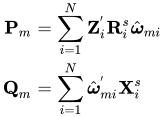
StartLayout 1st Row 1st Column bold upper P Subscript m 2nd Column equals 3rd Column sigma-summation Underscript i equals 1 Overscript upper N Endscripts bold upper Z Subscript i Superscript prime Baseline bold upper R Subscript i Superscript s Baseline ModifyingAbove bold-italic omega With caret Subscript m i 2nd Row 1st Column bold upper Q Subscript m 2nd Column equals 3rd Column sigma-summation Underscript i equals 1 Overscript upper N Endscripts ModifyingAbove bold-italic omega With caret Subscript m i Superscript prime Baseline bold upper X Subscript i Superscript s EndLayout

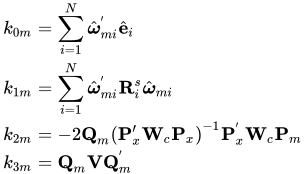
The AR(m) test statistic is upper Z Subscript m Baseline equals k Subscript 0 m Baseline StartSet k Subscript 1 m Baseline plus k Subscript 2 m Baseline plus k Subscript 3 m Baseline EndSet Superscript negative 1 slash 2, where

StartLayout 1st Row 1st Column k Subscript 0 m 2nd Column equals 3rd Column sigma-summation Underscript i equals 1 Overscript upper N Endscripts ModifyingAbove bold-italic omega With caret Subscript m i Superscript prime Baseline ModifyingAbove bold e With caret Subscript i 2nd Row 1st Column k Subscript 1 m 2nd Column equals 3rd Column sigma-summation Underscript i equals 1 Overscript upper N Endscripts ModifyingAbove bold-italic omega With caret Subscript m i Superscript prime Baseline bold upper R Subscript i Superscript s Baseline ModifyingAbove bold-italic omega With caret Subscript m i 3rd Row 1st Column k Subscript 2 m 2nd Column equals 3rd Column minus 2 bold upper Q Subscript m Baseline left-parenthesis bold upper P prime Subscript x Baseline bold upper W Subscript c Baseline bold upper P Subscript x Baseline right-parenthesis Superscript negative 1 Baseline bold upper P Subscript x Superscript prime Baseline bold upper W Subscript c Baseline bold upper P Subscript m 4th Row 1st Column k Subscript 3 m 2nd Column equals 3rd Column bold upper Q Subscript m Baseline bold upper V bold upper Q Subscript m Superscript prime EndLayout

The matrix bold upper V is the estimated variance matrix of the parameters, corresponding to the GMM stage specified, and either model-based, robust, or bias-corrected.

Under the null hypothesis of no autocorrelation, upper Z Subscript m follows a standard normal distribution. Because of the differencing in the errors, well-specified models present autocorrelation of order m equals 1, but any autocorrelation at higher orders indicates a violation of assumptions.

Last updated: June 19, 2025