Dependent Variable
If only a single candidate dependent variable is detected in your data source, it is automatically selected. If multiple candidates are detected, you must choose one.
- Dependent variable
-
Specify the variable in your data set that you want to forecasta numerical prediction of a future value for a specified time period for each unique combination of BY variable values. This variable must be numeric.
- Hierarchy aggregation
-
Aggregation is the process of combining data from more than one time seriesan aggregation of transactional data into specified time intervals and sorted according to unique combinations of the default attributes (BY variables) to form a single series. Select the aggregationthe process of combining more than one time series to form a single series within the same time interval. For example, data can be combined into a total or an average. method that you want to use for all of the time series in each level of the hierarchy. The dependent variable has fewer aggregation options than independent variables. The following examples explain when you might want to use an aggregation method:
- Your data set contains the sales for a group of products and you want to know the total sales for a category.
- Your data contains the price of each product and you want to know the average price for a product line.
Select from one of the following options.
- Sum of Values
-
aggregates the vector values based on the number of values.

- Average of Values
-
aggregates the vector values based on the average of their values.
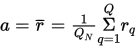
Missing values are ignored in the summation. If
 , then a is set to missing. Note: Average of values applies only to hierarchical modeling. The plot and table in Overrides shows a dynamic sum of values of the time series captured by the selected filtersa set of specified criteria that are applied to data in order to identify the subset of data for a subsequent operation, such as continued processing. .
- Time interval accumulation
-
Accumulation combines data within the same time interval into a summary value for that time interval.
- Average of Values
-
accumulates the vector values based on the average of their values.
Missing values are ignored in the summation. If
, then a is set to missing. - Corrected Sum of Squares
-
accumulates the vector values based on their corrected sum of squares.
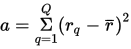
Missing values are ignored in the summation. If
, then a is set to missing. - Maximum of Values
-
accumulates the vector values based on the maximum of their values.
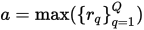
Missing values are ignored in the summation. If
, then a is set to missing. - Minimum of Values
-
accumulates the vector values based on the minimum of their values.
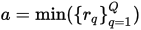
Missing values are ignored in the summation. If
, then a is set to missing. - Number of non-missing values
-
accumulates the vector values based on the number of nonmissing values.

- Number of Missing values
-
accumulates the vector values based on the number of missing values.
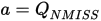
- Standard Deviation of Values
-
accumulates the vector values based on their standard deviation.
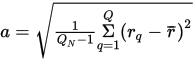
Missing values are ignored in the summation. If
 , then a is set to missing.
 - Sum of Values
-
accumulates the vector values based on the summation of their values.

Missing values are ignored in the summation. If
, then a is set to missing. - Uncorrected Sum of Squares
-
accumulates the vector values based on their uncorrected sum of squares.
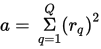
Missing values are ignored in the summation. If
, then a is set to missing.
For more information, see Time Interval Accumulation Settings.
- Missing interpretation
-
Once the data has been accumulated to form a time series, missing value interpretation is performed. If any time series contain missing values for the dependent or independent variables, you can specify how SAS Visual Forecasting should interpret these missing values. For more information, see Interpretation Step.
Choose from the following options:
- First
-
Specifies that missing values are set to the first nonmissing value of all accumulated nonmissing values in the span of the series.
- Last
-
Specifies that missing values are set to the last nonmissing value of all accumulated nonmissing values in the span of the series.
- Maximum
-
Specifies that missing values are set to the maximum value of all accumulated nonmissing values in the span of the series
- Median
-
Specifies that missing values are set to the median value of all accumulated nonmissing values in the span of the series
- Minimum
-
Specifies that missing values are set to the minimum value of all accumulated nonmissing values in the span of the series
- Average
-
Specifies that missing values are set to the average value of all accumulated nonmissing values in the span of the series.
- Missing
-
Specifies missing values to remain missing. Use this option if a missing value indicates an unknown value.
- Next
-
Specifies that missing values are set to the next period’s accumulated nonmissing value. Missing values at the end of the accumulated series remain missing.
- Previous
-
Specifies that missing values are set to the previous period’s accumulated nonmissing value. Missing values at the beginning of the accumulated series remain missing.
- 0
-
Specifies missing values to be set to zero. This setting is often used for transactional datatimestamped data collected over time at no particular frequency. Some examples of transactional data are point-of-sale data, inventory data, call center data, and trading data., because no recorded data usually implies no activity.