Working with Saved Filters
Use the Filter drop-down menu to select filtersa set of specified criteria that are applied to data in order to identify the subset of data for a subsequent operation, such as continued processing. that have been saved. The page is updated to show the plot and time seriesan aggregation of transactional data into specified time intervals and sorted according to unique combinations of the default attributes (BY variables) that match the filter selections.
- If you are using the Time Series Viewer, any filters that were created using forecasta numerical prediction of a future value for a specified time period for each unique combination of BY variable values attributes are disabled.
- Any changes that you make to the attributes in the filter can invalidate the filter. For example, consider an attribute with the name Size.
If Size is used in a filter
and then the attribute is deactivated on the Data tab,
the filter is no longer valid.
In this situation, you can recover the filter by going to the Data tab, selecting the attribute, and turning on the Activate attribute setting. If you no longer need the filter, click
 to open Manage Filters and remove the filter.
|
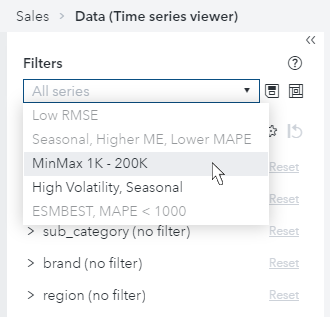
As shown in this image, sometimes the filters that are saved are disabled and cannot be selected from the drop-down menu. These are described in Disabled Filters. |
|