Importing Attributes to Your Project
BY variables are the initial, default attributes for the project. You can add additional attributes to a project from another data source. See Preparing Attributes for Your Project for more information.
Before importing attributes to the project, make sure you have assigned the BY variables as described in Assigning Variable Roles. These are the default attributes for the project. The default attributes should have discrete values, such as character data or numeric data with a limited set of values.
Follow these steps to add attributes from another data source to your project.
- From the Data tab,
click
 and select Attributes.
The Browse Data window box is displayed.
- Locate the data source
with the additional variables to use as attributes with this project.
Select the data source and click OK to load
it.
The imported attributes must contain a row for each unique combination of the default attributes (BY variables) as defined in the input time seriesan aggregation of transactional data into specified time intervals and sorted according to unique combinations of the default attributes (BY variables) or external forecasta numerical prediction of a future value for a specified time period for each unique combination of BY variable values table. When the table is imported, each row is checked to verify that the combination of default attribute values is unique. For large data sets, this process can take a long time.
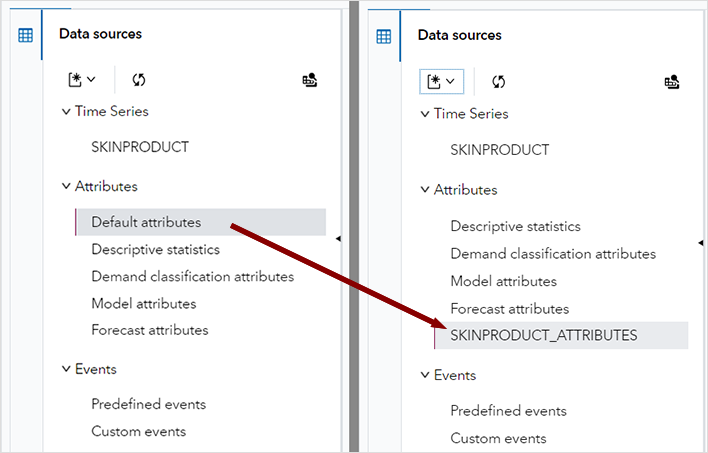
Whether an attributes table is imported determines how the project attributes are selected in the project. The following figure shows how the Data tab is changed after importing attributes. On the left, the assigned BY variables are listed as Default attributes when attributes are not imported. The image on the right shows an attributes table with the name SKINPRODUCT_ATTRIBUTES that has been imported. Selecting this table shows all of the default and imported attributes.