SPATIALREG Procedure
PROC SPATIALREG Statement
PROC SPATIALREG <options>;
You can specify the following options in the PROC SPATIALREG statement.
Data Set Options
- DATA=SAS-data-set
specifies the primary SAS data set that contains dependent variables, and explanatory variables, and so on.
- WMAT=SAS-data-set
-
specifies the secondary spatial weights data set, which can be used to construct the spatial weights matrix
 . Loosely speaking, the entries of ,
  , define the amount of influence that a unit
  has over a unit
  . The entries must be nonnegative and have zeros on the diagonal; that is,
 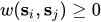 and
and 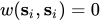 , where
  , with n being the total number of spatial units in the data. Any nonzero diagonal elements
  are replaced with 0. The spatial weights matrix can be asymmetric; that is, it is not necessary that
  . For information about missing spatial weights in , see the section NONORMALIZE.
 The
matrix can take two different forms. First, you can provide a full spatial weights matrix. In this case, the data set that you specify in the WMAT= option has n rows. However, the number of columns can be either  or n, depending on whether you need a spatial ID variable to match observations in two data sets that are specified by the DATA= option and WMAT= option. If you need a SPATIALID statement to specify a spatial ID variable for the purpose of matching observations, the data set that you specify in the WMAT= option needs to have n+1 columns. In this case, the spatial ID variable can appear in any column in the data set. Otherwise, the number of columns in the data set that you specify in the WMAT= option should be n.
 Second, you can also specify the spatial weights matrix by using a compact form when appropriate. In this form, the number of observations in the data set that you specify in the WMAT= option should match the number of nonzero elements in the spatial weights matrix. Moreover, the number of columns in this data set should be three. The first two columns give the row and column indices for nonzero entries in the spatial weights matrix. The third column in the data set contains the nonzero entries in the spatial weights matrix. If you use the compact form for the spatial weights matrix, you must include a SPATIALID statement to match observations in the two data sets that are specified in the DATA= option and WMAT= option. For more information about the SPATIALID statement, see the section SPATIALID Statement. For more information about the compact representation of the spatial weights matrix, see the section Compact Representation of Spatial Weights Matrix.
- NONORMALIZE
suppresses the row standardization of the spatial weights matrix that is specified in the WMAT= option. By default, the spatial weights matrix is row-standardized; that is, the spatial weights matrix has unit row sum. If the NONORMALIZE option is specified, spatial weights are used "as is" except for
, which is always treated as 0. This implies that an entry in the matrix cannot be missing for  if the NONORMALIZE option is specified. If this option is not specified, missing spatial weights are replaced with zeros.
Approximation Control Options
For the SAR, SDM, SEM, and SDEM models, you can specify the following options:
- APPROXIMATION=(<approx-options>)
-
specifies options that are related to approximating the Jacobian, as described in the section Approximations to the Jacobian. You must specify one or more of the following approx-options:
- CHEBYSHEV | TAYLOR
specifies the approximation method. By default, Chebyshev approximation is used. The Taylor approximation is used only if you specify the TAYLOR option.
- NMC=number
specifies a positive integer as the number of standard random normal draws for the Monte Carlo simulation that approximates the traces of powers of the spatial weights matrix
. If the SEED= option is specified, NMC=100 by default. If neither the NMC= option nor the SEED= option is specified, Monte Carlo simulation is not used and the traces of powers of the spatial weights matrix are computed exactly. For more information, see the section Approximations to the Jacobian. - ORDER=number
specifies a positive integer as the order of series in Taylor approximation or Chebyshev approximation. If Taylor approximation is used, ORDER=50 by default. If Chebyshev approximation is used, ORDER=5 by default.
- SEED=number
specifies an integer seed in the range 1 to
 for the random number generator that is used for the Monte Carlo simulation that approximates the traces of powers of the spatial weights matrix . If the NMC= option is specified, SEED=1 by default. If neither the NMC= option nor the SEED= option is specified, Monte Carlo simulation is not used and the traces of powers of the spatial weights matrix are computed exactly. For more information, see the section Approximations to the Jacobian. Specifying a seed enables you to reproduce your analysis.
Output Data Set Options
Printing Options
Estimation Control Options
Optimization Process Control Options
PROC SPATIALREG uses the nonlinear optimization (NLO) subsystem to perform nonlinear optimization tasks. All the NLO options are available in the NLOPTIONS statement. For more information, see the section NLOPTIONS Statement. In addition, you can specify the following option in the PROC SPATIALREG statement: