X13 Procedure

REGRESSION Statement

  • REGRESSION regression-group-options;

  • REGRESSION PREDEFINED= variables < / B=(value <F> …) > ;

  • REGRESSION USERVAR= variables < / B=(value <F> …) USERTYPE=(values) >;

The REGRESSION statement includes regression variables in a regARIMA model or specifies regression variables whose effects are to be removed by the IDENTIFY statement to aid in ARIMA model identification. Include the PREDEFINED= option to select predefined regression variables. Include the USERVAR= option to specify user-defined regression variables.

Table 3 shows the X-13ARIMA-SEATS tables that contain regression factors. Tables A8AO, A8LS, and A8TC are available only when more than one outlier type is present in the model.

Table 3: X-13ARIMA-SEATS Regression Effects Tables

Table Regression Effects
A6 Trading day effects
A7 Holiday effects including Easter, Labor Day, and Thanksgiving-Christmas
A8 Combined effects of outliers, level-shifts, ramps, and temporary changes
A8AO Point outlier effects; available only when more than one outlier type is present in the model
A8LS Level-shift and ramp effects; available only when more than one outlier type is present in the model
A8TC Temporary change effects; available only when more than one outlier type is present in the model
A9 User-defined regression effects
A10 User-defined seasonal component effects


Missing values in the span of an input series automatically create missing value regressors. For more information about missing values, see the NOTRIMMISS option in the PROC X13 statement and the section Missing Values.

Combining your model with additional predefined regression variables can result in a singularity problem. To successfully perform the regression if a singularity occurs, you might need to alter either the model or the choices of the regressors.

To seasonally adjust a series that uses a regARIMA model, the factors derived from regression are used as multiplicative or additive factors, depending on the mode of seasonal decomposition. Therefore, regressors that are appropriate to the mode of the seasonal decomposition should be defined, so that meaningful combined adjustment factors can be derived and adjustment diagnostics can be generated. For example, if a regARIMA model is applied to a log-transformed series, then the regression factors are expressed as ratios, which match the form of the seasonal factors that are generated by the multiplicative or log-additive adjustment modes. Conversely, if a regARIMA model is fit to the original series, then the regression factors are measured on the same scale as the original series, which matches the scale of the seasonal factors that are generated by the additive adjustment mode. Note that the default transformation (no transformation) and the default seasonal adjustment mode (multiplicative) are in conflict. Thus, when you specify the X11 statement and any of the REGRESSION, INPUT, or EVENT statements, you must also either use the TRANSFORM statement to specify a transformation or use the MODE= option in the X11 statement to specify a different mode to seasonally adjust the data that uses the regARIMA model.

According to Ladiray and Quenneville (2001), "X-12-ARIMA is based on the same principle [as the X-11 method] but proposes, in addition, a complete module, called Reg-ARIMA, that allows for the initial series to be corrected for all sorts of undesirable effects. These effects are estimated using regression models with ARIMA errors (Findley et al. [23])." The REGRESSION, INPUT, and EVENT statements specify these regression effects. Predefined effects that can be corrected in this manner are listed in the PREDEFINED= option. You can create your own definitions to remove other effects by using the USERVAR= option and the EVENT statement.

You can specify either the PREDEFINED= option or the USERVAR= option, but not both, in a single REGRESSION statement. You can use multiple REGRESSION statements.

You can specify the following regression-group-options in the REGRESSION statement. The regression-group-options apply to all regression variables in a regression group. For predefined regression variables, the regression group is predefined. For user-defined regression variables, you can specify the regression group in the USERTYPE= option.

AICTEST=(EASTER | TD | TD1COEF | TD1NOLPYEAR | TDNOLPYEAR | TDSTOCK | USER)

specifies that an AIC-based selection be used to determine whether a given set of regression variables are to be included with the specified regARIMA model. For example, if you specify a trading day model selection, then AIC values (with a correction for the length of the series, henceforth referred to as AICC) are derived for models with and without the specified trading day variable. By default, the model with a smaller AICC is used to generate forecasts, identify outliers, and so on. If you specify more than one type of regressor, the AIC tests are performed sequentially in this order: (a) trading day regressors, (b) Easter regressors, (c) user-defined regressors. If there are several variables of the same type (for example, several trading day regressors), then AIC-based selection is applied to them as a group. That is, either all variables of this type or none are included in the final model. If you do not specify this option, no automatic AIC-based selection is performed.

If you use the AUTOMDL statement to identify the model and you also specify this option, then this option affects the model selection process in the following manner:

  • AIC-based selection tests are performed on the default model.

  • A new series is created by removing the regression effects that are identified in the default model from the original series. The automatic model identification process attempts to identify a model that is based on the new series.

  • After a model is automatically identified, AIC-based selection tests that use the automatically identified model are performed on the original series.

  • The default model, including regressors that are identified by using AIC-based selection, is compared to the automatically identified model, which also might include regressors that are identified by using AIC-based selections. The regressors for the two models can differ.

For more information about the X-13ARIMA-SEATS automatic modeling method, see section 7.2 of the X-13ARIMA-SEATS Reference Manual, Version 1.1 (US Bureau of the Census 2013c).

EASTERMEANS=(YR400 | YR500 | SPAN)

specifies how the monthly means, which are used to remove seasonality from the EASTER predefined regressor, are calculated. When PREDEFINED=EASTER(w) is specified in the REGRESSION statement, monthly means are computed internally over the 500-year range from 1600 to 2099 by default. These monthly means are then used to remove seasonality from the Easter effect prior to calculating the Easter regression coefficient. The EASTERMEANS= option is ignored if no predefined EASTER regressor is included in the regression model or if SCEASTER(w) is the only predefined Easter regressor specified. You can specify the following values:

SPAN

computes short-term monthly means rather than long-term monthly means to remove seasonality in the Easter effect. In this case, the monthly means are computed over the same span of data that is used to calculate the coefficient of the EASTER(w) regressor.

YR400

computes monthly means over the 400-year range from 1583 to 1982. This method was used in earlier versions of the X-13ARIMA-SEATS methodology.

YR500

computes monthly means over the 500-year range from 1600 to 2099.

By default, EASTERMEANS=YR500.

NOAPPLY=(AO | HOLIDAY | LS | TC | TD | USER | USERSEASONAL)

specifies a list of the types of regression effects whose model-estimated values are not to be removed from the original series before performing the seasonal adjustment calculations that are specified by the X11 statement. The NOAPPLY= option applies to the regression component values displayed in the X11 seasonal adjustment method regARIMA component tables as shown in Table 4.

Table 4: NOAPPLY= Types and Regression Effects

NOAPPLY= Option Regression Effects Table Description
AO A8AO Point outliers
HOLIDAY A7 Easter, Labor Day, and Thanksgiving-to-Christmas
holiday effects
LS A8LS Level changes and ramps
TC A8TC Temporary changes
TD A6 Trading day effects
USER A9 User-defined regression effects
USERSEASONAL A10 User-defined seasonal regression effects


You can specify the following regression variable specification options in the REGRESSION statement.

PREDEFINED=CONSTANT | EASTER(value) | LABOR(value) | LOM | LOMSTOCK | LOQ | LPYEAR
PREDEFINED=SCEASTER(value) | SEASONAL | SINCOS(value …) | TD | TD1COEF
PREDEFINED=TD1NOLPYEAR | TDNOLPYEAR | TDSTOCK(value) | THANK(value)

lists the predefined regression variables to be included in the model. Data values for these variables are calculated by the program, mostly as functions of the calendar. Table 5 gives definitions for the available predefined variables. The values LOM and LOQ are equivalent: the actual regression is controlled by the SEASONS= option in the PROC X13 statement. You can specify multiple predefined regression variables. The syntax for using both a length-of-month and a seasonal regression can be in one of the following forms:

regression predefined=lom seasonal;

regression predefined=(lom seasonal);

regression predefined=lom predefined=seasonal;

The following restrictions apply when you use more than one predefined regression variable:

  • You can specify only one of TD, TDNOLPYEAR, TD1COEF, or TD1NOLPYEAR.

  • You cannot specify LPYEAR with TD, TD1COEF, LOM, LOMSTOCK, or LOQ.

  • You cannot specify LOM or LOQ with TD or TD1COEF.

  • If you specify the SINCOS predefined regression variable, then you must also specify the INTERVAL= option or the SEASONS= option in the PROC X13 statement because there are restrictions on this regression variable that are based on the frequency of the data.

The predefined regression variables, EASTER, LABOR, SCEASTER, SINCOS, TDSTOCK, and THANK, require extra parameters. Only one TDSTOCK regressor can be implemented in the regression model. If you specify multiple TDSTOCK variables, PROC X13 uses the last TDSTOCK variable specified. For EASTER, LABOR, SCEASTER, SINCOS, and THANK, you can specify the variables with different parameters to implement multiple regressors in the model. For example, the following statement specifies two EASTER regressors with widths 7 and 14:

regression predefined=easter(7) easter(14);

For SINCOS, specifying a parameter includes both the sine and the cosine regressor except for the highest order allowed (2 for quarterly data and 6 for monthly data.) For quarterly data, the following statement is the most common use of the SINCOS variable; it includes three regressors in the model:

regression predefined=sincos(1,2);

For monthly data, the following statement is the most common use of the SINCOS variable; it includes 11 regressors in the model:

regression predefined=sincos(1,2,3,4,5,6);

Table 5: Predefined Regression Variables in X-13ARIMA-SEATS

Regression Effect Variable Definitions

left-parenthesis 1 minus upper B right-parenthesis Superscript negative d Baseline left-parenthesis 1 minus upper B Superscript s Baseline right-parenthesis Superscript negative upper D Baseline upper I left-parenthesis t greater-than-or-equal-to 1 right-parenthesis
Trend constant
CONSTANT
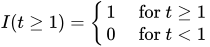
where upper I left-parenthesis t greater-than-or-equal-to 1 right-parenthesis equals StartLayout Enlarged left-brace 1st Row 1st Column 1 2nd Column for t greater-than-or-equal-to 1 2nd Row 1st Column 0 2nd Column for t less-than 1 EndLayout
upper E left-parenthesis w comma t right-parenthesis equals StartFraction 1 Over w EndFraction times n Subscript t and
n Subscript t is the number of the w days before Easter that fall in month
Easter holiday (or quarter) t. (Note: This variable is 0 except in February, March,
EASTER(w) and April (or first and second quarter).
It is nonzero in February only for w greater-than 22.)
Restriction: .
Labor Day upper L left-parenthesis w comma t right-parenthesis equals StartFraction 1 Over w EndFraction times left-bracket no period of the w days before Labor Day that fall in month t right-bracket
LABOR(w) (Note: This variable is 0 except in August and September.)
Restriction: 1 less-than-or-equal-to w less-than-or-equal-to 25.
Length-of-month m Subscript t Baseline minus m overbar where m Subscript t = length of month t (in days)
(monthly flow) and m overbar equals 30.4375 (average length of month)

LOM
Stock length-of-month
LOMSTOCK

normal upper S normal upper L normal upper O normal upper M Subscript t Baseline equals StartLayout Enlarged left-brace 1st Row 1st Column m Subscript t Baseline minus m overbar minus mu left-parenthesis l right-parenthesis 2nd Column for t equals 1 2nd Row 1st Column normal upper S normal upper L normal upper O normal upper M Subscript t minus 1 Baseline plus m Subscript t Baseline minus m overbar 2nd Column otherwise EndLayout
where m overbar and m Subscript t are defined in LOM and
mu left-parenthesis l right-parenthesis equals StartLayout Enlarged left-brace 1st Row 1st Column 0.375 2nd Column when first February in series is a leap year 2nd Row 1st Column 0.125 2nd Column when second February in series is a leap year 3rd Row 1st Column negative 0.125 2nd Column when third February in series is a leap year 4th Row 1st Column negative 0.375 2nd Column when fourth February in series is a leap year EndLayout
Length-of-quarter q Subscript t Baseline minus q overbar where q Subscript t = length of quarter t (in days)
(quarterly flow) and q overbar equals 91.3125 (average length of quarter)
LOQ
Leap year
(monthly and quarterly flow)
LPYEAR

upper L upper Y Subscript t Baseline equals StartLayout Enlarged left-brace 1st Row 1st Column 0.75 2nd Column in leap year February left-parenthesis first quarter right-parenthesis 2nd Row 1st Column negative 0.25 2nd Column in other Februaries left-parenthesis first quarter right-parenthesis 3rd Row 1st Column 0 2nd Column otherwise EndLayout
Statistics Canada Easter If Easter falls before April w, let n Subscript upper E be the number of the w days
(monthly or quarterly flow) on or before Easter that fall in March. Then:
SCEASTER(w)
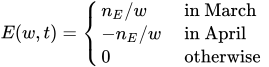
upper E left-parenthesis w comma t right-parenthesis equals StartLayout Enlarged left-brace 1st Row 1st Column n Subscript upper E Baseline slash w 2nd Column in March 2nd Row 1st Column minus n Subscript upper E Baseline slash w 2nd Column in April 3rd Row 1st Column 0 2nd Column otherwise EndLayout
If Easter falls on or after April w, then upper E left-parenthesis w comma t right-parenthesis equals 0.
(Note: This variable is 0 except in March and April (or first and
second quarter).) Restriction: 1 less-than-or-equal-to w less-than-or-equal-to 24.
Fixed seasonal
SEASONAL
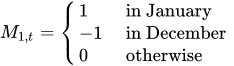
upper M Subscript 1 comma t Baseline equals StartLayout Enlarged left-brace 1st Row 1st Column 1 2nd Column in January 2nd Row 1st Column negative 1 2nd Column in December 3rd Row 1st Column 0 2nd Column otherwise EndLayout
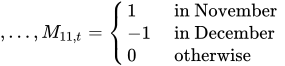
comma ellipsis comma upper M Subscript 11 comma t Baseline equals StartLayout Enlarged left-brace 1st Row 1st Column 1 2nd Column in November 2nd Row 1st Column negative 1 2nd Column in December 3rd Row 1st Column 0 2nd Column otherwise EndLayout
Fixed seasonal sine left-parenthesis w Subscript j Baseline t right-parenthesis comma cosine left-parenthesis w Subscript j Baseline t right-parenthesis comma
SINCOS(j) where w Subscript j Baseline equals 2 pi j slash s comma 1 less-than-or-equal-to j less-than-or-equal-to s slash 2, and s is the seasonal period
SINCOS(j 1 comma ellipsis comma j Subscript n Baseline) left-parenthesis drop sine left-parenthesis w Subscript j Baseline t right-parenthesis identical-to 0 for j equals s slash 2)
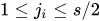
Restrictions: 1 less-than-or-equal-to j Subscript i Baseline less-than-or-equal-to s slash 2, 1 less-than-or-equal-to n less-than-or-equal-to s slash 2.
Trading day upper T Subscript 1 comma t Baseline equals left-parenthesis number of Mondays right-parenthesis en-dash left-parenthesis number of Sundays right-parenthesis
TD, TDNOLPYEAR comma ellipsis comma upper T Subscript 6 comma t Baseline equals left-parenthesis number of Saturdays right-parenthesis en-dash left-parenthesis number of Sundays right-parenthesis
One coefficient trading day left-parenthesis number of weekdays right-parenthesis negative five-halves left-parenthesis number of Saturdays and Sundays right-parenthesis
TD1COEF, TD1NOLPYEAR
Stock trading day
TDSTOCK(w)

upper D Subscript 1 comma t Baseline equals StartLayout Enlarged left-brace 1st Row 1st Column 1 2nd Column w overTilde th day of month t is a Monday 2nd Row 1st Column negative 1 2nd Column w overTilde th day of month t is a Sunday 3rd Row 1st Column 0 2nd Column otherwise EndLayout
comma ellipsis comma upper D Subscript 6 comma t Baseline equals StartLayout Enlarged left-brace 1st Row 1st Column 1 2nd Column w overTilde th day of month t is a Saturday 2nd Row 1st Column negative 1 2nd Column w overTilde th day of month t is a Sunday 3rd Row 1st Column 0 2nd Column otherwise EndLayout
where w overTilde is the smaller of w and the length of month t.
For end-of-month stock series, set w to 31; that is,
specify TDSTOCK(31). Restriction: 1 less-than-or-equal-to w less-than-or-equal-to 31.
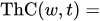
Thanksgiving ThC left-parenthesis w comma t right-parenthesis equals proportion of days from w days before Thanksgiving
THANK(w) through December 24 that fall in month t (negative values of w indicate
days after Thanksgiving).
(Note: This variable is 0 except in November and December.)
Restriction: negative 8 less-than-or-equal-to w less-than-or-equal-to 17.


USERVAR=(variables)

specifies variables in the DATA= or AUXDATA= data set (which are specified in the PROC X13 statement) that are to be used as regressors. The variables in the data set should contain the values for each observation that define the regressor. Regression variables should also include future values in the data set for the forecast horizon if the time series is to be extended with regARIMA forecasts. Regression variables should include past values if the time series is to be extended with regARIMA backcasts. Missing values are not permitted within the data span, including backcasts and forecasts, of the user-defined regressors. Example 45.6 shows how to create an input data set that contains both the series to be seasonally adjusted and a user-defined input variable. Example 45.11 shows how to create an auxiliary data set that contains a user-defined input variable. For more information about specifying user-defined regression variables, see the section User-Defined Regression Variables.

All regression variables in the USERVAR= option apply to all time series to be seasonally adjusted unless the MDLINFOIN= data set specifies different regression information. You cannot specify the PREDEFINED= option and the USERVAR= option in the same REGRESSION statement; however, you can specify multiple REGRESSION statements.

You can specify the following options for individual regression variables. Individual regression variable options are specified in the PREDEFINED= and USERVAR= options after the slash. The B= option can be specified in both the PREDEFINED= and USERVAR= options. Because the regression group is predefined for predefined variables, you can specify the USERTYPE= option only in the USERVAR= option.

B=(value <F> …)

specifies initial or fixed values for the regression parameters in the order in which they appear in a PREDEFINED= or USERVAR= option. Each B= list applies to the PREDEFINED= or USERVAR= variable list that immediately precedes the slash.

For example, the following statements set an initial value of 1 for the user-defined regressor, x:

regression predefined=LOM ;
regression uservar=x / b=1 2 ;

In this example, the B= option applies only to the USERVAR= option. The value 2 is discarded because there is only one variable in the USERVAR= list.

To assign an initial value of 1 to the LOM regressor and 2 to the x regressor, use the following statements:

regression predefined=LOM / b=1;
regression uservar=x / b=2 ;

An F immediately following the numerical value indicates that this is not an initial value, but a fixed value. For an example that uses fixed parameters, see Example 45.8. In PROC X13, individual parameters can be fixed while other parameters in the same model are estimated.

USERTYPE=(values)

enables a variable that you define to be processed in the same manner as a US Census predefined variable. You can specify the following values: AO, CONSTANT, EASTER, HOLIDAY, LABOR, LOM, LOMSTOCK, LOQ, LPYEAR, LS, RP, SCEASTER, SEASONAL, TC, TD, TDSTOCK, THANKS, or USER. For example, the US Census Bureau EASTER(w) regression effects are included the "RegARIMA Holiday Component" table (A7). Specify USERTYPE=EASTER to define a variable that is processed exactly as the US Census predefined EASTER(w) variable, including inclusion in the A7 table. Each USERTYPE= list applies to the USERVAR= variable list that immediately precedes the slash. USERTYPE= does not apply to US Census predefined variables.

The same rules for assigning B= values to regression variables apply for USERTYPE= options. For example, the following statements specify that the user-defined regressor in the variable MyEaster be processed exactly as the US Census predefined LOM variable:

regression uservar=MyLOM;
regression uservar=MyEaster / usertype=LOM EASTER;

In this example, the USERTYPE= option applies only to the MyEaster variable in the second REGRESSION statement. The USERTYPE value EASTER is discarded because there is only one variable in the USERVAR= list.

To assign the USERTYPE value LOM to the MyLOM variable and EASTER to the MyEaster variable, use the following statements:

regression uservar=MyLOM / usertype=LOM;
regression uservar=MyEaster / usertype=EASTER;

The following USERTYPE= options specify that the regression effect be removed from the seasonally adjusted series: EASTER, HOLIDAY, LABOR, LOM, LOMSTOCK, LOQ, LPYEAR, SCEASTER, SEASONAL, TD, TDSTOCK, THANKS, and USER. When a regression effect is removed from the seasonally adjusted series, the level (mean) of the seasonally adjusted series can be altered. It is often desirable to use a zero-mean (mean-adjusted) regressor for effects that are to be removed from the seasonally adjusted series. For an example that specifies a zero-mean regressor, see Example 45.6.

Last updated: June 19, 2025