SASENOAA Interface Engine
Example 50.9 Mapping Hail Data in a Geospatial Framework (KMZ Format) for a Specific Weather Station
(View the complete code for this example.)
This example retrieves the same hail data as in Example 50.4, but instead of requesting the XML format, it requests the KMZ format, so that you can look at the data in a geospatial framework such as that provided by Google Maps.
options validvarname=any;

title 'Retrieve NOAA NX3HAIL Data for WSR_ID=KFWS on May 21, 2011';
libname mylib "/sasusr/noaa/doc/";
libname noaa sasenoaa "%sysget(NOAA_DATA)"
   debug=on
   noaaset=nx3hail
   range='20110521:20110522'
   filterBy='WSR_ID:KFWS'
   filterByCondition='WSR_ID:or'
   outkmz=myK2by
   automap=replace
   mapref=MyMap
   kmxmap="%sysget(NOAA_DATA)myK2by.kmz"
   format=kmz
   ;

data mylib.HAILby2;
   set noaa.myK2by;
run;
proc contents data=mylib.HAILby2; run;
proc print data=mylib.HAILby2; run;
Output 50.9.1: Using FORMAT= KMZ Option to Retrieve NX3HAIL Data for WSR_ID:KFWS
| Files in the ZIP file |
| Obs | memname | isFolder | memcount |
|---|---|---|---|
| 1 | swdi-export.kml | 0 | 1 |
Note: The KMZ file shown in Output 50.9.1 is automatically unzipped and renamed MYK2BY.kml by the SASENOAA engine.
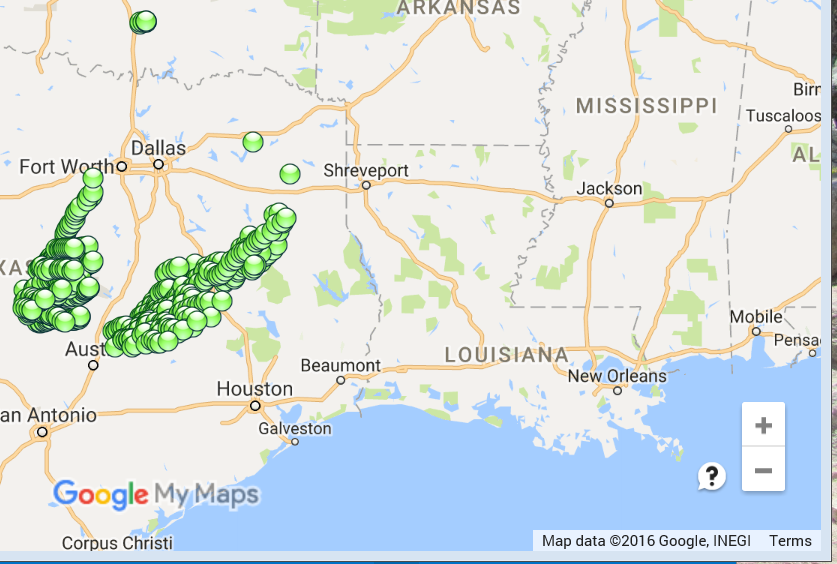
Figure 3 shows the Google Earth map for the observations within range of the weather station designated by the filter WSR_ID=KFWS. When you import your KML file (MYK2BY.kml) into Google My Maps, you can examine the details of each set of mapped coordinates on the map by clicking on the data point you want to look at.
Figure 3: Screen Shot of Google Earth Map of the NX3HAIL Data in MYK2BY.kml