SASEFRED Interface Engine
The LIBNAME libref SASEFRED Statement
LIBNAME libref SASEFRED 'physical-name' options;
The LIBNAME statement assigns a SAS library reference (libref) to the physical path of the directory of FRED data files in which the downloaded FRED XML data are stored.
You must specify the following arguments:
You can also specify the following options.
- AGG='AVG' | 'EOP' | 'SUM'
-
specifies the aggregation method used for frequency aggregation. You can specify the following values:
- 'AVG'
aggregates by averaging the frequencies.
- 'EOP'
aggregates by using the end of the period.
- 'SUM'
aggregates by summing the frequencies.
By default, AGG='AVG'. This option has no effect if the frequency option (FREQ=) is not specified.
- AUTOMAP=REPLACE | REUSE
-
specifies which XMLmap file to use. You can specify the following values:
- REPLACE
overwrites the existing XMLmap file and uses the most current XMLmap that is generated by the SASEFRED engine and named in the XMLMAP= option.
- REUSE
uses a preexisting XMLmap file that is named in the XMLMAP= option.
- CASLIB=fred_caslib_name
specifies the name of the CAS library (caslib) where the in-memory CAS table is stored when the JSON data from the FRED website are read into SAS. The default value is the name of the active caslib. The GOCAS=ON option is required when you specify the CASLIB= option. For an example of the CASLIB= option, see Example 48.5.
-
CASOUT=libref.data-table
OUTCAS=libref.data-table specifies the name of the in-memory CAS table that is created when the JSON data from FRED are read into SAS. The default value is the name that you specify in the OUT= option. The in-memory table is created only when you also specify the GOCAS=ON option. For an example of the CASOUT= option, see Example 48.5. libref.data-table is a two-level name, where libref refers to the library, and data-table specifies the name of the output data table. For more information about this two-level name, see the section Using CAS Sessions and CAS Engine Librefs.
- CONNECT=ON | OFF
specifies whether or not to use the connect method along with the PROXY= option. Note: You must use the PROXY= option and specify your proxy server in addition to the CONNECT=ON option when you want to use the connect method. For more information about a secure connection, see the PROXY= option.
- DEBUG=ON | OFF
specifies whether or not to include diagnostic message logging in the SAS log window. This information can be very useful for troubleshooting a problem. DEBUG=OFF redirects the SAS debug logging to a temporary file in the current working folder. You can specify a different folder to store the resulting log information (in the USER folder) when you specify the USER=option. DEBUG= OFF is the default. Use DEBUG=ON to see all the log messages (including debug information) in the SAS log. For more information about the USER folder, see the USER= option.
- END='fred_enddate'
specifies the end date for the time series in the format
YYYY-MM-DD. The default is 9999-12-31 (latest available).- FORMAT=fred_xmlformat
specifies the format of the file to be received from the FRED website. Although FRED can report data in many formats, the SASEFRED engine for 9.4 supports the XML format (default).
- FREQ='fred_frequency'
-
specifies a lower frequency to aggregate values to. The FRED frequency aggregation feature converts higher-frequency time series to lower-frequency time series (such as converting a daily time series to a monthly time series). In FRED, the highest frequency is daily, and the lowest frequency is annual. There is no default value for no frequency aggregation. The valid frequency arguments are presented in Table 2.
Note: An error is returned if you specify a frequency that is higher than the native frequency of the series. For example, if a series has the native frequency 'Annually', it is not possible to aggregate the series to the higher 'Monthly' frequency by using the frequency parameter value 'm'. To find the native frequency of an economic time series, enter the following URL in your web browser. The output includes the 'Frequency' field, which shows native frequency of that time series.
https://api.stlouisfed.org/fred/series?series_id=DJCA&api_key=your_fred_apikeyNote: When a single time series is specified in the IDLIST= option and the FREQ= option is not specified or is an empty string, then the native frequency of that time series is used as the reporting frequency. When multiple time series are specified in the IDLIST= option, then the 'Annual' frequency is used as the reporting frequency unless the reporting frequency is specified in the FREQ= option. If any time series in the IDLIST= option list have a lower native frequency than the requested frequency, then those time series are dropped from the list and excluded from the output.
Table 2: FRED Frequency Codes
Frequency Code Description d Displays data on a daily basis w Displays data on a weekly basis bw Displays data on a biweekly basis m Displays data on a monthly basis q Displays data on a quarterly basis sa Displays data on a semiannual basis a Displays data on an annual basis wef Displays data on a weekly (ending Friday) basis weth Displays data on a weekly (ending Thursday) basis wew Displays data on a weekly (ending Wednesday) basis wetu Displays data on a weekly (ending Tuesday) basis wem Displays data on a weekly (ending Monday) basis wesu Displays data on a weekly (ending Sunday) basis wesa Displays data on a weekly (ending Saturday) basis bwew Displays data on a biweekly (ending Wednesday) basis bwem Displays data on a biweekly (ending Monday) basis
- GOCAS=ON | OFF
specifies whether or not to create an in-memory CAS table of the FRED data (in addition to the SAS data set that is created). When GOCAS=ON, the SASEFRED engine assumes that there is an active CAS session running before the LIBNAME statement is used. By default, GOCAS=OFF. For an example of the GOCAS= option, see Example 48.5.
- LIMIT=fred_limit
specifies the maximum number of rows (time series observations) to return, where fred_limit is an integer between 1 and 100,000. LIMIT= is optional, and the default is LIMIT=100000.
- MAPREF=fred_xmlmapref
-
specifies the fileref used for the map assignment. For an example of the SASEFRED engine that uses the MAPREF= and the XMLMAP= options in the FILENAME statement to assign a file name, as in the following, see the section Reading Price Data by Using Indices:
FILENAME MyMap "/sasusr/fred/test/gstart.map";You can use the MAPREF= and XMLMAP= options to control where the map resides, what you name the map, and how you refer to it with a fileref. You can use the OUTXML= option to name your XML data file, and to name your SAS data set created from reading the XML data into SAS. The resulting SAS data set is placed in the folder designated by ‘physical-name’, and you can reference it by using the myLib libref in your SASEFRED LIBNAME statement. This is shown in the section Getting Started: SASEFRED Interface Engine, inside the DATA step in the SET statement. The SET statement reads observations from the input data set
myLib.gstartand stores them in a SAS data set namedCompany_pvol. - OFFSET=fred_offset
specifies the number of rows (time series observations) to skip before reading the time series observations from the FRED database, where fred_offset is an optional nonnegative integer. If you specify both the OFFSET= and LIMIT= options, the number of rows specified in the OFFSET= option is skipped before the count begins of the number of rows (specified in the LIMIT= option) that are returned. By default, OFFSET=0.
- OUTPUT=1 | 2 | 3 | 4
-
specifies the type of the file to be received from the FRED website. You can specify the following values:
- 1
specifies the type Observations by Real-Time Period.
- 2
specifies the type Observations by Vintage Date, All Observations.
- 3
specifies the type Observations by Vintage Date, New and Revised Observations Only.
- 4
specifies the type Observations, Initial Release Only.
If OUTPUT=1 and UNITS='lin', then you must specify a START= date that is later than the series observation start date,
Obs_Start. If OUTPUT=3 or OUTPUT=4, then you must specify UNITS='lin'. - OUTXML=fred_xmlfile
specifies the name of both the XML file (downloaded) and the SAS data set created when the XML data are read into SAS. Each FRED time series that is listed in the IDS= option is given a positional numeral: 1 for the first time series ID in the ID= option, 2 for the second time series ID, and so on. The SASEFRED engine appends this numeral to the file name of the XML of each data set that the website returns. When all the XML files are retrieved, the data are merged into a SAS data set. When only one FRED time series ID is specified in the ID= option, the file name has the numeral 1 appended to the OUTXML file name. By default, OUTXML=FRED, which creates a file named FRED1.xml in the current working directory. The SAS data set created when the XML data are read into SAS is placed in the folder specified by the physical path in the LIBNAME libref SASEFRED statement.
- PROXY="fred_proxyserver"
specifies which proxy server to use. This option is not required. The specified proxy server is used only when a connection-refused error or a connection-timed-out error occurs. For fred_proxyserver, specify the server’s HTTP address followed by a colon and the port number, and enclose that string in double quotation marks; for example, PROXY="http://inetgw.unx.sas.com:8118". See also the CONNECT= option.
- RTEND='fred_rtenddate'
specifies the real-time end date for the time series in the format
YYYY-MM-DD. When you use the OUTPUT=4 option, it is important to specify RTSTART=’1776-07-04’ and RTEND=’9999-12-31’to get the available observations for the initial release of the data. Failure to do so can result in no observations being returned for the requested series. The default is today.- RTSTART='fred_rtstartdate'
specifies the real-time start date for the time series in the format
YYYY-MM-DD. When you use the OUTPUT=4 option, it is important to specify RTSTART=’1776-07-04’ and RTEND=’9999-12-31’to get the available observations for the initial release of the data. Failure to do so can result in no observations being returned for the requested series. The default is today.- SORT='ASC' | 'DSC'
-
specifies the order of the time series observations. You can specify the following values:
- 'ASC'
specifies that the time series observations are in ascending order.
- 'DSC'
specifies that the time series observations are in descending order.
By default, SORT='ASC'.
- START='fred_startdate'
specifies the start date for the time series in the format
YYYY-MM-DD. The default is 1776-07-04 (earliest available). When you use the OUTPUT=1 option (observation by real-time period) and the UNITS='chg' option, it is important to specify a date in the START= option that is later than the series observation start date,Obs_Start. Failure to do so forces the SASEFRED interface engine to change UNITS='chg' to UNITS='lin'.- UNITS='fred_units'
-
specifies the data value transformation. The valid units arguments are ‘lin’, ‘chg’, ‘ch1’, ‘pch’, ‘pc1’, ‘pca’, ‘cch’, ‘cca’, and ‘log’. the default is UNITS=‘lin’ (for no transformation). The details of the arguments and the corresponding formulas are presented in Table 3. When you specify UNITS='chg' and OUTPUT=1 (observation by real-time period), it is important to specify a date in the START= option that is later than the series observation start date,
Obs_Start. Failure to do so forces the SASEFRED interface engine to change UNITS='chg' to UNITS='lin'.Table 3: FRED Transformation UNITS Codes
Units Code Description Formula chg Change 
ch1 Change from one year ago 
pch Percentage change 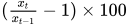
pc1 Percentage change from one year ago 
pca Compounded annual rate of change 
cch Continuously compounded rate of change 
cca Continuously compounded annual rate of change 
log Natural log 
 is the value of series x at time period t. N is the number of observations per year that differs by frequency: daily (N=260), annual (N=1), monthly (N=12), quarterly (N=4), biweekly (N=26), and weekly (N=52).
- URL="fred_url_link/<query_type?<query_option=value>><LIMIT=limit>"
-
queries for useful information (such as categories, tags, groups, and releases) and stores the information in a temporary utility data set named
XFREDTPU. Specify the following fields within double quotation marks: - USER="user-folder-location"
specifies the location of the writable folder where you permanently store SAS data sets that have one-level names. Enclose the user-folder-location in double quotation marks, and end it with a backslash if the folder is in a Windows environment or a forward slash if it is in a UNIX environment. Use the USER= option to redirect the current working folder when you see this error: Insufficient authorization to access. This error can occur if your SAS environment does not allow you to have write access in the current working folder.
- VINTAGE='fred_vintage_date1,fred_vintage_date2,…,fred_vintage_dateN'
-
specifies one or more vintage dates in history. The fred_vintage_dates are represented in
YYYY-MM-DDformat and are used to download the data for a time series as it existed on that specific date in history. The dates in the list are separated by commas (no blanks are allowed). When requesting multiple vintage dates, specify OUTPUT=2 to retrieve all observations or OUTPUT=3 to retrieve only new or revised observations. The default setting is no vintage dates.Archival Federal Reserve economic data (ALFRED) enable you to retrieve vintage versions of economic data that were available on specific dates in history. To retrieve vintage versions of various time series, enter the following URL in your web browser:
https://alfred.stlouisfed.org/
To see a list of available vintage dates for each series, refer to the FRED documentation at the web page with the following URL:
https://api.stlouisfed.org/docs/fred/series_vintagedates.html
- XMLMAP=fred_xmlmapfile
specifies the fully qualified name of the location where the XMLmap file is automatically stored. By default, XMLMAP=Fred.map.