You can specify the following options in the PROC COUNTREG statement.
Data Set Options
DATA=SAS-data-set
specifies the input SAS data set. If the DATA= option is not specified, PROC COUNTREG uses the most recently created SAS data set.
GROUPID=variable
specifies an identification variable when a panel data model is estimated. The identification variable is used as a cross-sectional ID variable.
NONORMALIZE
does not row-normalize the spatial weights matrix that is specified in the WMAT= option. By default, the spatial weights matrix is required to be row-normalized; that is, the spatial weights matrix has unit row sum. Equivalently, this means that is normalized by multiplying it by , where n is the total number of spatial units. If the NONORMALIZE option is specified, spatial weights are used "as is" except for , which is always treated as 0. This implies that a spatial weight cannot be missing for if the NONOMALIZE option is specified. If the NONOMALIZE option is not specified, missing spatial weights are replaced with 0.
WMAT=SAS-data-set
specifies the input SAS data set that contains spatial weights matrix. The spatial weights matrix is often known as the W matrix. The spatial weights for two locations and must satisfy the following: and , where and n is the total number of spatial locations. However, it is not necessary that . In addition, any nonzero is replaced with 0. For more information about missing spatial weights in W, see the section NONORMALIZE.
For a spatial weights data set that has n spatial units, the number of columns must be if the SPATIALID statement specifies a spatial ID variable for the purpose of matching observations. For more information, see the section SPATIALID Statement. However, if the SPATIALID statement is not specified, the number of rows and columns in the spatial weights data set must be equal.
Item Store Control Options
RESTORE=item-store-name
specifies the source item store for processing. An item-store-name consists of a one- or two-level name, as with SAS data sets. As with data sets, an item store is associated by default with the Work library, and any item stores that are created in this library are deleted when the SAS session concludes.
Output Data Set Options
OUTEST=SAS-data-set
writes the parameter estimates to the specified output data set.
COVOUT
writes the covariance matrix for the parameter estimates to the OUTEST= data set. This option is valid only if the OUTEST= option is specified.
Printing Options
CORRB
prints the correlation matrix of the parameter estimates. This option can also be specified in the MODEL statement.
COVB
prints the covariance matrix of the parameter estimates. This option can also be specified in the MODEL statement.
NOPRINT
suppresses all printed output.
Estimation Control Options
COVEST=HESSIAN | OP | QML
specifies the type of covariance matrix of the parameter estimates. The quasi-maximum-likelihood estimates are computed using COVEST=QML. By default, COVEST=HESSIAN. You can specify the following values:
HESSIAN
specifies the covariance from the Hessian matrix.
OP
specifies the covariance from the outer product matrix.
QML
specifies the covariance from the outer product and Hessian matrices.
requests that the COUNTREG procedure produce statistical graphics via the Output Delivery System, provided that ODS GRAPHICS has been enabled. For general information about ODS Graphics, see Chapter 24, Statistical Graphics Using ODS (SAS/STAT User's Guide). The global-plot-options apply to all relevant plots that are generated by the COUNTREG procedure.
You can specify the following global-plot-options:
COUNTS(value1 <value2…>)
supplies the plots PREDPROB and PREDPROFILE with particular values of the response variable. Each value should be a nonnegative integer. Nonintegers are rounded to the nearest integer. The value can also be a list of the form X TO Y BY Z. For example, COUNTS(0 1 2 TO 10 BY 2 15) specifies plotting for counts 0, 1, 2, 4, 6, 8, 10, and 15.
ONLY
suppresses the default plots. Only the plots that are specifically requested are produced.
UNPACKPANEL
UNPACK
displays each graph separately. (By default, some graphs can appear together in a single panel.)
You can specify the following plot-requests:
ALL
requests that all plots appropriate for the particular analysis be produced.
AUTOCORR<(LAGS=n)>
displays the autocorrelation function plots of the parameters. This plot-request is available only for Bayesian analysis. The optional LAGS= suboption specifies the number (up to lag n) of autocorrelations to be plotted in the AUTOCORR plot. If this suboption is not specified, autocorrelations are plotted up to lag 50.
BAYESDIAG
displays the TRACE, AUTOCORR, and DENSITY plots. This plot-request is available only for Bayesian analysis.
BAYESSUM
displays the posterior distribution, prior distribution, and maximum likelihood estimates. This plot-request is available only for Bayesian analysis.
DENSITY<(FRINGE)>
displays the kernel density plots of the parameters. This plot-request is available only for Bayesian analysis. If you specify the FRINGE suboption, a fringe plot is created on the X axis of the kernel density plot.
DISPERSION
produces the overdispersion diagnostic plot.
NONE
suppresses all plots.
PREDPROB
produces the overall predictive probabilities of the specified count levels. You must also specify COUNTS in global-plot-options.
PREDPROFILE
produces the predictive probability profiles of specified count levels against model regressors. The regressor on the X axis is varied, whereas all other regressors are fixed at the mean of the observed data set.
PROFILELIKE
produces the profile likelihood functions of the model parameters. The model parameter on the X axis is varied, whereas all other parameters are fixed at their estimated maximum likelihood estimates.
TRACE<(SMOOTH)>
displays the trace plots of the parameters. This plot-request is available only for Bayesian analysis. The SMOOTH suboption displays a fitted penalized B-spline curve for each trace plot.
ZEROPROFILE | ZPPRO
produces the probability profiles of zero-inflation process selection and zero count prediction against model regressors. The regressor on the X axis is varied, whereas all other regressors are fixed at the mean of the observed data set.
Optimization Process Control Options
PROC COUNTREG uses the nonlinear optimization (NLO) subsystem to perform nonlinear optimization tasks. All the NLO options are available in the NLOPTIONS statement. For more information, see the NLOPTIONS Statement. In addition, you can specify the following option in the PROC COUNTREG statement:
 is normalized by multiplying it by
  , where n is the total number of spatial units. If the NONORMALIZE option is specified, spatial weights are used "as is" except for
  , which is always treated as 0. This implies that a spatial weight
  if the NONOMALIZE option is specified. If the NONOMALIZE option is not specified, missing spatial weights are replaced with 0.
  and
and  must satisfy the following:
 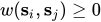 and
and 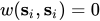 , where
  and n is the total number of spatial locations. However, it is not necessary that
  . In addition, any nonzero
  if the SPATIALID statement specifies a spatial ID variable for the purpose of matching observations. For more information, see the section SPATIALID Statement. However, if the SPATIALID statement is not specified, the number of rows and columns in the spatial weights data set must be equal.