COUNTREG Procedure
Variable Selection
Variable Selection Methods
Variable Selection Using an Information Criterion
This type of variable selection uses either Akaike’s information criterion (AIC) or the Schwartz Bayesian criterion (SBC) and either a forward selection method or a backward elimination method.
Forward selection starts from a small subset of variables. In each step, the variable that gives the largest decrease in the value of the information criterion specified in the CRITER= option (AIC or SBC) is added. The process stops when the next candidate to be added does not reduce the value of the information criterion by more than the amount specified in the LSTOP= option in the MODEL statement.
Backward elimination starts from a larger subset of variables. In each step, one variable is dropped based on the information criterion chosen.
You can force a variable to be retained in the variable selection process by adding a RETAIN list to the SELECT=INFO (or SELECTVAR=INFO) option in your model. For example, suppose you add a RETAIN list to the SELECT=INFO option in your model as follows:
MODEL Art = Mar Kid5 Phd / dist=negbin(p=2) SELECT=INFO(lstop=0.001 RETAIN(Phd));
Then this causes the variable selection process to consider only those models that contain Phd as a regressor. As a result, you are guaranteed that Phd will appear as one of the regressor variables in whatever model the variable selection process produces. The model that results is the "best" (relative to your selection criterion) of all the possible models that contain Phd.
When a ZEROMODEL statement is used in conjunction with a MODEL statement, then all the variables that appear in the ZEROMODEL statement are retained by default unless the ZEROMODEL statement itself contains a SELECT=INFO option.
For example, suppose you have the following:
MODEL Art = Mar Kid5 Phd  / dist=negbin(p=2) SELECT=INFO(lstop=0.001 RETAIN(Phd));
ZEROMODEL Art ~ Fem Ment / link=normal;
Then Phd is retained in the MODEL statement and all the variables in the ZEROMODEL statement (Fem and Ment) are retained as well. You can add an empty SELECT=INFO clause to the ZEROMODEL statement to indicate that all the variables in that statement are eligible for elimination (that is, need not be retained) during variable selection. For example:
MODEL Art = Mar Kid5 Phd  / dist=negbin(p=2) SELECT=INFO(lstop=0.001 RETAIN(Phd));
ZEROMODEL Art ~ Fem Ment / link=normal SELECT=INFO();
In this example, only Phd from the MODEL statement is guaranteed to be retained. All the other variables in the MODEL statement and all the variables in the ZEROMODEL statement are eligible for elimination.
Similarly, if your ZEROMODEL statement contains a SELECT=INFO option but your MODEL statement does not, then all the variables in the MODEL statement are retained, whereas only those variables listed in the RETAIN() list of the SELECT=INFO option for your ZEROMODEL statement are retained. For example:
MODEL Art = Mar Kid5 Phd  / dist=negbin(p=2) ;
ZEROMODEL Art ~ Fem Ment / link=normal SELECT=INFO(RETAIN(Ment));
Here, all the variables in the MODEL statement (Mar Kid5 Phd) are retained, but only the Ment variable in the ZEROMODEL statement is retained.
Variable Selection and Class Variables
When a model that contains a classification variable is evaluated, the classification variable is effectively replaced by a set of parameters, each of which corresponds to some level of the classification variable. This is known as levelizing the classification variable. In the following discussion, the parameters that result from levelizing a classification variable are called level-qualified parameters.
By default, as variable selection proceeds, PROC COUNTREG treats each level-qualified parameter as an effect in its own right. This is described as splitting the original classification variable effect. Thus, at any particular step during the variable selection process, a candidate model can contain all, none, or only some of the level-qualified parameters that result from levelizing a classification variable.
Variable Selection with Split Effects
For example, suppose that Fem and Ment are continuous variables and that Kid5 is a classification variable that has four levels: 0, 1, 2, and 3. Suppose your model is the following:
CLASS Kid5;
MODEL Art = Fem Kid5 Ment / dist=poisson SELECT=INFO( lstop=0.001 );
Levelizing the Kid5 classification variable produces four level-qualified parameters: Kid5_0, Kid5_1, Kid5_2, and Kid5_3. Because the Intercept is an effect in the model (by default), PROC COUNTREG eliminates the last level-qualified parameter for each levelized class variable in the model. This prevents problems that would otherwise ensue because of collinearity. In this case, PROC COUNTREG eliminates Kid5_3 from the model from the outset. Thus, Kid5_3 will never be included in any candidate model. PROC COUNTREG evaluates the following candidates at Step 1:
{Intercept, Fem} |
{Intercept, Kid5_0} |
{Intercept, Kid5_1} |
{Intercept, Kid5_2} |
{Intercept, Ment} |
Note how each candidate contains either none or only one of the level-qualified parameters that result from levelizing the Kid5 classification variable. Thus, the classification variable Kid5 has been split: its associated level-qualified parameters are treated as individual effects. Suppose that {Intercept, Ment} is selected from among the candidates. Then PROC COUNTREG evaluates the following candidates at Step 2:
{Intercept, Ment, Fem} |
{Intercept, Ment, Kid5_0} |
{Intercept, Ment, Kid5_1} |
{Intercept, Ment, Kid5_2} |
Suppose that {Intercept, Ment, Fem} is selected from among the candidates. Then PROC COUNTREG evaluates the following candidates at Step 3:
{Intercept, Ment, Fem, Kid5_0} |
{Intercept, Ment, Fem, Kid5_1} |
{Intercept, Ment, Fem, Kid5_2} |
Suppose that {Intercept, Ment, Fem, Kid5_0} is selected from among the candidates. Depending on the data, it is entirely possible that none of the Step 4 candidates improves the information criterion that is associated with the model that was selected at Step 3. As a result, the final selected model is:
{Intercept, Ment, Fem, Kid5_0} |
As this example shows, when classification effects are split, it is possible for the final selected model to contain some, but not all, of the level-qualified parameters that are associated with the Kid5 classification variable.
Variable Selection without Split Effects
If you do not want the variable selection process in PROC COUNTREG to split classification effects as illustrated in the preceding section, then you must specify the NOSPLITEFFECTS option. If you specify the NOSPLITEFFECTS option (which can be abbreviated as NOSPLIT), then as variable selection proceeds, a particular candidate model will contain either all or none of the level-qualified parameters that result from levelizing the classification variable. When the NOSPLIT option is specified, no candidate will ever contain only some but not all of the level-qualified parameters that are associated with a classification variable.
Suppose your model is the following:
CLASS Kid5;
MODEL Art = Fem Kid5 Ment / dist=poisson SELECT=INFO( lstop=0.001 NOSPLIT );
Because the NOSPLIT option is specified, PROC COUNTREG evaluates the following candidates at Step 1:
{Intercept, Fem} |
{Intercept, Kid5_0, Kid5_1, Kid5_2} |
{Intercept, Ment} |
Note how each candidate contains either all or none of the level-qualified parameters that result from levelizing the Kid5 classification variable. Thus, the classification variable Kid5 is not split: its associated level-qualified parameters are not treated as individual effects. Suppose that {Intercept, Ment} is selected from among the candidates. Then PROC COUNTREG evaluates the following candidates at Step 2:
{Intercept, Ment, Fem} |
{Intercept, Ment, Kid5_0, Kid5_1, Kid5_2} |
Suppose that {Intercept, Ment, Fem} is selected from among the candidates. Depending on the data, it is entirely possible that none of the Step 3 candidates improves the information criterion that is associated with the model that was selected at Step 2. As a result, the final selected model is:
{Intercept, Ment, Fem} |
As this example shows, when the NOSPLIT option is specified, the final selected model contains either all or none of the level-qualified parameters that are associated with the Kid5 classification variable.
Classification Variables and the RETAIN Option
As described earlier in this section, if you want to constrain the variable selection process in such a way that it considers only candidates that include a certain variable, then you can use the RETAIN option. However, you cannot refer to a classification variable by name in the RETAIN list. Recall that by default, the variable selection process in PROC COUNTREG splits classification effects into individual effects that correspond to the levels of the classification variable. Thus, if you want to retain the original classification variable Kid5, you must list each of its level-qualified parameters by name. You can also retain some but not all of the level-qualified parameters. For example, to retain the level-qualified parameters Kid5_0 and Kid5_2 of the Kid5 classification variable, you would specify the RETAIN option as follows:
MODEL Art = Fem Kid5 Ment / dist=poisson
      SELECT=INFO( lstop=0.001 RETAIN(Kid5_0 Kid5_2) );
The RETAIN option can be used to retain effects only when the NOSPLITEFFECTS option is not specified. The RETAIN option is ignored if the NOSPLITEFFECTS option is specified.
Classification Variables and the RETAINEFFECT Option
When the NOSPLITEFFECTS option is specified, you must use the RETAINEFFECT option if you want to constrain the variable selection process in such a way that it considers only candidates that include a certain variable. Any effect in your MODEL statement can be added to a RETAINEFFECT list. Thus, if you want to retain the original classification variable Kid5, you can refer to it by name in the RETAINEFFECT option as follows:
MODEL Art = Fem Kid5 Ment / dist=poisson
      SELECT=INFO( lstop=0.001  NOSPLIT  RETAINEFFECT(Kid5) );
Effects in other modeling statements can be retained in a similar fashion. In the following example, the RETAINEFFECT option in the ZEROMODEL statement causes the zero-inflated Kid5 classification variable to be retained:
MODEL Art = Fem Kid5 Ment / dist=ZIP SELECT=INFO( lstop=0.001  NOSPLIT );
ZEROMODEL Art ~ Mar Kid5 / SELECT=INFO( RETAINEFFECT(Kid5) );
Individual level-qualified parameters that are associated with a classification variable cannot be retained using the RETAINEFFECT option. The RETAINEFFECT option can be used to retain effects only when the NOSPLITEFFECTS option is specified. The RETAINEFFECT option is ignored if the NOSPLITEFFECTS option is not specified.
Variable Selection Using Penalized Likelihood
Variable selection in the linear regression context can be achieved by adding some form of penalty on the regression coefficients. One particular such form is  norm penalty, which leads to LASSO:
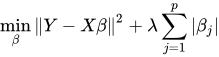
This penalty method is becoming more popular in linear regression, because of the computational development in the recent years. However, how to generalize the penalty method for variable selection to the more general statistical models is not trivial. Some work has been done for the generalized linear models, in the sense that the likelihood depends on the data through a linear combination of the parameters and the data:

In the more general form, the likelihood as a function of the parameters can be denoted by  , where
  is a vector that can include any parameters and
  is the likelihood for each observation. For example, in the Poisson model,
  , and in the negative binomial model
  . The following discussion introduces the penalty method, using the Poisson model as an example, but it applies similarly to the negative binomial model. The penalized likelihood function takes the form
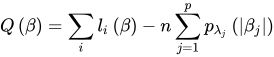
The  norm penalty function that is used in the calculation is specified as

The main challenge for this penalized likelihood method is on the computation side. The penalty function is nondifferentiable at zero, posing a computational problem for the optimization. To get around this nondifferentiability problem, Fan and Li (2001) suggested a local quadratic approximation for the penalty function. However, it was later found that the numerical performance is not satisfactory in a few respects. Zou and Li (2008) proposed local linear approximation (LLA) to solve the problem numerically. The algorithm replaces the penalty function with a linear approximation around a fixed point  :
:

Then the problem can be solved iteratively. Start from  , which denotes the usual MLE estimate. For iteration k,

The algorithm stops when  is small. To save computing time, you can also choose a maximum number of iterations. This number can be specified by the LLASTEPS= option.
The objective function is nondifferentiable. The optimization problem can be solved using an optimization methods with constraints, by a variable transformation

For each fixed tuning parameter  , you can solve the preceding optimization problem to obtain an estimate for
  . Because of the property of the
  norm penalty, some of the coefficients in can be exactly zero. The remaining question is to choose the best tuning parameter . You can use either of the approaches that are described in the following subsections.
The GCV Approach
In the GCV approach, the generalized cross validation criteria (GCV) is computed for each value of on a predetermined grid 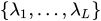 ; the value of that achieves the minimum of the GCV is the optimal tuning parameter. The maximum value
  can be determined by lemma 1 in Park and Hastie (2007) as follows. Suppose
  is free of penalty in the objective function. Let
  be the MLE of by forcing the rest of the parameters to be zero. Then the maximum value of is
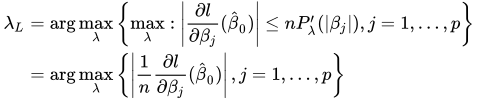
You can compute the GCV by using the LASSO framework. In the last step of Newton-Raphson approximation, you have

The solution  satisfies

where
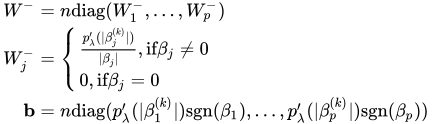
Note that the intercept term has no penalty on its absolute value, and therefore the  term that corresponds to the intercept is 0. More generally, you can make any parameter (such as the
  in the negative binomial model) in the likelihood function free of penalty, and you treat them the same as the intercept.
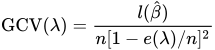
The effective number of parameters is

and the generalized cross validation error is
The GCV1 Approach
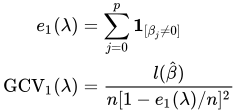
Another form of GCV uses the number of nonzero coefficients as the degrees of freedom:
The standard errors follow the sandwich formula:

It is common practice to report only the standard errors of the nonzero parameters.
Variable Selection with a NOINT Model
If you specify the NOINT option in your MODEL statement, the model produced by variable selection will always contain at least one effect from the original MODEL statement. If you request forward selection with a NOINT model and you do not retain any main model effect, then the only effects that will be candidates for the single-effect model that is derived in the first step will be the effects that are present in the original MODEL statement. For all subsequent steps, all effects from the MODEL, ZEROMODEL, DISPMODEL, and SPATIALEFFECTS statements will be candidates for inclusion in the model that is derived at that step in the process. Meanwhile, if you request backward selection with a NOINT model, you do not retain a specific main model effect, and a model that contains only one effect from the original MODEL statement is derived at a particular step, then that effect will remain in all the models that are evaluated in all subsequent steps.