Shared Concepts
selection Parameter
This section applies to actions in the following action sets: phreg, quantreg, and regression.
Actions in this book that support model selection use the selection parameter to control details about the model selection process.
You can specify the following subparameters in the selection parameter:
-
method='method' -
specifies the method to be used to select the model.
The following methods are available and are explained in detail in the section Model Selection Methods. By default, the stepwise method is used.
- backward
specifies backward elimination. This method starts with all effects in the model and deletes effects.
- bestsubset
specifies best-subset selection. This method uses the branch-and-bound technique (Furnival and Wilson 1974) to find the best subsets of model effects without examining all possible subsets. The only SAS Viya action that supports this method is the
glmaction.- forward
specifies forward selection. This method starts with no effects in the model and adds effects.
- elasticnet
specifies the elastic net method. This is an extension of LASSO that estimates parameters by using constrained optimization, in which both the sum of the absolute regression coefficients and the sum of the squared regression coefficients are constrained. The SAS Viya actions that support this method are the
glmaction and thelogisticaction.- forwardswap
specifies forward-swap selection, which is an extension of the forward selection method. Before any addition step, the action makes all pairwise swaps of one effect in the model and one effect out of the current model that improve the selection criterion.
- lar
specifies least angle regression. Like forward selection, this method starts by adding effects to an empty model. The parameter estimates at any step are "shrunk" when they are compared to the corresponding least squares estimates. If the model contains classification variables, then these classification variables are split. For more information, see the
splitsubparameter in theclassparameter. The only SAS Viya action that supports this method is theglmaction.- lasso
specifies the LASSO method, which adds and deletes parameters by using a version of ordinary least squares in which the sum of the absolute regression coefficients is constrained. If the model contains classification variables, then these classification variables are split. For more information, see the
splitsubparameter in theclassparameter.- mcp
specifies the MCP method, which minimizes ordinary least squares plus the minimax concave penalty (MCP) function. The only SAS Viya action that supports this method is the
glmaction.- none
specifies no model selection.
- scad
specifies the SCAD method, which minimizes ordinary least squares plus the smoothly clipped absolute deviation (SCAD) function. The only SAS Viya action that supports this method is the
glmaction.- stepwise
specifies stepwise regression. This method is similar to the forward selection method except that effects already in the model do not necessarily stay there.
Table 8 lists the applicable subparameters for each of these methods.
Table 8: Applicable Subparameters by method
Subparameter BACKWARD BESTSUBSET ELASTICNET FORWARD LAR LASSO MCP/SCAD STEPWISE adaptivex x bestSubsetOptionsx candidatesx x x x x x choosex x x x x x x competitivex detailsx x x x x x x elasticNetOptionsx enScalex enStepsx fastx fcpSelectionOptionsx gammax x hierarchyx x x x x x lsCoeffsx x L2x L2Highx L2Lowx maxEffectsx x x x x x maxStepsx x x x x x minEffectsx x orderSelectx x x x x x plotsx x x x x x selectx x x x slEntryx x x x x slStayx x x x stopx x x x x x stopHorizonx x x
The subparameters that you can specify in the
selectionparameter are listed and described in the Syntax section of the specific action chapters. More details about many of these subparameters follow; as described in Table 8, not all selection subparameters are applicable to every method or to every action.-
adaptive=TRUE | FALSE when set to True, applies adaptive weights to each of the coefficients when the LASSO or elastic net method is performed. Ordinary least squares estimates of the model parameters are used to form the adaptive weights. You can specify the
gammasubparameter to specify the power transformation to use in forming the adaptive weights.-
bestSubsetOptions={best-parameter} -
specifies subparameters that control how best-subset selection works and displays its results. This subparameter is ignored unless the
methodsubparameter value is bestsubset.You can specify the following best-parameters:
best=nspecifies the maximum number of subset models to display if the model selection criterion is CP or ADJRSQ, or specifies the maximum number of subset models for each size if the model selection criterion is RSQUARE, where n is a positive integer.
computeBeta=TRUE | FALSEwhen set to True, displays estimated regression coefficients for each model in the SubsetSelectionSummary table.
displayAIC=TRUE | FALSEwhen set to True, displays the AIC statistic for each model in the SubsetSelectionSummary table.
displayBIC=TRUE | FALSEwhen set to True, displays the BIC statistic for each model in the SubsetSelectionSummary table.
displayGMSEP=TRUE | FALSEwhen set to True, displays the GMSEP statistic (estimated mean square error of prediction, assuming that both independent and dependent variables are multivariate normal (Stein 1960; Darlington 1968)) for each model in the SubsetSelectionSummary table.
displayJP=TRUE | FALSEwhen set to True, displays the
 statistic (estimated mean square error of prediction, assuming that the values of the regressors are fixed and that the model is correct) for each model in the SubsetSelectionSummary table.
 displayMSE=TRUE | FALSEwhen set to True, displays the mean square error for each model in the SubsetSelectionSummary table.
displayPC=TRUE | FALSEwhen set to True, displays the PC statistic (Amemiya’s prediction criterion (Amemiya 1976; Judge et al. 1980)) for each model in the SubsetSelectionSummary table.
displayRMSE=TRUE | FALSEwhen set to True, displays the root mean square error for each model in the SubsetSelectionSummary table.
displaySBC=TRUE | FALSEwhen set to True, displays the SBC statistic for each model in the SubsetSelectionSummary table.
displaySP=TRUE | FALSEwhen set to True, displays the SP statistic for each model in the SubsetSelectionSummary table.
displaySSE=TRUE | FALSEwhen set to True, displays the error sum of squares for each model in the SubsetSelectionSummary table.
sigma=valuespecifies the true standard deviation of the error term to use in computing the CP and BIC statistics, where value is a positive number. If you omit this best-parameter, an estimate from the full model is used.
-
candidates='all' | number specifies the maximum number of candidates to display at each step of the selection process, when the
detailsubparameter value is all.-
choose='criterion' chooses from the list of models (at each step of the selection process) the model that yields the best value of the specified criterion. If the optimal value of the specified criterion occurs for models at more than one step, then the model that has the smallest number of parameters is chosen. If you do not specify the
choosesubparameter, then the selected model is the model at the final step in the selection process. The criteria that are supported depend on the type of model that is being fit. For the supported values of criterion, see the chapters for the relevant actions.-
competitive=TRUE | FALSE when set to True, applies only when the selection method is stepwise and the
selectsubparameter value is not sl. The criterion that is specified in theselectsubparameter is evaluated for all models in which an effect currently in the model is dropped or an effect not yet in the model is added. The effect whose removal from or addition to the model yields the maximum improvement to the criterion specified in theselectsubparameter is dropped or added.-
elasticNetOptions={en-parameter} -
specifies subparameters that control optimization solvers for elastic net selection. This subparameter is ignored unless the
methodsubparameter value is ELASTICNET.You can specify the following en-parameters:
absFConv=valuespecifies an absolute function difference convergence criterion. This subparameter is available only when the solver is the alternating direction method of multipliers (ADMM) for elastic net selection.
fConv=valuespecifies a relative function difference convergence criterion. This subparameter is available only when the solver is either the alternating direction method of multipliers (ADMM) or the limited-memory BFGS method of elastic net selection.
gConv=valuespecifies a relative gradient convergence criterion. This subparameter is available only when the solver is the limited-memory BFGS method of elastic net selection.
lambda=value(s)specifies the regularization parameter
 to use for elastic net selection. If you specify a single value, elastic net selection fits a single model. If you supply a list of values, elastic net selection fits multiple models and selects the best model among the candidates. If you specify neither this subparameter nor the
 numLambdasubparameter, elastic net selection fits a model by using a regularization parameter that is a fraction of .
. mixing=valuespecifies the mixing parameter that controls the balance between the
 penalty and the
  penalty in elastic net selection. The specified value must be between 0 and 1, inclusive. If you specify 0, elastic net selection fits ridge regression models. If you specify 1, elastic net selection fits LASSO regression models. The default value is 0.5.
 numLambda=nspecifies the number of regularization parameters for fitting candidate models. The default value is 1. The subparameter is ignored if you supply a list of regularization parameters by using the
lambdasubparameter.rho=valuespecifies the scaling factor
 when the
 numLambdasubparameter value is greater than 1. If you omit the
 lambdasequence values, elastic net selection fits candidate models by using the following sequence of the regularization parameters: . If you omit this en-parameter subparameter, elastic net selection uses
 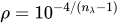 when the number of observations is greater than the number of parameters, or
 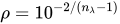 when the number of observations is less than the number of parameters.
 solver='ADMM' | 'BFGS' | 'LBFGS' | 'NLP'-
specifies the optimization solver. You can specify the following values:
- ADMM
specifies the alternating direction method of multipliers (ADMM).
- BFGS
specifies the Broyden-Fletcher-Goldfarb-Shanno (BFGS) method.
- LBFGS
specifies the limited-memory BFGS method.
- NLP
specifies the nonlinear programming (NLP) method.
-
enScale=TRUE | FALSE when set to True, scales the results of the elastic net method to offset bias from the double shrinkage inherent in this method (Zou and Hastie 2005). This option applies only when you specify 'ELASTICNET' for the
methodsubparameter. The default is not to rescale the solution; this is the so-called naive elastic net.-
enSteps=n specifies the number of steps in the search for the suitable value of the ridge regression parameter L2 when you specify 'ELASTICNET' for the
methodsubparameter. If you specify a value for theL2subparameter, then theenStepssubparameter is ignored. By default,enSteps=50.-
fast=TRUE | FALSE when set to True, implements the computational algorithm of Lawless and Singhal (1978) to compute a first-order approximation to the remaining slope estimates for each subsequent elimination of a variable from the model. When applied in backward selection, this option essentially leads to approximating the selection process as the selection process of a linear regression model in which the crossproducts matrix equals the Hessian matrix in the full model under consideration. This option is available only when the
methodsubparameter value is BACKWARD. It is computationally efficient because the model is not fit after removal of each effect.-
fcpSelectionOptions={fcp-parameter} -
specifies subparameters that control how MCP and SCAD selections work and display the results. This subparameter is ignored unless the
methodsubparameter value is MCP or SCAD.You can specify the following fcp-parameters:
alpha=valuespecifies the regularization parameter
 . If you specify a value for this
 alphasubparameter, then themaxAlpha,minAlpha, andmaxIterAlphasubparameters are ignored. If you omit thealphasubparameter, then theglmaction searches for a suitable value of the parameter according to the values of the maxAlpha,minAlpha, andmaxIterAlphasubparameters.bigM=valuespecifies the constant
 when you specify 'MILP' for the
 solversubparameter.coefTol=valuespecifies the tolerance for the truncation of the estimated coefficients of parameters. In other words, if
 is less than the value of the
 coefTolsubparameter for some j, then would be set to 0; that is, the jth effect is not selected in the final model. By default,
 coefTol=1E–7.intTol=valuespecifies the amount by which an integer variable value can differ from an integer and still be considered integer-feasible, when you specify 'MILP' for the
solversubparameter. The value of theintTolsubparameter can be any number between 1E–9 and 0.5, inclusive. By default,intTol=1E–7.lambda=valuespecifies the regularization parameter
. If you specify a value for this lambdasubparameter, then themaxLambda,minLambda,maxIterLambda, andlambdaGridsubparameters are ignored. If you omit thelambdasubparameter, then theglmaction searches for a suitable value of the parameter according to the values of the maxLambda,minLambda,maxIterLambda, andlambdaGridsubparameters.lambdaGrid='LINSPACE' | 'LOGSPACE'-
specifies the grid pattern for searching for a suitable value of the regularization parameter
. You can specify the following values: - LINSPACE
requests an evenly spaced grid search for a suitable value of
in the range  , where
  and are the values that you specify for the
 minLambdaandmaxLambdasubparameters, respectively.- LOGSPACE
requests a log-scale grid search for a suitable value of
in the range , where and are the values that you specify for the minLambdaandmaxLambdasubparameters, respectively.
By default,
lambdaGrid='LOGSPACE'. maxAlpha=valuespecifies the highest value to use in the search for a suitable value of the regularization parameter
. If you specify a value for the alphasubparameter, then themaxAlphasubparameter is ignored. By default,maxAlpha=5.7 when you specify 'SCAD' for themethodsubparameter andmaxAlpha=4.7 when you specify 'MCP' for themethodsubparameter.maxIterAlpha=valuespecifies the number of steps in the search for a suitable value of the regularization parameter
. The grid values of parameter are evenly spaced between minAlphaandmaxAlphasubparameter values. If you specify a value for thealphasubparameter, then themaxIterAlphasubparameter is ignored. By default,maxIterAlpha=4.maxIterLambda=valuespecifies the number of steps in the search for a suitable value of the regularization parameter
. If you specify a value for the lambdasubparameter, then themaxIterLambdasubparameter is ignored. By default,maxIterLambda=10.maxLambda=valuespecifies the highest value to use in the search for a suitable value of the regularization parameter
. If you specify a value for the lambdasubparameter, then themaxLambdasubparameter is ignored.maxTime=valuespecifies the upper limit of time (in seconds) for performing the optimization process, in each
and step. By default, maxTime=600.minAlpha=valuespecifies the lowest value to use in the search for a suitable value of the regularization parameter
. If you specify a value for the alphasubparameter, then theminAlphasubparameter is ignored. By default,minAlpha=2.7 when you specify 'SCAD' for themethodsubparameter andminAlpha=1.7 when you specify 'MCP' for themethodsubparameter.minLambda=valuespecifies the lowest value to use in the search for a suitable value of the regularization parameter
. If you specify a value for the lambdasubparameter, then theminLambdasubparameter is ignored.scale=TRUE | FALSEspecifies whether the design matrix is scaled (TRUE) or not scaled (FALSE) during model selection. By default,
scale=TRUE; this is the same as in other penalized methods, such as LASSO and elastic net.solver='MILP' | 'NLP'-
specifies the optimization solver. You can specify the following values:
- MILP
specifies the mixed integer linear programming (MILP) solver.
- NLP
specifies the nonlinear programming (NLP) solver.
By default,
solver='MILP'.
-
gamma=nonnegative_number specifies the power transformation that is applied to the parameters in forming the adaptive weights when the
adaptivesubparameter is specified. By default,gamma=1.-
lsCoeffs=TRUE | FALSE when set to True, requests a hybrid version of the LAR and LASSO methods, in which the sequence of models is determined by the LAR or LASSO algorithm but the coefficients of the parameters for the model at any step are determined by using ordinary least squares.
-
L2=value specifies the ridge regularization parameter to use when the
methodsubparameter value is ELASTICNET. If you specify a value for theL2subparameter, then the value that you specify is used to define the elastic net method, and theL2High,L2Low, andenStepssubparameters are ignored. If you do not specify theL2subparameter together with the elastic net method, then theglmaction searches for a suitable value of theL2subparameter according to the values of theL2High,L2Low, andenStepssubparameters.-
L2High=value specifies the highest value to use in the search for a suitable value of the ridge regression subparameter
L2when you specify the elastic net method. If you specify a value for theL2subparameter, then theL2Highsubparameter is ignored. By default,L2High=1.-
L2Low=value specifies the lowest value to use in the search for a suitable value of the ridge regression subparameter
L2when you specify the elastic net method. If you specify a value for theL2subparameter, then theL2Lowsubparameter is ignored. By default,L2Low=0.-
maxEffects=n specifies the maximum number of effects in any model that is considered during the selection process. This option is ignored when backward selection is specified. If, at some step of the selection process, the model contains the specified maximum number of effects, then no candidates for addition are considered.
-
maxSteps=n specifies the maximum number of selection steps that are performed. The default value of n is the number of effects in the
modelparameter when themethodsubparameter value is FORWARD, BACKWARD, or LAR. The default is three times the number of effects when themethodsubparameter value is STEPWISE, LASSO, or ELASTICNET.-
minEffects=n specifies the minimum number of effects in any model that is considered during backward selection. This option is ignored unless the
methodsubparameter value is BACKWARD. The selection process terminates if, at some step of the selection process, the model contains the specified minimum number of effects.-
select='sl' | 'criterion' specifies the criterion that the action uses to determine the order in which effects enter or leave at each step of the selection method. For each step, the effect whose addition to or removal from the current model yields the maximum improvement in the specified criterion is selected. You can use the traditional significance-level approach by specifying the SL criterion; for other supported criteria, see the chapter for the relevant action. This option is not valid when the
methodsubparameter value is LAR, LASSO, or ELASTICNET.-
slEntry=value specifies the significance level for entry when the
stopsubparameter value is SL or theselectsubparameter value is SL. By default,slEntry=0.05.-
slStay=value specifies the significance level for staying in the model when the
stopsubparameter value is SL or theselectsubparameter value is SL. By default,slStay=0.05.-
stop='sl' | 'none' | 'criterion' -
specifies a criterion that is used to stop the selection process. The criteria that are supported depend on the type of model that is being fit. For information about the supported criteria, see the chapter for the relevant action.
If you do not specify the
stopsubparameter but do specify theselectsubparameter, then the criterion specified in theselectsubparameter is also used for stopping.You can specify the following criteria:
- none
stops the selection process if no suitable add or drop candidates can be found or if a size-based limit is reached. For example, if you specify 'NONE' for the
stopsubparameter and 5 for themaxEffectssubparameter, then the selection process stops at the first step that produces a model that has five effects.- sl
stops the selection process at the step where the significance level of the candidate for entry is greater than the value of the
slEntrysubparameter for addition steps when themethodsubparameter value is forward or stepwise and where the significance level of the candidate for removal is greater than the value of theslStaysubparameter when themethodsubparameter value is backward or stepwise.- criterion
stops the selection process if the selection process produces a local extremum of this criterion or if a size-based limit is reached. For example, if you specify 'AIC' for the
stopsubparameter and 5 for themaxStepssubparameter, then the selection process stops before step 5 if the sequence of models has a local minimum of the AIC criterion before step 5. The determination of whether a local minimum is reached is made on the basis of a stop horizon. The default stop horizon is 3, but you can change it by using thestopHorizonsubparameter. If the stop horizon is n and the criterion at any step is better than the criterion at the next n steps, then the selection process terminates.
In addition, you can also specify the following subparameters: