Shared Concepts
lsmeans Parameter
This section applies to actions in the following action sets: mixed and regression.
The lsmeans parameter computes least squares means (LS-means) of classification fixed effects. As in the GLM procedure, LS-means are predicted population margins—that is, they estimate the marginal means over a balanced population. In a sense, LS-means are to unbalanced designs as classification and subclassification arithmetic means are to balanced designs. You can view LS-means as linear combinations of the parameter estimates that are constructed in such a way that they correspond to average predicted values in a population where the levels of classification variables are balanced.
Each LS-mean is computed as  , where
  is the coefficient matrix that is associated with the least squares mean and
  is the estimate of the fixed-effects parameter vector. This matrix is the same as the matrix that is constructed in PROC GLM; however, the standard errors are adjusted for the covariance parameters in the model. The approximate standard errors for the LS-mean are computed as the square root of
 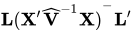 . The approximate variance matrix of the fixed-effects estimates depends on the estimation method.
LS-means can be computed for any effect in the action’s model specification that involves only classification variables. You can specify multiple model-effects in one lsmeans parameter or in multiple lsmeans parameters, and all lsmeans parameters must appear after the model parameter.
The matrix is tested for estimability, and if this test fails, the action displays "Non-est" for the LS-means entries. Note that linear functions of LS-means, such as differences, can be estimable even when the means themselves are not estimable. Estimability checks for differences are thus applied separately from checks for the means. Assuming that the LS-mean is estimable, the action constructs an approximate normal test or t test (depending on the action) to test the null hypothesis that the associated population quantity equals zero. By default, the denominator degrees of freedom for the t test are the residual degrees of freedom.
The lsmeans parameter contains a series of statements subparameters, each of which contains one or more sets of option subparameters. Table 6 summarizes the option subparameters that are available in the lsmeans parameter. All option subparameters are subsequently discussed in alphabetical order. Note that the df and slice subparameters are available only with the mixed action.
Table 6: lsmeans Parameter option Subparameters
option |
Description |
|---|---|
| Construction and Computation of LS-Means | |
at |
Modifies the covariate value used to compute LS-means |
diff |
Computes differences of LS-means |
singular |
Tunes estimability checking |
slice |
Partitions interaction LS-means effects |
terms |
Specifies model effects for LS-means estimation |
| Degrees of Freedom and p-Values | |
adjust |
Specifies the multiple comparison adjustment method for LS-means differences |
alpha= |
Specifies the confidence level ( ) ) |
df |
Assigns a specific value to the degrees of freedom for tests and confidence limits |
| Statistical Output | |
cl |
Constructs confidence limits for means and mean differences |
corr |
Displays the correlation matrix of LS-means |
cov |
Displays the covariance matrix of LS-means |
e |
Displays the  matrix matrix |
You must specify the following option subparameter in each option set in the lsmeans parameter:
You can specify the following subparameters in each option set in the lsmeans parameter:
-
adjust={method='method'<, method-specific-parameters>} -
computes a multiple comparison adjustment for the p-values and confidence limits for the differences of LS-means. The adjusted quantities are produced along with the unadjusted quantities. The
adjustparameter works together with thediffparameter. If you omit thediffparameter and specify a method other than NONE, then theadjustparameter invokes thediffparameter. Only the SIMULATE method has method-specific-parameters.You must specify one of the following methods for the
adjustparameter:- BON
performs Bonferroni t tests of differences between LS-means. The method involves correction factors described in Chapter 53, The GLM Procedure (SAS/STAT User's Guide), and Chapter 86, The MULTTEST Procedure (SAS/STAT User's Guide); also see Westfall and Young (1993) and Westfall et al. (1999).
- DUNNETT
performs Dunnett’s t test, which tests whether any treatments are significantly different from a single control for the effects in the
lsmeansparameter. When the LS-means are correlated, the action uses the factor-analytic covariance approximation described in Hsu (1992) and identifies the adjustment as "Dunnett-Hsu" in the results. The approximation derives approximate "effective sample sizes" for which exact critical values are computed.- NELSON
performs Nelson’s t test of each LS-mean against an average of the LS-means (Ott 1967; Nelson 1982, 1991, 1993). When the LS-means are correlated, the action uses the factor-analytic covariance approximation described in Hsu (1992) and identifies the adjustment as "Nelson-Hsu" in the results. The approximation derives approximate "effective sample sizes" for which exact critical values are computed.
- NONE | T
performs no adjustment for multiple comparisons.
- SCHEFFE
performs Scheffé’s multiple comparison procedure.
- SIDAK
performs pairwise t tests on differences between LS-means with levels adjusted according to Šidák’s inequality. The method involves correction factors described in Chapter 53, The GLM Procedure (SAS/STAT User's Guide), and Chapter 86, The MULTTEST Procedure (SAS/STAT User's Guide); also see Westfall and Young (1993) and Westfall et al. (1999).
- SIMULATE < simopts >
-
performs the simulation-based multiple comparison procedure. This method computes adjusted p-values and confidence limits from the simulated distribution of the maximum or maximum absolute value of a multivariate t random vector. All covariance parameters, except the residual scale parameter, are fixed at their estimated values throughout the simulation, potentially resulting in some underdispersion. The simulation estimates q, the true
 quantile, where
  is the confidence coefficient. The default value of is 0.05; you can change this value by specifying the
 alphaparameter in thelsmeansparameter.The number of samples is set so that the tail area for the simulated q is within
 of with
  % confidence. In equation form,
where
 is the simulated q and F is the true distribution function of the maximum; see Edwards and Berry (1987) for details. By default, = 0.005 and
  = 0.01, placing the tail area of within 0.005 of 0.95 with 99% confidence.
 You can specify the following simopts method-specific-parameters to modify the simulation method:
-
ACC=value specifies the target accuracy radius
of a % confidence interval for the true probability content of the estimated quantile. By default, ACC=0.005. Note that if you also set the cvparameter to True, then the actual accuracy radius will probably be substantially less than this target.-
cv=True | False when set to True, estimates the quantile by the control variate adjustment method of Hsu and Nelson (1998) instead of simply as the quantile of the simulated sample. Specifying this parameter usually has the effect of significantly reducing the accuracy radius
of a 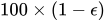 % confidence interval for the true probability content of the estimated quantile. The control-variate-adjusted quantile estimate takes approximately twice as long to compute, but it is typically much more accurate than the sample quantile.
 -
epsilon=value specifies the value
for a % confidence interval for the true probability content of the estimated quantile. The default value of the accuracy confidence is 99%, corresponding to epsilon=0.01.-
nSample=n specifies the sample size for the simulation. By default, n is set by a formula that is based on the values of the target accuracy radius
and accuracy confidence % for an interval for the true probability content of the estimated quantile. When the default values are used for , , and (0.005, 0.01, and 0.05, respectively), nSample=12605. If you omit the NSAMP= option or specify NSAMP=0, the default sample size is used.-
report=True | False when set to True, displays a report on the simulation, including a listing of the parameters, such as
, , and , as well as an analysis of various methods of estimating or approximating the quantile. -
seed=number specifies an integer to be used to start the pseudorandom number generator for the simulation. If you do not specify a seed, or if you specify a number less than or equal to 0, the seed is generated by reading the time of day from the computer’s clock.
-
- SMM | GT2
performs pairwise comparisons based on the studentized maximum modulus and Šidák’s uncorrelated-t inequality, yielding Hochberg’s GT2 method when sample sizes are unequal.
- T | NONE
performs no adjustment for multiple comparisons.
- TUKEY
performs Tukey’s studentized range test on LS-means. When your data are unbalanced, the action uses the approximation described in Kramer (1956) and identifies the adjustment as "Tukey-Kramer" in the results.
By default,
method='NONE'.If you specify
method='DUNNETT', the action analyzes all differences with the first control level unless you have specified a different control level. If you specifymethod='NELSON', thendiff='ANOM' is assumed.If you specify
method='TUKEY', thendiff='ALL' is assumed. If you specify other methods, then the action performs all pairwise differences unless you specify thediffparameter.Note that computing the exact adjusted p-values and critical values for unbalanced designs can be computationally intensive, especially for
method='NELSON'. -
alpha=number specifies that a confidence interval be constructed for each of the LS-means with confidence level
 . The value of number is between 0 and 1; the default is 0.05.
 -
at='MEANS' | {at-specification} -
enables you to modify the values of the covariates that are used in computing LS-means. By default, all covariates are set equal to their mean values for computing standard LS-means. The
atparameter enables you to assign arbitrary values to the covariates. Additional columns in the output table indicate the values of the covariates.You can specify
at='MEANS' to set the covariates equal to their mean values (as with standard LS-means) and apply this adjustment to crossproducts of covariates, or you can specify the following at-specifications:Consider the following example:
class={{vars={'A', 'B'}}},
model={depVars={{name='Y'}},
       effects={{vars={'A', 'B'}, interaction='CROSS'},
                {vars={'x1', 'x2'}},
                {vars={'x1', 'x2'}, interaction='CROSS'}}},
lsmeans={{statements={
   {terms={{vars={'a','b'},interaction='CROSS'}}},
   {terms={{vars={'a','b'},interaction='CROSS'}}, at='MEANS'},
   {terms={{vars={'a','b'},interaction='CROSS'}}, at={vars={'x1'},
                                                      vals={1.2}}},
   {terms={{vars={'a','b'},interaction='CROSS'}}, at={vars={'x1','x2'},
                                                      vals={1.2, 0.3}}}
   }}},
For the first two sets of
optionsubparameters in thelsmeansparameter, the LS-means coefficient ofx1is (the mean of
 x1) and ofx2is (the mean of
 x2). For the first set ofoptionsubparameters, the coefficient ofx1*x2is . However, for the second set of
 optionsubparameters, the coefficient is . The third set of
 optionsubparameters sets the coefficient ofx1equal to 1.2 and leaves it at for x2, and the final set ofoptionsubparameters sets these values to 1.2 and 0.3, respectively.Even if you specify a weight variable, the unweighted covariate means are used for the covariate coefficients if you omit the
atparameter. If you specify theatparameter, then weight and frequency variables are taken into account as follows. The weighted covariate means are used for the covariate coefficients for which no explicitatparameter values are given, or if you specify theat='MEANS' parameter. Observations that do not contribute to the analysis because of a missing dependent variable are used in computing the covariate means. You should use theeparameter in conjunction with theatparameter to verify that the modified LS-means coefficients are the ones that you want. -
cl=True | False when set to True, constructs confidence limits for each of the LS-means. The
mixedaction computes t-type limits, whereas other actions compute normal (z) intervals. If you specify thedfMethod='NONE' subparameter of themodelparameter in themixedaction, then infinite degrees of freedom are used for this test, which essentially computes a z interval. The confidence level is 0.95 by default; you can change the level by specifying thealphaparameter.-
controlLevel={'level1' | <, 'level2', …>} specifies the control levels of the specified least squares means effects. This parameter is used in conjunction with the
control,controll, andcontroluparameters. See thecontrolparameter for more information.-
corr displays the estimated correlation matrix of the least squares means as part of the "Least Squares Means" table.
-
cov displays the estimated covariance matrix of the least squares means as part of the "Least Squares Means" table.
-
df=number specifies the degrees of freedom for the t test and confidence limits. The default is the residual degrees of freedom that you define by specifying the
dfMethod='RESIDUAL' subparameter of themodelparameter in themixedaction. This parameter is available only for themixedaction.-
diff<=difftype> -
displays differences of the LS-means in the "Differences of Least Squares Means" table. You can specify the following values for the optional difftype:
- 'ALL'
displays all pairwise differences.
- 'ANOM'
displays differences between each LS-mean and the average LS-mean, as in the analysis of means (Ott 1967). The average is computed as a weighted mean of the LS-means, with the weights being inversely proportional to the diagonal entries of the
 matrix. When you specify a
 weightparameter, the preceding matrix is replaced with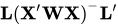 , where
  is the diagonal matrix that contains the weights. If LS-means are nonestimable, this design-based weighted mean is replaced with an equally weighted mean. Note that the ANOM procedure in SAS/QC software implements both tables and graphics for the analysis of means with a variety of response types. For one-way designs and normally distributed data, the ANOM computations are equivalent to the results of PROC ANOM.
 - 'CONTROL'
-
produces two-tailed tests and confidence limits for differences with a control; by default, the control is the first level of each specified LS-mean effect. To specify which levels of the effects are the controls, specify the
controlLevelparameter. For example, if the effectsA,B, andCare classification variables, each having two levels, 1 and 2, the followinglsmeansparameter specifies the (1,2) level ofA*Band the (2,1) level ofB*Cas controls:lsmeans={{statements={{ terms={{vars={'a','b'},interaction='CROSS'}, {vars={'b','c'},interaction='CROSS'}}, diff='CONTROL', controlLevel={'1', '2', '2', '1'} }}}}For multiple effects, the results depend on the order of the list, so you should check the output to make sure that the controls are correct.
- 'CONTROLL'
produces one-tailed results and tests whether the noncontrol levels are significantly smaller than the control. The upper confidence limits for the control minus the noncontrol levels are considered to be infinity and are displayed as missing.
- 'CONTROLU'
produces one-tailed results and tests whether the noncontrol levels are significantly larger than the control. The upper confidence limits for the noncontrol levels minus the control are considered to be infinity and are displayed as missing.
-
e=True | False when set to True, displays the matrix coefficients for all LS-mean effects in the "Matrix Coefficients" table.
-
singular=number tunes the estimability checking. If
 is a vector, define ABS() to be the largest absolute value of the elements of . If ABS(
 ) is greater than c*number for any row of in the contrast, then
  is declared nonestimable. Here,
  is the Hermite form matrix
 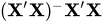 , and c is ABS(), except when it equals 0, and then c is 1. The value of number is between 0 and 1; the default is 1E–4.
 -
slice={{effect1} <,{effect2}, …>} -
specifies effects by which to partition interaction LS-mean effects. This parameter is available only for the
mixedaction. This partition can produce what are known as tests of simple effects (Winer 1971). For example, suppose thatA*Bis significant, and you want to test the effect ofAfor each level ofB. The appropriatelsmeansparameter islsmeans={{statements={{ terms={{vars={'a', 'b'}, interaction='CROSS'}}, slice={{vars={'b'}}} }}}}This parameter tests for the simple main effects of
AforB, which are calculated by extracting the appropriate rows from the coefficient matrix for theA*BLS-means and by using them to form an F test.The
sliceparameter produces F tests that test the simultaneous equality of cell means at a fixed level of the slice effect (Schabenberger, Gregoire, and Kong 2000). It produces a table titled "Tests of Effect Slices."