Shared Concepts
Polynomial Effects
You use a polynomial parameter to define effects that are constructed as multiples of powers of numeric variables. The variables specified in the vars subparameter must be numeric. A design matrix column is generated for each term of the specified polynomial. By default, each of these terms is treated as a separate effect for the purpose of model building. For example, the following two action parameters (displayed in the CASL language) yield the identical analysis:
polynomial={name='MyPoly', vars={'x1','x2','x3'}, degree='2'},
   effects={ {vars={'x1','x2','x3'}, interaction='BAR', maxinteract='2'},
             {vars={'x1','x1'}, interaction='CROSS'},
             {vars={'x2','x2'}, interaction='CROSS'},
             {vars={'x3','x3'}, interaction='CROSS'}}}
The subparameters that you can specify are described in the Syntax section of the specific action chapters. The following list provides more detail about these subparameters using the CASL language.
-
degree=n specifies the degree of the polynomial, where n must be a positive integer and is typically a small integer, such as 1, 2, or 3. By default,
degree=1.-
details=TRUE | FALSE when set to True, displays a table that shows the details of the specified polynomial, including the number of terms generated. If you also specify the
standardizesubparameter, then a table that shows the standardization details is also produced.-
labelStyle={style-opts} -
specifies how to label the terms in the polynomial. By default, powers are shown with ^ as the exponentiation operator and * as the multiplication operator. For example, a polynomial term such as
 is labeled
 x1^3*x2*x3^2. You can change the style of the label by using the following style-opts within parentheses:-
expand=TRUE | FALSE when set to True, writes each variable whose exponent is greater than 1 as products of that variable. For example, the term
receives the label x1*x1*x1*x2*x3*x3.-
exponent=quoted-string -
writes each variable whose exponent is greater than 1 by using exponential notation and by using the quoted-string as the exponentiation operator. By default, ^ is the exponentiation operator. For example, if you specify the following, then the term
receives the label x1**3*x2*x3**2:LABELSTYLE=(EXPONENT="**") -
includeName=TRUE | FALSE -
when set to True, uses the name of the effect, followed by an underscore, as a prefix for term labels. For example, the following CASL language statement generates terms whose labels are
MyPoly_x1andMyPoly_x1^2:EFFECT MyPoly=POLYNOMIAL(x1/degree=2 labelstyle=INCLUDENAME)The
includeNamesubparameter is ignored if you also specify thenoSeparatesubparameter in thepolynomialparameter. -
productSymbol='NONE' | quoted-string -
specifies the product symbol. You can specify the following values:
- quoted-string
-
specifies a quoted string to be used as the product symbol. For example, the following CASL language statement generates terms whose labels are
x1,x2, andx1 x2:EFFECT MyPoly=POLYNOMIAL(x1 x2 / degree=2 mdegree=1 labelstyle=(PRODUCTSYMBOL=" ")) - 'NONE'
forms the labels by juxtaposing the constituent variable names.
-
-
mDegree=n -
specifies the maximum degree of any variable in a term of the polynomial, where n must be a positive integer. The default is the degree of the specified polynomial. For example, the following CASL language statement generates the terms
 ,
,  ,
,  ,
,  ,
,  ,
,  ,
,  , and
, and  :
: polynomial={name='MyPoly', vars={x1 x2}, degree=4, mdegree=2}; -
noSeparate=TRUE | FALSE when set to True, treats the polynomial as a single effect that has multiple degrees of freedom. The value of the
namesubparameter that you specify is used as the constructed effect name, and the labels of the terms are used as labels of the corresponding parameters.-
standardize={stdize-opts} -
standardizes the variables that define the polynomial. The stdize-opts include the
prefix,method, andoptionssubparameters.By default, the standardized variables receive prefix "s_" in the variable names. You can use the
prefixsubparameter to control this prefix as follows:-
prefix='none' | quoted-string -
specifies the prefix that is appended to standardized variables when forming the term labels. You can specify the following values:
- quoted-string
specifies the prefix
- NONE
does not apply a prefix
-
method='moments' | 'mrange' | 'wmoments' -
controls how the center and scale are estimated. You can specify the following methods:
Let
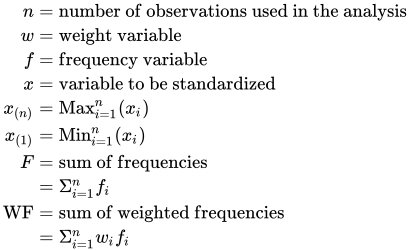
Table 4 shows how the center and scale are computed for each of the supported methods.
Table 4: Center and Scale Estimates by Method
Method Center Scale mrange 

moments 

wmoments 

-
options='center' | 'centerscale' | 'none' | 'scale' -
controls whether the standardization is to center, scale, or both center and scale. You can specify the following values:
- center
-
centers but does not scale the variables. For a variable x,

- centerscale
-
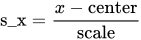
centers and scales the variables. This is the default. For a variable x,
- none
performs no standardization.
- scale
-
scales but does not center the variables. For a variable x,

-